63
Advanced Features
3
62
UNPROTECTUNPROTECT OK? OK?
FRAMEFRAME
100−0009100−0009
YESYES CANCELCANCEL
1Press “d” or “c” to select the protected frame
(file).
2Press the “MENU/OK” button to unprotect the
displayed frame (file).
FRAME RESET
Press the “MENU/OK” button to protect all the
frames (files).
SET ALL
Press the “MENU/OK” button to unprotect all the
frames (files).
RESET ALL
◆
To stop the procedure midway
◆
If the images are very large, protecting or
unprotecting all the frames (files) may take some
time.
If you want to take a picture or record a movie during
the procedure, press the “BACK (DISP)” button. To
return to protecting or unprotecting all the frames
(files), see the procedure on P.62 and begin at step
1.
01 02
SET ALL OK? SET ALL OK?
IT MAY TAKE A WHILEIT MAY TAKE A WHILE
SET ALLSET ALL
100−0009100−0009
YESYES CANCELCANCEL
RESET ALLRESET ALL OK? OK?
IT MAY TAKE A WHILEIT MAY TAKE A WHILE
RESET ALLRESET ALL
100−0009100−0009
YESYES CANCELCANCEL
SET ALLSET ALL
CANCELCANCEL
100−0009100−0009
PROTECTPROTECT OK? OK?
FRAMEFRAME
100−0009100−0009
YESYES CANCELCANCEL
PROTECTPROTECT
FRAMEFRAME
SET ALLSET ALL
RESET ALLRESET ALL
PROTECTPROTECT
FRAMEFRAME
SET ALLSET ALL
RESET ALLRESET ALL
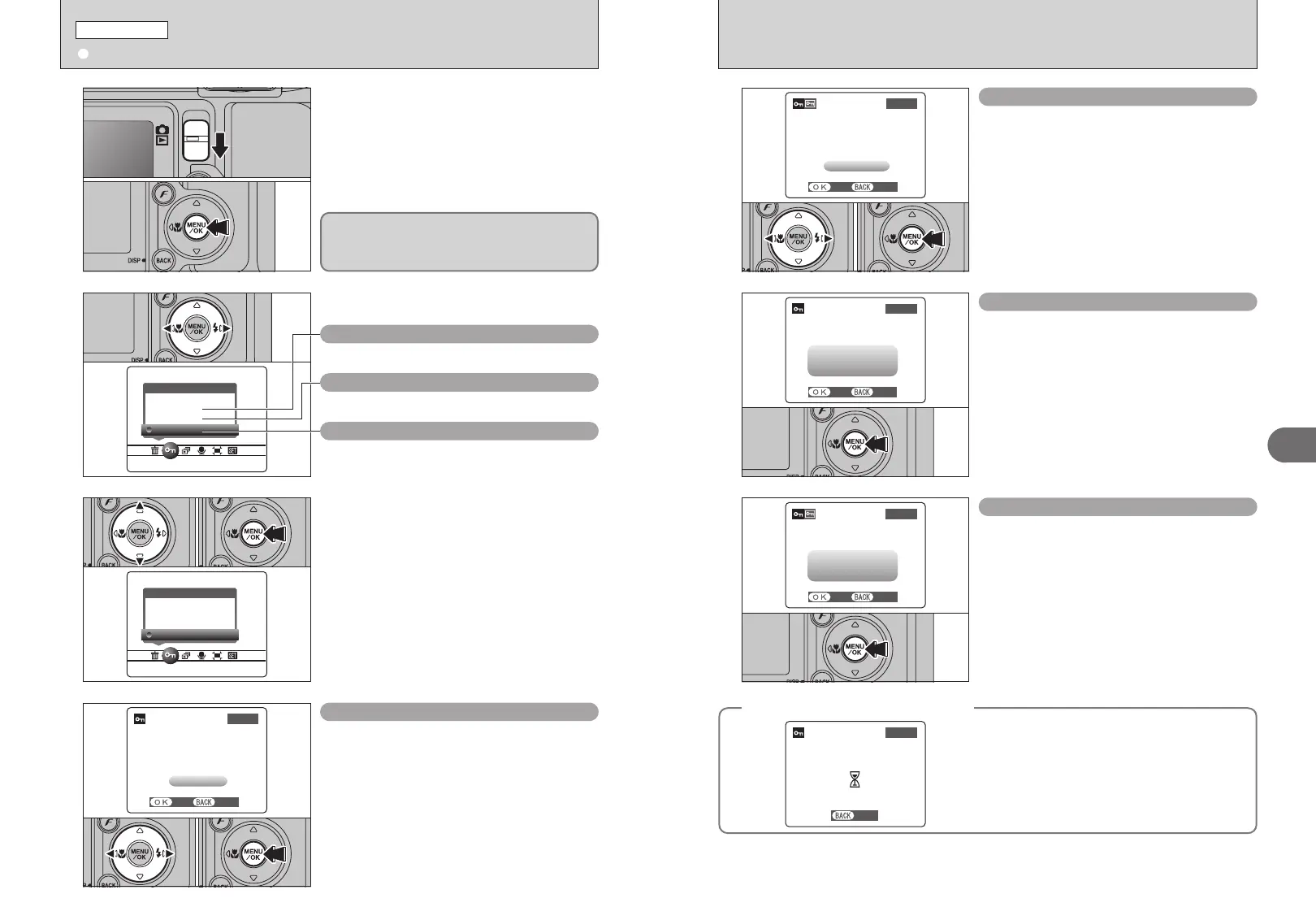
1
1Set the Mode switch to “w”.
2Press the “MENU/OK” button to display the
menu on the LCD monitor.
2
Press “d” or “c” to select “i” PROTECT.
3
1Press “a” or “b” to select “FRAME”, “SET ALL”
or “RESET ALL”.
2Press “MENU/OK” button to confirm your
selection.
RESET ALL
Removes the protection from all the frames (files).
SET ALL
Protects all the frames (files).
FRAME
Protects or unprotects only the selected frame (file).
Protection is a setting that prevents frames (files)
from being accidentally erased. However, the
“FORMAT” function erases all the frames (files),
including protected frames (files) (➡P.82).
01
02
01 02
1Press “d” or “c” to select the frame (file) to be
protected.
2Press the “MENU/OK” button to protect the
frame (file) currently displayed.
To protect another frame (file), repeat steps 1 and
2. When you have finished protecting frames
(files), press the “BACK (DISP)” button.
FRAME SET
01 02
i PROTECTING IMAGES: FRAME / SET ALL / RESET ALL
PLAYBACK MENU













 To Next Page