47
Advanced Features
3
COLORCOLOR
STANDARDSTANDARD
CHROMECHROME
B&WB&W
1
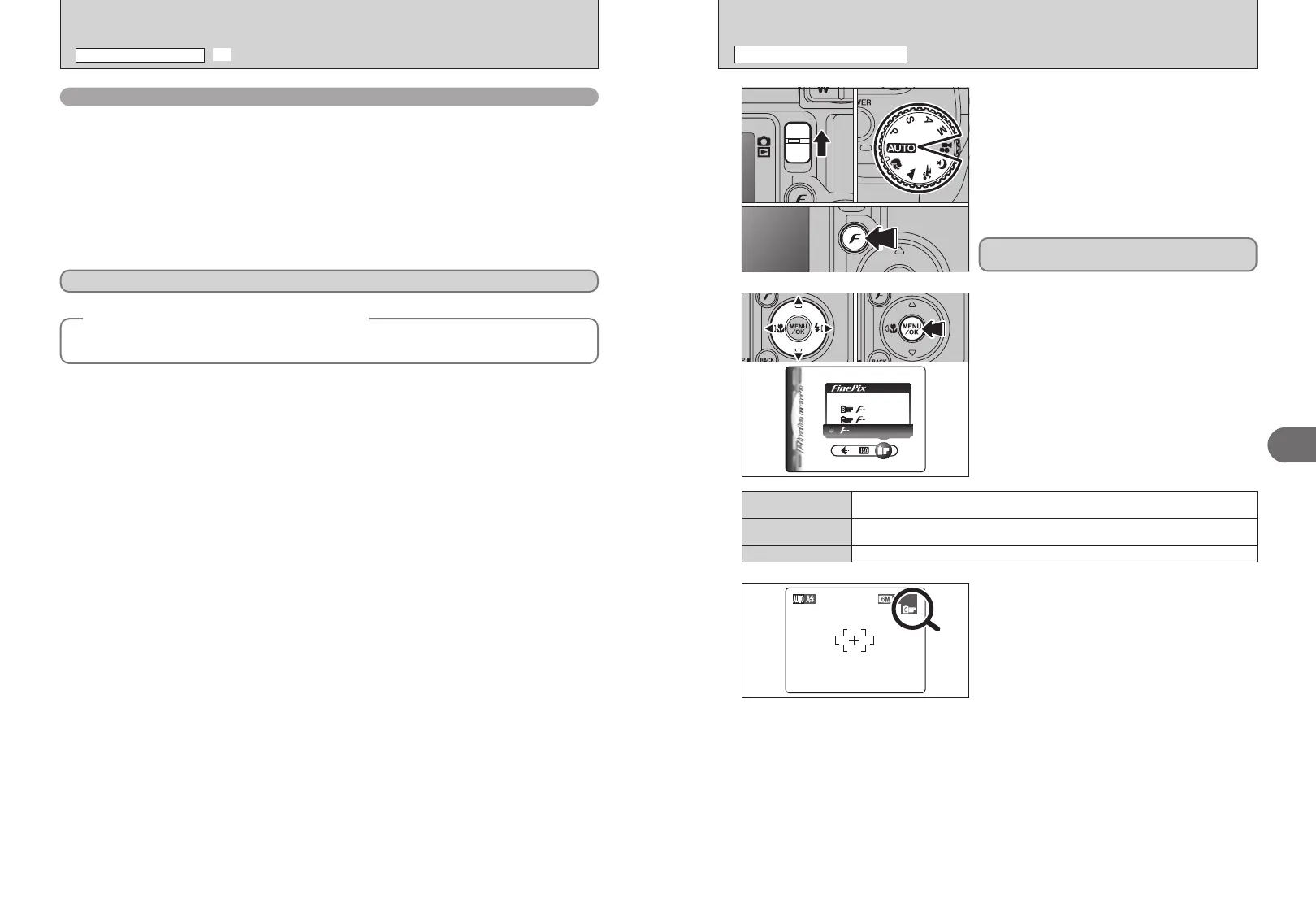
1Set the Mode switch to “q”.
2Set the Mode dial to Photography mode.
3Press the “p” button.
2
1Press “d” or “c” to select the “J” FinePix
COLOR setting and then press “a” or “b” to
change the setting.
2Press the “MENU/OK” button to confirm the
setting.
01
03
02
01 02
The FinePix COLOR setting is retained even when
the camera is off or the mode is changed.
●
!
In “r” Movie mode, do not set the “J” FinePix COLOR
setting.
3
●
!
p-CHROME may have little visible effect with some subjects,
such as close-up shots of people (portraits).
●
!
Because the effects on the image differ depending on the
scene being shot in
p-CHROME mode, take pictures in p-
STANDARD mode as well as this mode. Note that you may
not be able to see any difference on the LCD monitor.
●
!
For shots taken in p-CHROME mode or p-B&W mode,
automatic quality adjustment will be suppressed on Exif Print
compliant printers.
When setting p-CHROME or p-B&W, the icon
appears on the LCD monitor.
p-CHROME:
æ
p
-B&W:
…
The contrast and color saturation are set to standard. Use this mode for normal
photography.
p-STANDARD
The contrast and color saturation are set to high. This feature is effective for taking more
vivid shots of subjects such as scenery (blue sky and greenery) and flowers.
p-CHROME
This setting converts the colors in the photographed image to black and white.
p-B&W
J FinePix COLOR
p PHOTO MODE PHOTOGRAPHY
46
High-sensitivity photography
(
ISO 800
)
When a high-sensitivity (ISO 800) is selected, the quality setting “5” or “T” is reset to “3” (the
“a” appears).
h Digital zoom focal lengths
✽
2: approx. 130 mm-325 mm, max. zoom scale: approx. 2.5×
`: approx. 130 mm-819 mm, max. zoom scale: approx. 6.3×
✽ 35 mm camera equivalents
●
!
The digital zoom cannot be used with the “3” setting.
●
!
The high-sensitivity photography cannot be selected when setting CCD-RAW (➡P.85).
●
!
When you specify a high-sensitivity, the amount of noise (interference) in the image shown on the LCD monitor before the
picture is taken increase. However, this is normal.
◆
Quality setting in high-sensitivity mode
◆
When a high-sensitivity setting (ISO 800) is selected, the “5” and “T” quality modes are no longer
available. The “
`”, “2” and “3” quality modes can be selected.
High-sensitivity photography is retained even when the camera is off or the mode is changed.
S SENSITIVITY
p PHOTO MODE PHOTOGRAPHY













 To Next Page