79
Settings
4
78
OPTIONOPTION
LCDLCD
SET−UPSET−UP
IMAGE DISP.IMAGE DISP.
POWER SAVEPOWER SAVE
FORMATFORMAT
LCDLCD :ON:ON
:OK:OK
:2 MIN:2 MIN
ONON
1
3 42
SET−UP
SET−UP
SETSET CANCELCANCEL
IMAGE DISP.IMAGE DISP.
POWER SAVEPOWER SAVE
FORMATFORMAT
LCDLCD :ON:ON
:OK:OK
:2 MIN:2 MIN
:ON:ON
1
3 42
SET−UP
SET−UP
SETSET CANCELCANCEL
1
2
3
4
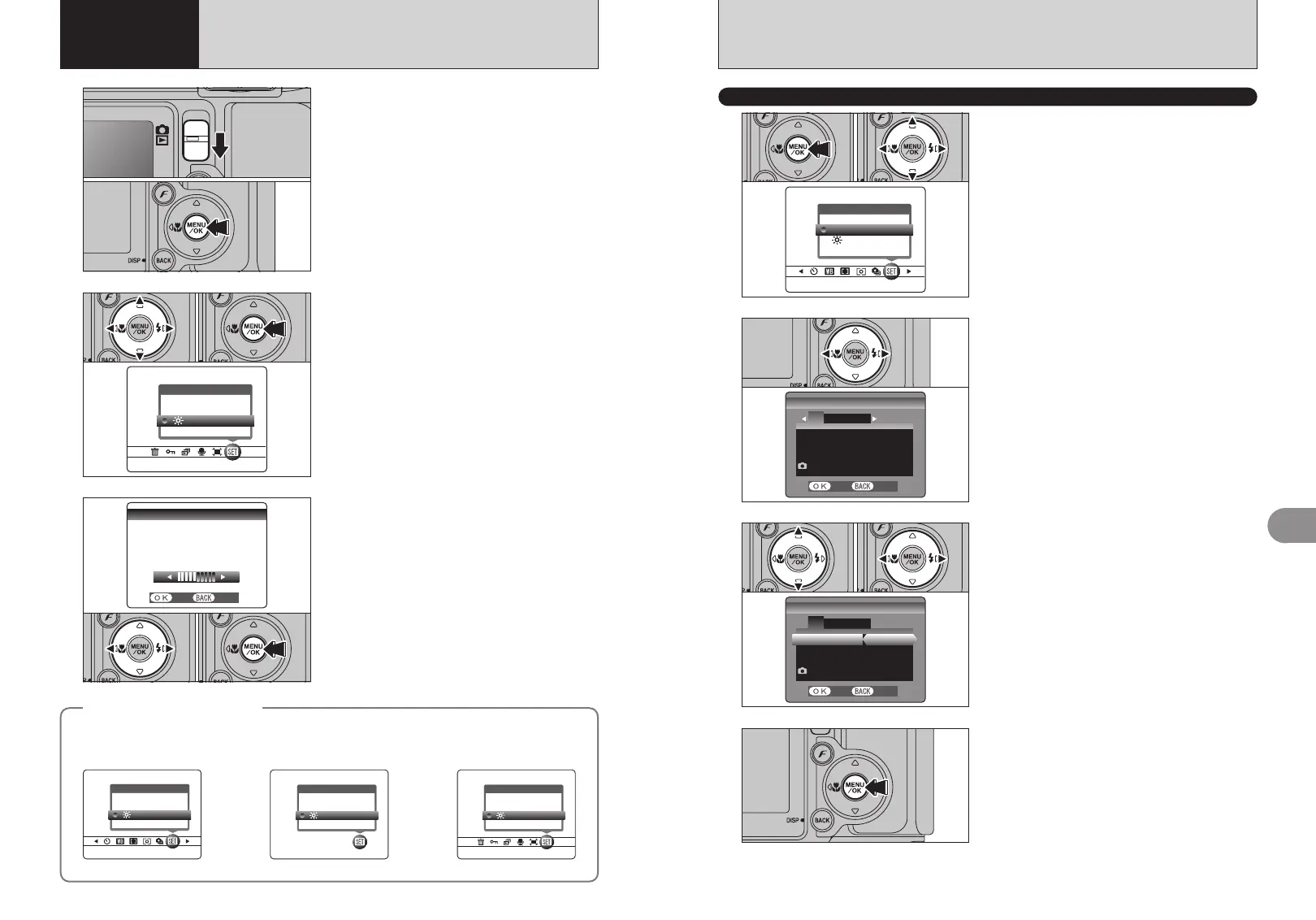
1Press the “MENU/OK” button to display the
menu on the LCD monitor.
2Press “d” or “c” to select “F” OPTION and
then press “a” or “b” to select “SET-UP”.
3Press the “MENU/OK” button to display the
SET-UP screen.
01
01 02
02
SET-UP
●
!
Always turn the camera off when replacing the battery.
Opening the battery cover or disconnecting the AC power
adapter without turning the camera off may cause the camera
settings to revert to the factory default values set at shipment.
Press “d” or “c” to move to option 1 to 4.
After you have changed the settings, press the
“MENU/OK” button to confirm the changes.
1Press “a” or “b” to select a menu option.
2Press “d” or “c” to change the setting. Press
“c ” for “FORMAT”, “DATE/TIME”, “TIME
DIFFERENCE”, “DISCHARGE” or “q RESET”.
F USING THE SET-UP SCREEN
03
BRIGHTNESSBRIGHTNESS
SETSET
− +
CANCELCANCEL
1
1Set the Mode switch to “q” or “w”.
2Press the “MENU/OK” button to display the
menu on the LCD monitor.
2
3
1Press “d” or “c” to select “F” OPTION and
then press “a” or “b” to select “fi LCD” or
“VOLUME”.
2Press the “MENU/OK” button.
◆
SET-UP menu options
◆
The options available in the “F” menu vary depending on whether the “q” or “w” mode is selected.
1Press “d ” or “c ” to adjust the monitor
brightness or the volume.
2Press the “MENU/OK” button to confirm the new
setting.
01
02
01 02
01 02
h “B, m, ,, ., /, N, M,
<, >” Photography mode
✽ In “N, M, <, >”
h “r” Movie mode h “w” Playback mode
OPTIONOPTION
LCDLCD
VOLUMEVOLUME
SET−UPSET−UP
OPTIONOPTION
LCDLCD
SET−UPSET−UP
OPTIONOPTION
LCDLCD
SET−UPSET−UP
OPTIONOPTION
LCDLCD
VOLUMEVOLUME
SET−UPSET−UP
fi
ADJUSTING THE MONITOR BRIGHTNESS /
VOLUME
4 Settings












 To Next Page