EasyManua.ls Logo

FujiFilm FinePix S5 Pro - User Manual

FujiFilm FinePix S5 Pro
244 pages
Print Icon
To Next Page IconTo Next Page
Loading...
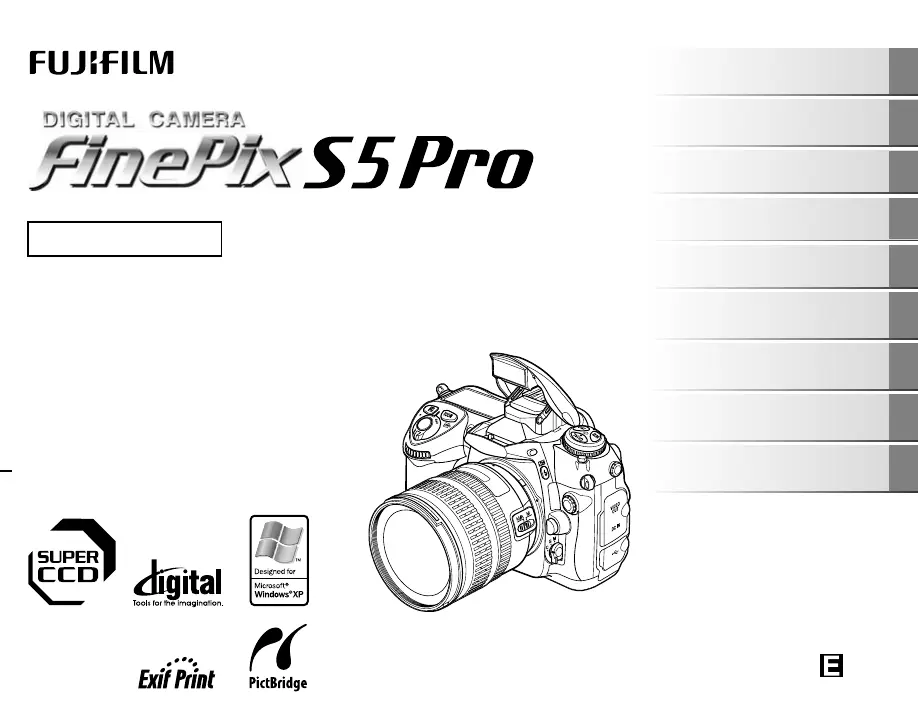
OWNER’S MANUAL
This manual will show you how to use
your FUJIFILM DIGITAL CAMERA
FinePix S5 Pro correctly.
Please follow the instructions carefully.
BL00577-200(1)
Getting Ready
Using the Camera
Advanced Features
Photography
Settings
Camera Connection
Software
Installation
Playback
Appendices
Troubleshooting

Table of Contents

Other manuals for FujiFilm FinePix S5 Pro

Questions and Answers

  • C
    cynthia85Aug 20, 2025
    Why is my FujiFilm FinePix S5 Pro not taking pictures?
    • C
      cortezmichelleAug 20, 2025
      If your FujiFilm Digital Camera isn't taking pictures when you press the shutter, here are a few things to check: * Make sure you have a memory card inserted. * If the memory card is full, insert a new one or erase some frames. * Format the memory card on the camera if it is not formatted. * In AF-S mode, ensure the focus indicator is lit; use AF lock to set focus. * If the camera won't focus, switch to manual focus (M) and focus manually. * Check the battery level and charge or replace if necessary. * If the Auto power off function has turned the camera off, turn the camera on. * If an error occurred, refer to the warning displays and take the appropriate action. * If the memory card is damaged, insert a new memory card.
  • R
    Richard WrightAug 22, 2025
    Why is my FujiFilm FinePix S5 Pro not turning on?
    • B
      bakeralexandriaAug 22, 2025
      If your FujiFilm Digital Camera isn't turning on, consider these possible causes: * The battery may be dead. Charge it or load a fully charged battery. * The battery might be loaded backward. Ensure it's in the correct direction. * The battery cover might not be closed securely. Make sure it's properly closed. * The camera and AC power adapter may not be correctly connected. Verify the connection.
  • B
    Bradley MillerAug 25, 2025
    Why does my FujiFilm FinePix S5 Pro battery drain so fast?
    • L
      Lisa FosterAug 25, 2025
      If the battery of your FujiFilm Digital Camera drains quickly, here are some possible reasons and solutions: * If you're using the camera in extremely cold conditions, warm the battery in your pocket before use. * Dirty battery terminals can also cause this problem. Wipe them with a clean, dry cloth. * If the battery has been used for a long time, it may no longer hold a charge efficiently. Try a new battery.
  • J
    Jason SmithAug 27, 2025
    What to do if buttons on my FujiFilm FinePix S5 Pro Digital Camera are not working?
    • T
      Tracy DavisAug 27, 2025
      If the buttons on your FujiFilm Digital Camera aren't responding, here's what you can try: * The camera may have a temporary malfunction. Remove the battery or disconnect the AC adapter briefly, then reload or reconnect. * Ensure the battery isn't depleted. Charge it or load a fully charged battery. * Check if the function lock is enabled and unlock it if it is.
  • J
    Jacob AlexanderAug 28, 2025
    Why can't I use the flash on my FujiFilm FinePix S5 Pro Digital Camera?
    • M
      molinakaraAug 28, 2025
      If the flash on your FujiFilm Digital Camera isn't working, consider these potential issues: * If you pressed the shutter button while the flash was charging, wait for charging to complete before pressing the shutter button. * If the flash is set to suppressed flash mode (closed), raise the built-in flash. * A depleted battery can prevent the flash from working. Charge the battery or load a fully charged one.
  • S
    Stacey MillerAug 29, 2025
    Why does my FujiFilm FinePix S5 Pro Digital Camera power off suddenly?
    • Y
      ysmithAug 30, 2025
      If your FujiFilm Digital Camera is losing power during use, here are a few possible reasons: * The battery may be dead. Charge it or load a fully charged battery. * The camera and AC power adapter may not be correctly connected. Verify the connection. * Ensure you are using the correct battery, the rechargeable battery NP-150.
  • M
    Mrs. Victoria DaughertyAug 31, 2025
    How to fix blurred images on my FujiFilm Digital Camera?
    • P
      pricelouisAug 31, 2025
      If your photos from the FujiFilm Digital Camera are blurry, here are some possible causes: * A dirty lens can cause blurriness. Clean the lens. * If the focus mode was set to M (Manual), set it to S (Single-servo AF) or C (Continuous-servo AF). Or make sharp focus using M (Manual) before taking a picture. * A slow shutter speed can cause camera shake. Hold the camera steadily.
  • J
    Justin PeckSep 2, 2025
    Why are my FujiFilm FinePix S5 Pro Digital Camera photos dark even with flash?
    • K
      Kimberly MooreSep 2, 2025
      If your playback images are dark even when using the flash on your FujiFilm Digital Camera: * The subject might be too far away. Move closer to within the effective flash range. * Your finger might have been covering the flash. Hold the camera correctly.
  • R
    Robert PierceSep 4, 2025
    Why is there no image on TV from my FujiFilm FinePix S5 Pro Digital Camera?
    • J
      Jimmy RobinsonSep 4, 2025
      If you're not seeing an image from your FujiFilm Digital Camera on the TV, check the following: * Ensure the camera is correctly connected to the TV. * Make sure the TV input is set to “VIDEO,” not “TV”. * Verify the video output setting is correct, and change the setting to [NTSC] or [PAL] if needed.
  • K
    kimberlymartinezSep 6, 2025
    Why won't my computer recognize my FujiFilm Digital Camera?
    • M
      Ms. Diana AlexanderSep 6, 2025
      If your PC isn't recognizing your FujiFilm Digital Camera, ensure the USB cable (mini-B) is correctly connected to both the PC and the camera. Set up the camera, and connect the USB cable (mini-B) correctly.

Summary

Getting Ready

Battery Management

Covers charging, loading, checking battery, and compatibility.

Memory Card Operations

Covers inserting and formatting the memory card for use.

Using the Camera

Taking Pictures

Instructions on how to take photos using default settings and camera handling.

Advanced Features - Photography

Focus Control

Covers focus modes, AF-area modes, focus zones, manual focus, and lock.

Shooting Modes & Controls

Details release modes, buffer size, metering, AE lock, and exposure modes.

Exposure Settings

Covers exposure modes (P, S, A, M), electronic display, and compensation.

Flash Photography

Covers built-in flash, i-TTL, flash modes, and exposure compensation.

Image Settings

Covers ISO, image quality, image size, and color balance adjustments.

White Balance Control

Explains auto, preset, and fine-tuning white balance settings.

Shooting Menu Functions

Details SHOOTING MENU options like Film Simulation, D-Range, Color, Tone, Sharpness, Color Space, Multiple Exposure, Live View, Noise Reduction.

Settings

Appendices

Battery Information

Details on battery features, charging, life, and specifications.

Troubleshooting

Specifications

Safety Notes

Icon Guide and Warnings

Explains document icons and lists critical safety warnings.

FujiFilm FinePix S5 Pro Specifications

General IconGeneral
Megapixel12.34 MP
Sensor typeCCD
InterfaceUSB 2.0
Digital SLRYes
Video capabilityNo
Camera shutter speed30 - 1/8000 s
Display diagonal2.5 \
Display resolution (numeric)230000 pixels
Magnification0.94 x
Product colorBlack
Battery typeAC-135VN
Focus adjustmentManual
Auto focusing (AF) modescontinuous auto focus, single auto focus
Compatible memory cardsCF
White balanceauto, custom modes, flash, Fluorescent, Incandescent, Shade
Weight and Dimensions IconWeight and Dimensions
Depth74 mm
Width147 mm
Height113 mm
Weight830 g

Related product manuals