129
Technical Notes
Optional Accessories
The WCL-X70 Wide Conversion Lens
The WCL-X70 Wide Conversion Lens
A Y WIDE CONVERSION LENS option has been
added to the shooting menu for use with the op-
tional WCL-X70 wide conversion lens (P 96). Se-
lect ON when using the WCL-X70.
Q Update the camera rmware to the latest version
when using a wide conversion lens.
R The wide conversion indica-
tor is displayed when ON is
selected.
12000
5.6
51200
R The WCL-X70 may cast shadows in pictures taken
with the built-in ash. Use an optional external ash
approved for the X70.
R Y WIDE CONVERSION LENS can be assigned to a
function button.
R Be sure to select OFF for Y WIDE CONVERSION
LENS when the WCL-X70 is not in use.
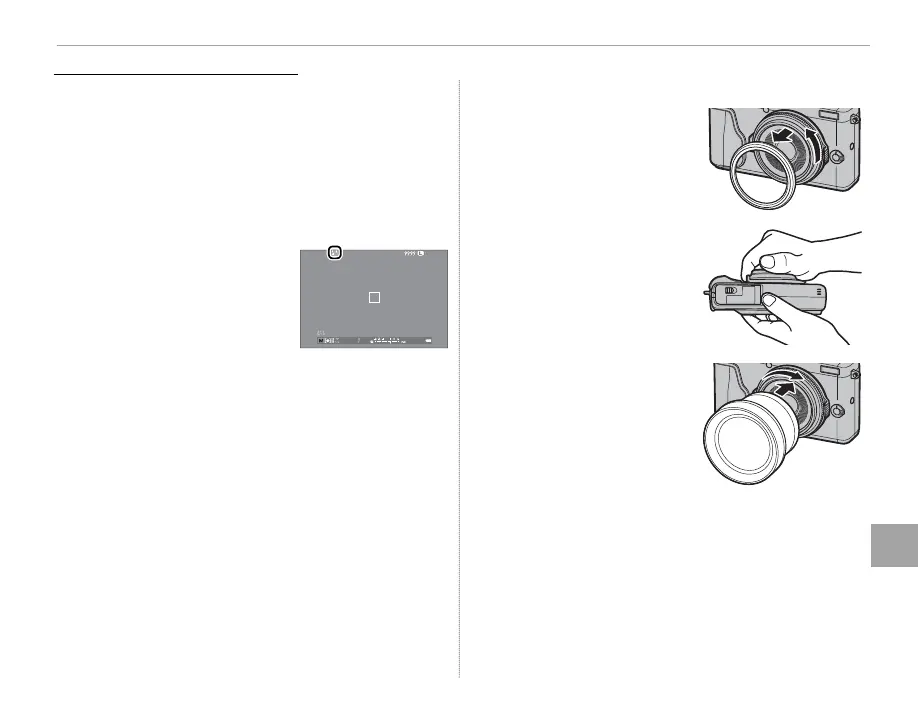
■ Attaching the WCL-X70
1
Remove the front ring.
R If you have trouble re-
moving the front ring,
grip the entire ring and
rotate it as shown.
2
Attach the wide conver-
sion lens.
Q Keep the front ring and lens cap in a safe place
when not in use.



 To Next Page