31
Basic Photography and Playback
Viewing Pictures
Viewing Photo Information
Viewing Photo Information
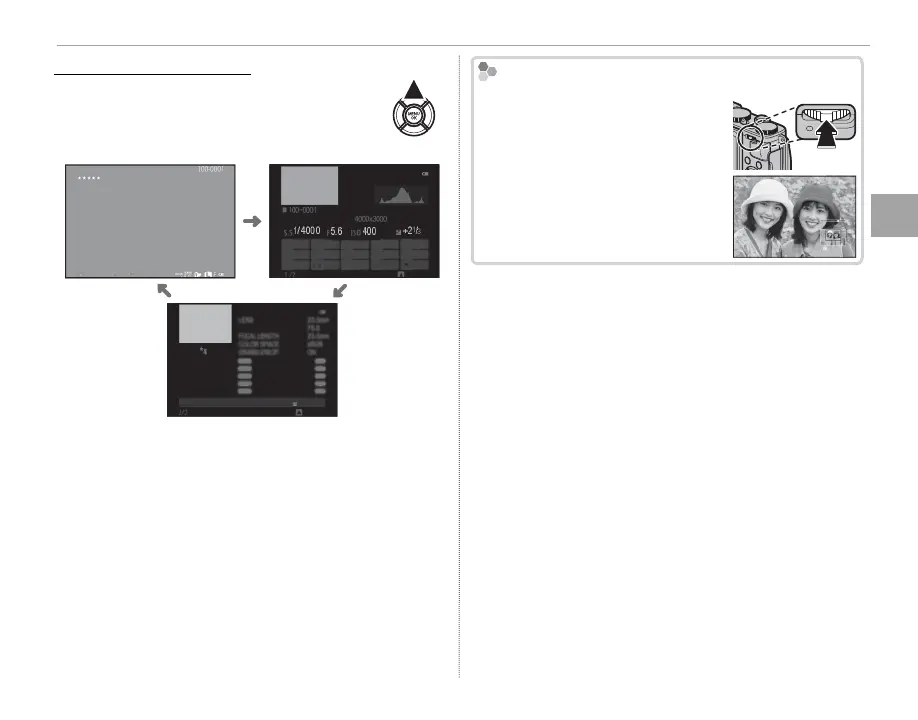
The photo information display changes
each time the selector is pressed up.
Basic data Info display 1
12/31/2050 10:00 AM
1/4000
+2
1
/
3
400
5.6
12/31/2050 10:00 AM
NEXT
1/4000 5.6 400 +2
1
/
3
1/4000
S.S
5.6
F
400 +2
1
/
3
ISO
LENS
23.0
mm
F
5.6
FOCAL LENGTH
23.0
mm
COLOR SPACE sRGB
LENS MODULATION OPT.
ON
NEXT
Info display 2
R Rotate the control ring to view other images with-
out changing the photo information display format.
Zooming in on the Focus Point
Zooming in on the Focus Point
Press the center of the command
control to zoom in on the focus
point. Press again to return to full-
frame playback.


 To Next Page