83
More on Photography and Playback
Interval Timer Photography
Interval Timer Photography
Follow the steps below to con gure the camera to take photos automatically at a preset interval.
1
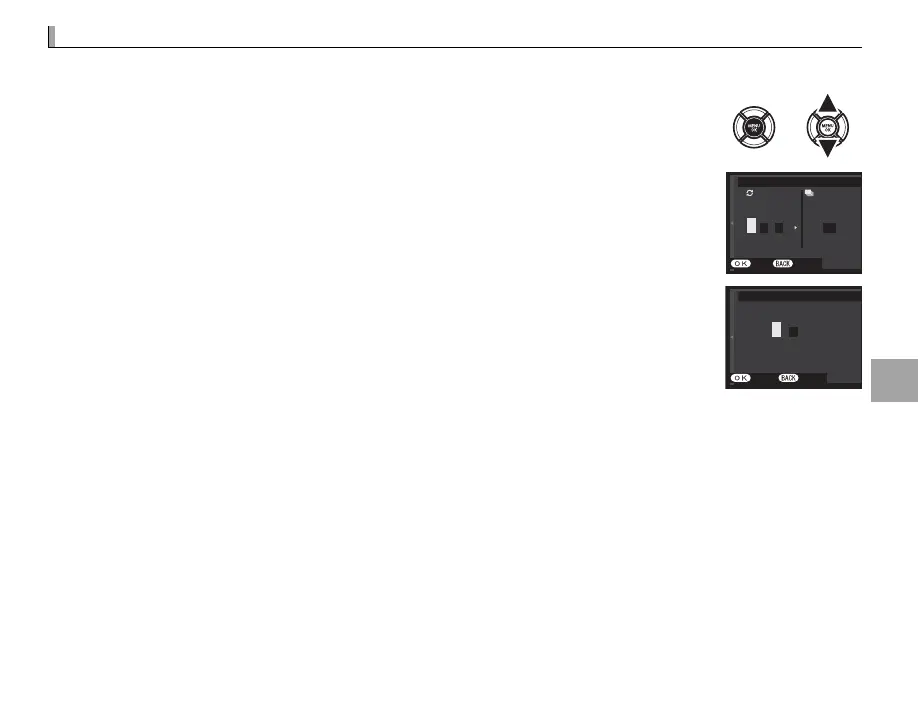
Press MENU/OK in shooting mode to display the shooting menu. Press the selector
up or down to highlight o INTERVAL TIMER SHOOTING and press MENU/OK.
2
Use the selector to choose the interval and number of shots. Press MENU/OK to
proceed.
INTERVAL/NUMBER OF TIMES
INTERVAL NUMBER OF TIMES
END CANCEL
001
2
1
24
23
0
01 00
hms
3
Use the selector to choose the starting time and then press MENU/OK. Shooting
will start automatically.
START WAITING TIME
ESTIMATED START TIME
11:00
PM
START CANCEL
LATERhm
2
1
24
23
0
00
Q Interval timer photography can not be used at a shutter speed of B (bulb) or during panorama or multiple
exposure photography. In burst mode, only one picture will be taken each time the shutter is released.
R Use of a tripod is recommended.
R Check the battery level before starting.
R The display turns o between shots and lights a few seconds before the next shot is taken. The display can be
activated at any time by pressing the shutter button all the way down.


 To Next Page