58
White Balance
For natural colors, choose a white balance option that matches the light source.
1
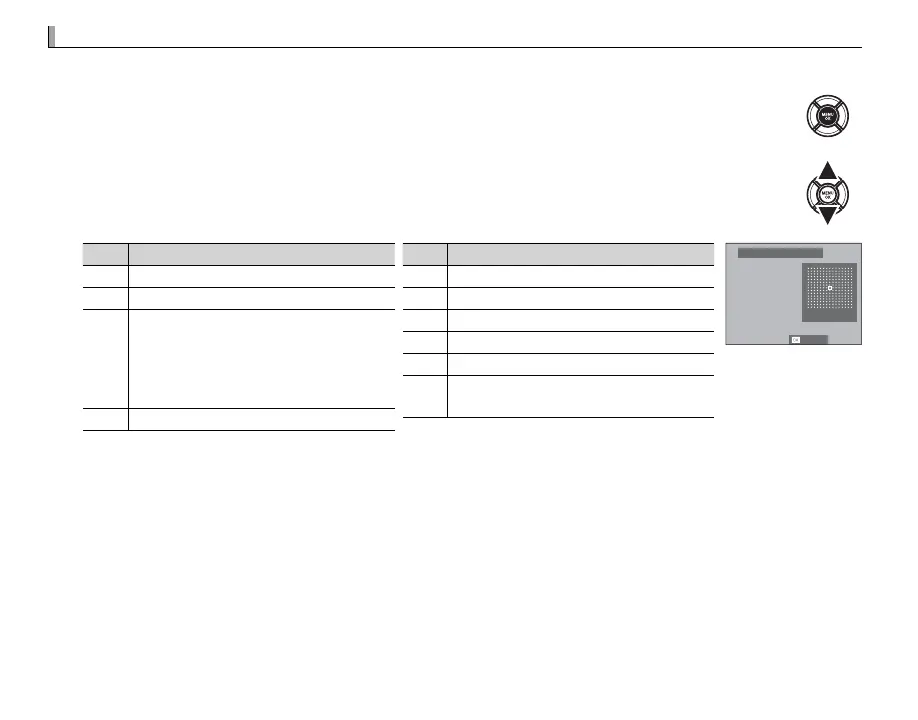
Press MENU/OK in shooting mode to display the shooting menu. Press the selector up or
down to highlight D WHITE BALANCE and press MENU/OK.
2
Press the selector up or down to highlight the desired option and press MENU/OK to select.
The dialog shown at bottom right will be displayed; use the selector to ne-tune white
balance or press DISP/BACK to exit without ne-tuning.
Option
Description
AUTO White balance adjusted automatically.
h
Measure a value for white balance (P 59).
k
Selecting this option displays a list of
color temperatures (P 59); highlight a
temperature and press MENU/OK to select
the highlighted option and display the
ne-tuning dialog.
i
For subjects in direct sunlight.
Option
Description
j
For subjects in the shade.
k
Use under “daylight” uorescent lights.
l
Use under “warm white” uorescent lights.
m
Use under “cool white” uorescent lights.
n
Use under incandescent lighting.
g
Reduces the blue cast typically associ-
ated with underwater lighting.
R:0 B:0
WB SHIFT AUTO
SET
R White balance is adjusted for ash lighting only in AUTO and g modes. Turn the ash o using other white
balance options.
R Results vary with shooting conditions. Play pictures back after shooting to check colors.


 To Next Page