EasyManua.ls Logo

Fujikura 90S - User Manual

Fujikura 90S
101 pages
Print Icon
To Next Page IconTo Next Page
Loading...
FUSION SPLICER 90S RevT1
Instruction manual
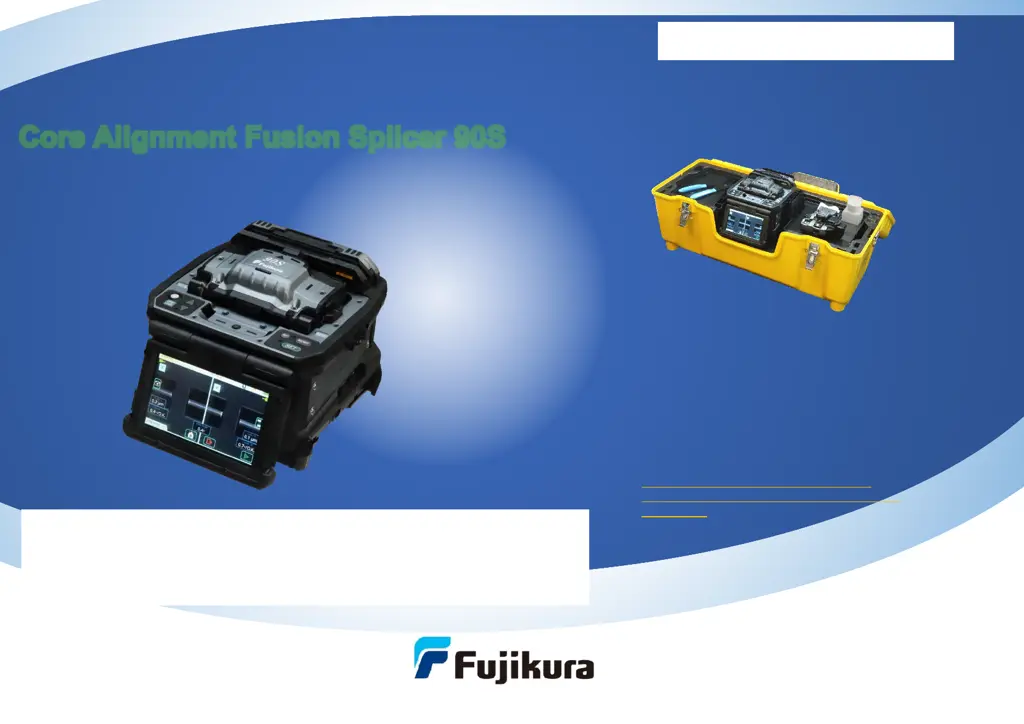
Core Alignment Fusion Splicer 90S
Please read this instruction manual carefully
before operating the equipment.
Adhere to all safety instructions and
warnings contained in this manual.
Keep this manual in a safe place.
There is a change without a previous notice.
We are not responsible for the products
which are not purchased from our authorized
distributors.
Please don't ship the 90S to an end customer until October 25 due to IP issue.
From October 26, it is possible to ship the 90S for an end customer with NDA
between distributor and customer.
Please don't publicize the information of 90S/R until a press release date on
December 6.
Tentative version

Table of Contents

Questions and Answers

  • C
    Caroline JohnsonAug 16, 2025
    Why does the Heater LED blink on Fujikura 90S Welding System?
    • J
      Joseph PhillipsAug 16, 2025
      If the Heater LED on the panel keyboard of your Fujikura Welding System blinks, it indicates that the heating temperature does not reach its inputted setting. Contact the authorized distributor.
  • M
    Mark GalvanAug 19, 2025
    What to do if “Test Finish” is never indicated in Arc Calibration on Fujikura 90S?
    • W
      Willie TaylorSep 12, 2025
      Execute the [Stabilize Electrodes] function in the [Maintenance Menu]. If the Fujikura splicer still does not indicate “Test Finish” after that, replace the electrodes.
  • J
    Judy JohnsonAug 22, 2025
    What to do if 'Test Finish' is never indicated after many repetitions in [Arc Calibration] on Fujikura Welding System?
    • P
      Peter MossAug 22, 2025
      Execute [Stabilize Electrodes] function in [Maintenance Menu]. If the fusion splicer still does not indicate “Test Finish”, replace the electrodes.
  • J
    Jade MillsAug 25, 2025
    What to do if the CHARGE LED blinks during battery recharge on Fujikura Welding System?
    • W
      williamstylerAug 25, 2025
      If the “CHARGE” LED on your Fujikura Welding System blinks during battery recharge, it indicates that the battery pack has a fault or has reached the end of its service life. Install a new battery pack. If the LED continues to blink after installing a new battery, contact the authorized distributor.
  • B
    barbara80Aug 27, 2025
    Why fiber protection sleeve does not shrink completely in Fujikura 90S?
    • R
      renee74Aug 28, 2025
      If the fiber protection sleeve does not shrink completely on your Fujikura Welding System, it might not be set to the tube heater properly. When setting the fiber to the heater, do not remove hands from the fiber until the heater cover closes and the buzzer sounds. Releasing hands from the fiber rapidly may prevent the protection sleeve from being set to the heatable position.
  • T
    Taylor WilliamsAug 30, 2025
    What to do if Fujikura 90S Welding System does not turn off?
    • A
      Ashley MartinezAug 30, 2025
      If your Fujikura Welding System does not turn off when pressing the ON/OFF key, press and hold the key until the LED color changes from green to red.
  • H
    hollyturnerSep 1, 2025
    What to do if wireless data communication is unsuccessful on my Fujikura Welding System?
    • S
      Susan KellySep 2, 2025
      If wireless data communication fails on your Fujikura Welding System, first ensure that all devices are powered 'ON'. If a device is 'Off', turn it 'ON'. Next, check the Link LED on each device. If the Link LED is not lit, press and hold the Link button on each device to initiate the pairing process, which should light the Link LED.
  • E
    Emily FowlerSep 5, 2025
    Why is my Fujikura Welding System fiber protection sleeve not shrinking completely?
    • K
      kmejiaSep 5, 2025
      A fiber protection sleeve may not shrink completely for several reasons: * The sleeve might not be set to the tube heater properly. When setting the fiber to the heater, do not remove your hands from the fiber until the heater cover closes and the buzzer sounds. Releasing hands rapidly can misplace the sleeve. * The protection sleeve might not be centered between the yellow lines. * Try extending the heating time.
  • C
    Christopher CampbellSep 7, 2025
    What to do if my Fujikura Welding System won't turn off?
    • V
      Veronica WoodardSep 7, 2025
      If your Fujikura Welding System does not turn off when pressing the ON/OFF key, press and hold the key until the LED color changes from green to red.
  • G
    gleonardSep 10, 2025
    Why is the heater LED blinking on my Fujikura Welding System?
    • K
      Kelsey AverySep 10, 2025
      The heater LED on the panel keyboard of your Fujikura Welding System may blink for the following reasons: * Pressing the HEAT key during heating will cause the LED to blink. Pressing the HEAT key again will turn off the tube heater. * If the heater does not reach the current mode’s temperature value, contact the nearest Fujikura authorized distributor.

Summary

Safety Information

General Safety Warnings

Important warnings and cautions for safe operation and handling.

Basic Operation and Power Management

Splicing Preparation and Power Handling

Steps for splicing preparation, power connection, and battery use.

Splicer Settings and Modes

READY Screen and Mode Selection

Understanding the READY screen and selecting operation/splice/heater modes.

Fiber Preparation and Cleaving

Splicing Process and Results

Arc Calibration, Splicing, and Results

Calibration, splicing steps, loss estimation, and storing results.

Maintenance and Quality Control

Wireless Communication and Connectivity

Wireless Data Communication Management

Setup, status check, and turning wireless communication on/off.

System Navigation and Menus

Advanced Splice Mode Configuration

Machine and Supervisor Settings

Accessory Settings

Troubleshooting and Support

Error Messages and Troubleshooting

Handling error messages, power issues, and operational problems.

Fujikura 90S Specifications

General IconGeneral
Model90S
CategoryWelding System
Splice Loss (SM)0.02dB
Splice Loss (MM)0.01dB
Splice Loss (DS)0.04dB
Splice Loss (NZDS)0.04dB
Data OutputUSB
Fiber AlignmentCore Alignment
Display5-inch color LCD
Applicable FibersSM, MM, DS, NZDS
Fiber CountSingle
Cladding Diameter125 µm
Fiber Cleave Length8-16 mm
Splicing ModeAutomatic
Heating ModeAutomatic
Return Loss≥ 60 dB

Related product manuals