En-6
PREPARATION
Set the Current Time and Day
1
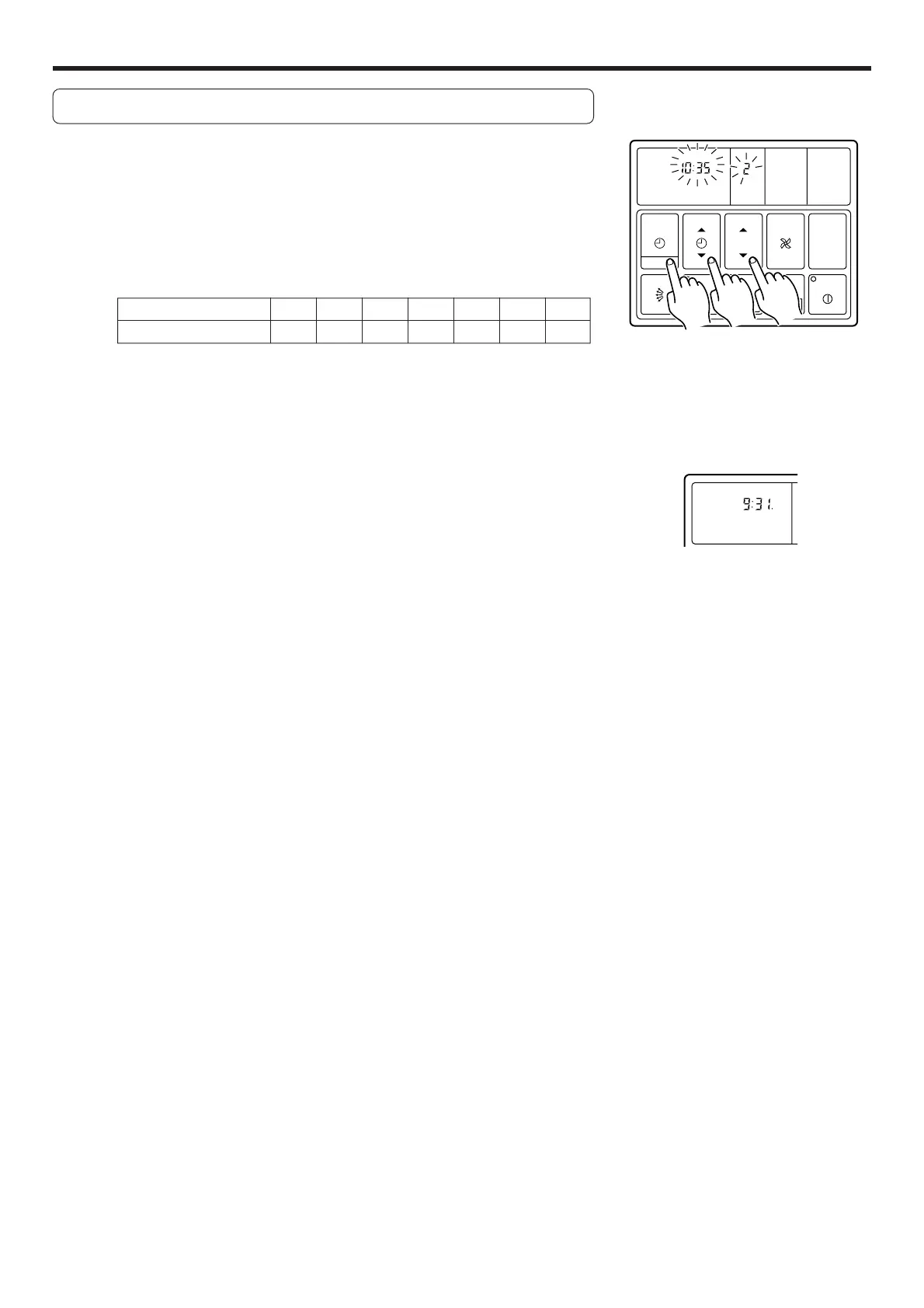
Press the CLOCK ADJUST button for more than three
seconds.
2
Press the SET TEMP./DAY button and set the day.
▲: Use to advance the day forward.
▼: Use to turn the day back.
The day is indicated by a code number from 1 to 7, as shown in the table
below. Set to the number that corresponds to the current day.
DAY CODE 1 234567
DAY OF THE WEEK MON TUE WED THU FRI SAT SUN
3
Press the SET TIME button and set the time.
▲: Use to advance the time forward.
▼: Use to turn the time back.
(Press once to move the time 1 minute; hold down and the time will move
10 minutes at a time.)
4
Press the CLOCK ADJUST button again.
This registers the new day and time values. The day display goes off, and
the time display stops flashing.
CLOCK
21
Example: Set the time to 9:31.
CLOCK
DAY
AUTO
TIMER
MODE
SET
START/STOP
CLOCK ADJUST
SET TIME TEMP./DAY FAN
CONTROL
MASTER
CONTROL
21
AUTO
DEFROST TEST
DAY OFF
3
2
1





 To Next Page