7
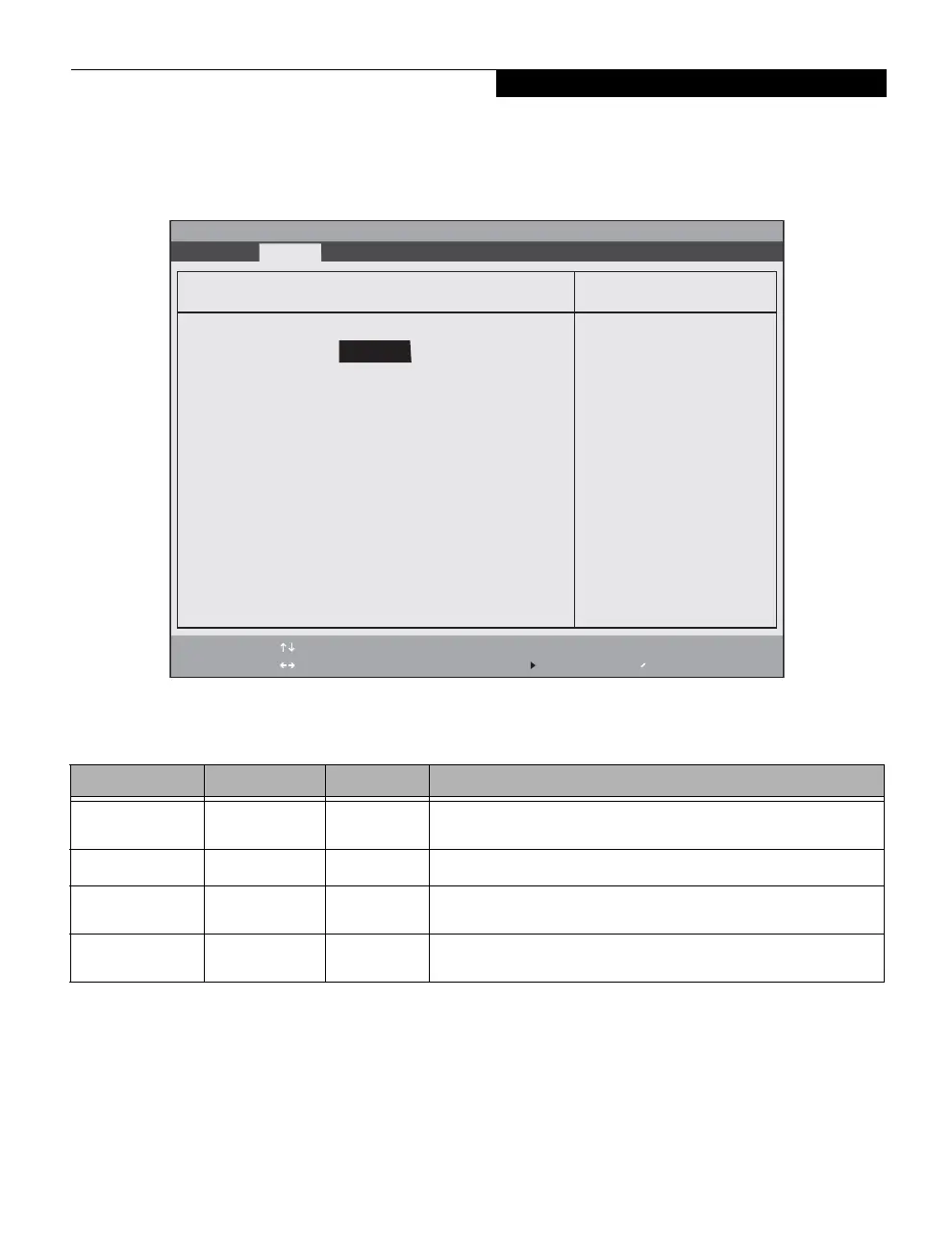
Drive0 Submenu of the System Menu
The Drive0 submenu identifies what ATA devices are installed.
Figure 3. Drive0 Master Submenu
Table 3: Fields, Options and Defaults for the Drive0 Submenu of the System Menu
Menu Field Options Default Description
Drive0: Disabled
Enabled
[Enabled] Enables or disables Drive0.
Type:
---
--- Displays the drive device type in Drive0. This field is for information only.
Model:
---
--- Displays the model number of the device in Drive0. This field is for
information only.
Capacity:
---
--- Displays the maximum capacity of your hard disk. This field is for
information only.
Phoenix SecureCore(tm) Setup Utility
F1 Help
ESC Exit
Select Item
Select Menu
-/Space
Enter
F9 Setup Defaults
F10 Save and Exit
Change Values
Select Sub-Menu
Item Specific Help
[Disabled]
The drive is disabled.
[Enabled]
The drive is enabled.
Drive0: [Hitachi HTS54032B9A300-(S1)]
Drive0: [Enabled]
Type: Hard Disk
Model: Hitachi HTS54032B9A300-(S1)
Capacity: 320GB SATA1
Info System Advanced Security Boot Exit
System Menu




 To Next Page