Installing/removing the processor
English - 5
Procedure
The processor socket is covered with a protective cap to protect the spring
contacts. In the event of a warranty claim, the mainboard can only be taken back
by Fujitsu Siemens Computers with the protective cap secured!
a
b
b
► Remove the heat sink.
► Press down the lever and unhook it.
► Fold up the frame.
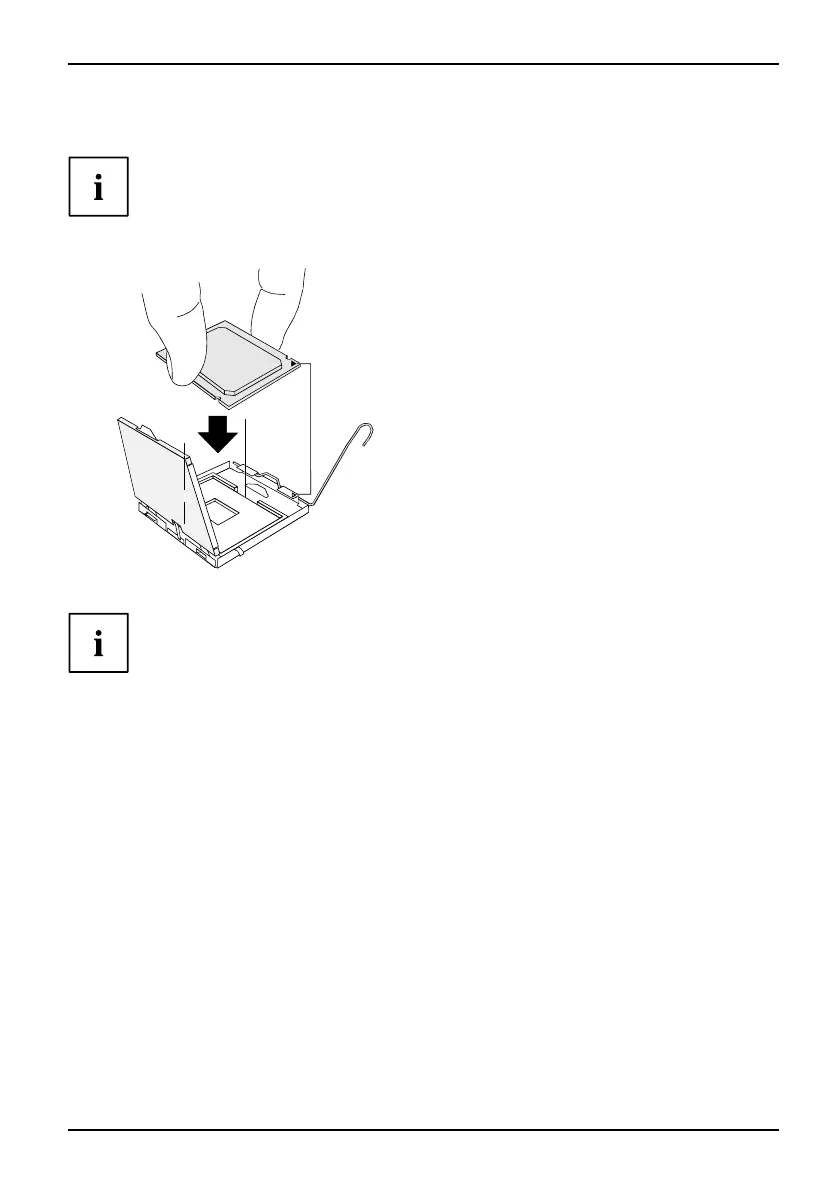
► Hold the proce ssor between your thumb
and index finger and insert it into the socket
(b) so th at the marking of the pro cessor i s
aligned with the marking on the socket (a).
► Press the lever downward until it is
hooked in again.
► Removetheprotectivecapandkeepit.
Please note that, depending on the heat sink used, different heat sink
mounts are required on the mainboard.
► Depending on the configuration variant, you must pull a prot ective foil off the heat sink
or coat the heat sink with he at conducting paste before fitting it.
► Secure the heat sink - depending on the model - with four screws or push it into the mounts.
Fujitsu Technology Solutions 23



 To Next Page