Need help?
Do you have a question about the Fujitsu D3031 and is the answer not in the manual?
Explains symbols and text formatting used in the manual for clarity.
Covers general safety precautions for handling and installing the system board safely.
Details handling procedures for components sensitive to electrostatic discharge to prevent damage.
Outlines the board's compliance with EC directives and the meaning of CE marking.
Discusses environmentally friendly design, energy saving, packaging, and proper disposal methods.
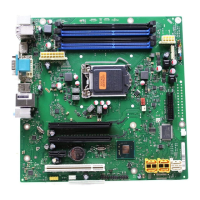
Describes processors, main memory, chipsets, connectors, and expansion slots on the system board.
Details main memory slots, module types, capacities, and population rules for optimal performance.
Explains different memory modes like Independent, Mirrored, Performance, and Spare Channel Modes.
Details support and operating parameters for Low Voltage DIMMs (LV-DIMMs).
Describes the available PCI Express slots and associated riser card options for expansion.
Lists supported screen resolutions, refresh rates, and color depths via the integrated graphics controller.
Covers temperature, fan, sensor, voltage monitoring, and System Event Log for system health.
Details internal system board connectors, their locations, and associated indicators.
Describes external connectors and the meaning of LAN indicator LEDs for network status.
Explains the function and settings for jumpers like Clear CMOS and RTC protection.
Details the functions of DIP switches for BIOS recovery, password, write-protect, and CMOS clear.
 General
| Socket Type | LGA 1155 |
|---|---|
| Memory Slots | 4 x DIMM |
| Maximum Memory | 32 GB |
| LAN | Intel 82579LM Gigabit Ethernet |
| Form Factor | microATX |
| Supported Memory Types | DDR3 1066/1333 MHz |
| Expansion Slots | 1x PCIe 2.0 x16, 1x PCI |
| Storage Connectors | 2 x SATA 6Gb/s |
| USB Ports | 10 x USB 2.0 |
| Audio | Realtek ALC662, High Definition Audio, 5.1 channel |

 To Next Page