EasyManua.ls Logo

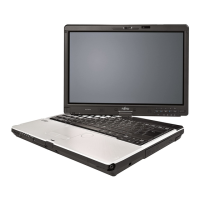
Fujitsu Lifebook T900 - User Manual

Fujitsu Lifebook T900
201 pages
Print Icon
To Next Page IconTo Next Page
Loading...
User’s Guide
Learn how to use
your Fujitsu LifeBook
T900 Tablet PC

Table of Contents

Other manuals for Fujitsu Lifebook T900

Questions and Answers

  • J
    John RodgersAug 16, 2025
    Why my Fujitsu Laptop cannot be started?
    • A
      Alice TuckerAug 16, 2025
      There are several reasons why your Fujitsu Laptop might not start. First, ensure the battery is correctly installed in its compartment. Second, the battery may be dead, so try charging it, inserting a charged battery, or connecting the mains adapter. Finally, verify that the power adapter is correctly connected to the laptop.
  • B
    Brandon CamposAug 19, 2025
    Why Fujitsu Tablet PC won't turn on in Port Replicator?
    • J
      Jeffrey MckinneySep 12, 2025
      If your Fujitsu Tablet PC does not turn on when installed in the optional Port Replicator, ensure the Port Replicator AC adapter is plugged in to provide power to the Port Replicator. Also, make sure the Tablet PC is properly seated in the Port Replicator by removing and re-docking your LifeBook Tablet PC.
  • B
    Brandi MejiaAug 21, 2025
    What to do if battery indicator does not illuminate on Fujitsu Lifebook T900 Laptop?
    • L
      Lauren VaughnAug 22, 2025
      The battery indicator on your Fujitsu Laptop may not illuminate if the battery is not installed correctly. Ensure the notebook is switched off, check the battery's installation in its compartment, and then switch the notebook back on. Alternatively, the battery may be fully discharged. In this case, charge the battery, install a charged battery, or connect the laptop to a mains outlet using the mains adapter.
  • D
    Donna MartinezAug 25, 2025
    What to do if the printer does not print from Fujitsu Lifebook T900?
    • P
      Pamela WoodwardAug 26, 2025
      If your Fujitsu Laptop printer isn't printing, first ensure the printer is switched on and ready. Refer to the printer's documentation for guidance. Next, check the data cable connecting the laptop to the printer to ensure it's properly connected. Finally, verify that the correct printer driver is loaded, consulting the printer documentation if needed.
  • S
    Sophia MartinAug 28, 2025
    How to disable NumLock on Fujitsu Laptop?
    • N
      Nicole CalderonAug 28, 2025
      If entering characters on the keyboard of your Fujitsu Laptop results in numerals, it means the virtual numeric keypad is activated. To resolve this, simply press the Num key.
  • K
    Katelyn OlsonAug 31, 2025
    How to correct date and time on Fujitsu Lifebook T900 Laptop?
    • C
      Christopher CookAug 31, 2025
      To correct the date or time on your Fujitsu Laptop, use the BIOS-Setup-Utility to set the date and time in the main menu.
  • N
    nmillerSep 5, 2025
    What to do if Fujitsu Lifebook T900 won't load operating system?
    • R
      Randy FischerSep 6, 2025
      If your Fujitsu Tablet PC fails to load the operating system but displays power information, the boot sequence settings may be incompatible. To resolve this, set the operating source by pressing the [ESC] key while the Fujitsu logo is on screen or use the [F2] key and enter the setup utility and adjust the source settings from the Boot menu. Also, if you have a secured system, ensure you are using the correct password to load your operating system. You can enter the setup utility to verify and modify the Security settings as needed. If the internal hard drive was not detected, use the BIOS setup utility or Primary Master submenu, located within the Main menu, to try to auto detect the internal hard drive.
  • B
    Brittany BarnesSep 9, 2025
    Why Fujitsu LifeBook Tablet PC won't work on battery?
    • C
      corysmithSep 9, 2025
      If your LifeBook Tablet PC will not work on battery alone, first, replace the battery with a charged one or install a power adapter if the installed battery is dead. If this does not help, verify that the battery is properly connected by re-installing it. If the issue persists, your installed battery may be faulty. Verify the condition of the battery using the Status Indicator panel and replace or remove any batteries that are shorted.

Fujitsu Lifebook T900 Specifications

General IconGeneral
RAMUp to 8 GB DDR3
GraphicsIntel HD Graphics
Operating SystemWindows 7 Professional
Battery6-cell Lithium-ion
Webcam1.3 MP
ProcessorIntel Core i5 or i7
Display1280 x 800
StorageHDD
WeightApprox. 2.2 kg (4.85 lbs)
ConnectivityWi-Fi, Bluetooth
PortsVGA, HDMI, Ethernet
Optical DriveDVD SuperMulti drive
SecurityFingerprint sensor, TPM

Related product manuals