6
LifeBook U810 Notebook BIOS
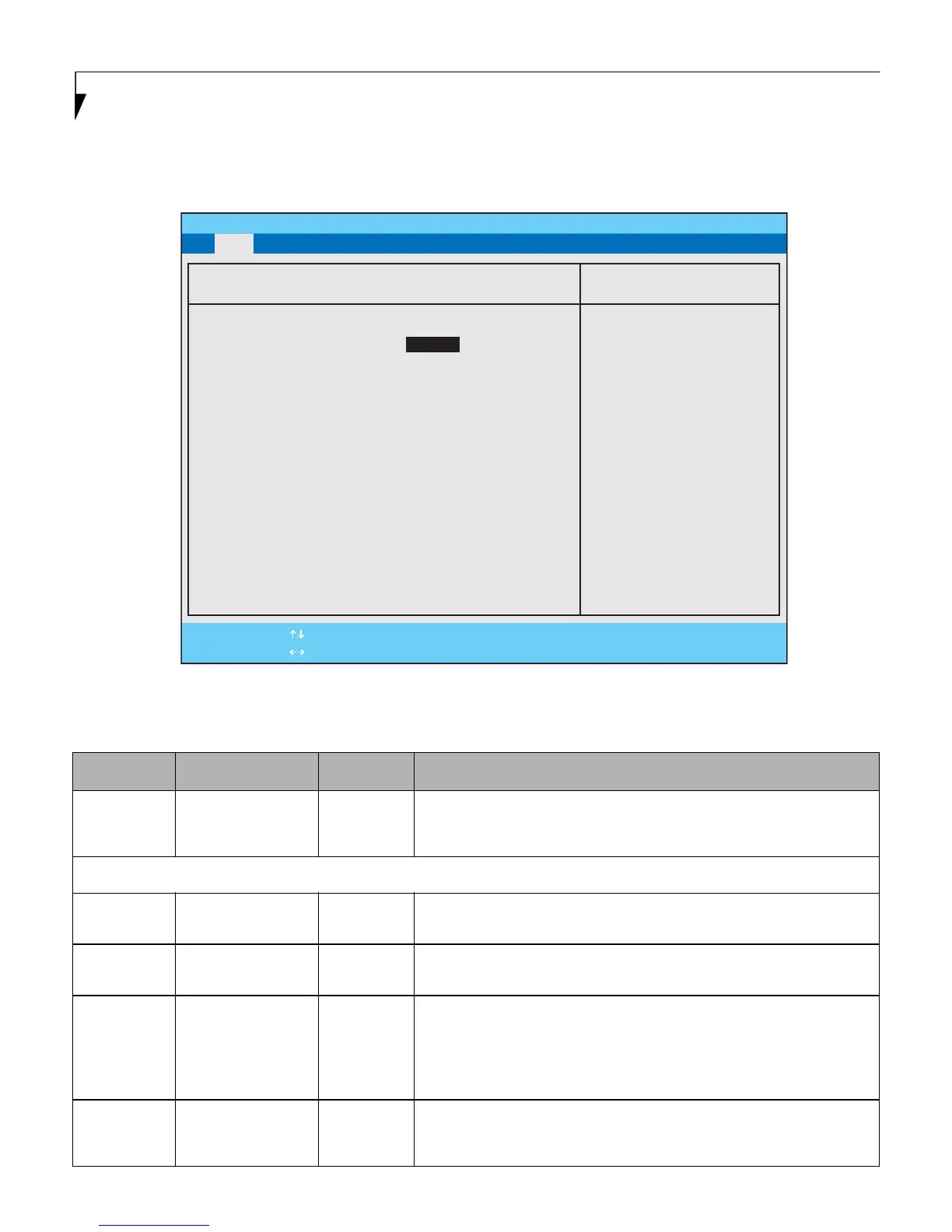
Drive0 Submenu of the Main Menu
The Drive0 submenu identifies which ATA devices are installed.
Figure 2. Drive0 Submenu
Table 2: Fields, Options and Defaults for the Drive0 Submenu of the Main Menu
Menu Field Options Default Description
Type:
■
Auto
■
None
[Auto] Select [Auto] to have the type of Serial or Parallel ATA device automatically
identified by the BIOS at POST. If [None] is selected, the following Set-up
items do not appear.
LBA Format Logical Block Addressing (LBA)
Total Sectors:
---
--- The total number of sectors on your hard disk. This information is automati-
cally displayed when [Auto] is selected.
Maximum
Capacity:
---
--- The maximum capacity of your hard disk. This information is automatically
displayed when [Auto] is selected as the Type.
Multi-Sector
Transfers:
■
Disabled
■
2 Sectors
■
4 Sectors
■
8 Sectors
■
16 Sectors
[16 Sectors] This information is automatically selected when [Auto] is selected as the Type.
LBA Mode
Control:
■
Disabled
■
Enabled
[Enabled] Enables or disables logical Block Addressing in place of Cylinder, Head, Sector
addressing. This setting is automatically selected when [Auto] is selected as
the Type.
PhoenixBIOS Setup Utility
F1 Help
ESC Exit
Select Item
Select Menu
-/Space Change Values
Enter Select Sub-Menu
F9 Setup Defaults
F10 Save and Exit
▲
Main Advanced Security Power Boot Info Exit
Item Specific Help
Select Serial ATA/IDE
drive installed here.
[Auto]
The BIOS auto-types the
drive on boot time.
[None]
The drive is disabled.
Drive0 [TOSHIBA MK4007GAl]
Type: [Auto]
LBA Format
Total Sectors: 78140160
Maximum Capacity: 40008MB
Multi-Sector Transfers: [16 Sectors]
LBA Mode Control: [Enabled]
Transfer Mode: [Multiword DMA 2]
Ultra DMA Mode: [Disabled]





 To Next Page