
EasyManua.ls Logo

Fujitsu RC25 - User Manual

Fujitsu RC25
32 pages
Print Icon
To Next Page IconTo Next Page
Loading...
User's Manual
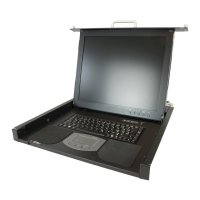
43cm/17" TFT Rack Console
(RC25)

Other manuals for Fujitsu RC25

Questions and Answers

Fujitsu RC25 Specifications

General IconGeneral
CategoryLCD Drawer
Power Supply100-240V AC
Product NameRC25
InterfaceVGA
MountingRack-mountable

Summary

3. Unpacking the Rack Console

Packing List

List of all items included in the shipping package for the Rack Console.

5. Safety

Safety Precautions

Essential safety guidelines and warnings for operating and handling the Rack Console.

6. Rack Mount Instructions

7. Moving the Rack Console

8. Installation

Installing the Rack Console Unit

Steps for physically placing the Rack Console into its designated rack position.

Installation Procedures

Detailed steps for assembling, removing, and installing rack mount kits and cable management.

9. Connecting Cables

Connecting Cables

Step-by-step instructions for connecting various cables to the Rack Console and server.

10. KVM Switch Installation

11. Operations

Operating the Rack Console

Instructions on how to pull out, open, and power on the Rack Console.

Monitor Control Buttons

Description of the five monitor control buttons and their functions.

Basic Monitor Adjustment Steps

Guide to performing basic adjustments like brightness, contrast, and position using the menu.

12. Troubleshooting

Troubleshooting Monitor Issues

Solutions for common problems like no image, flickering, or incorrect display on the monitor.

13. Cleaning the Rack Console

15. Technical Specifications