28
3. BASIC OPERATION
Turn on power Initial setting Clock setting
Group information store
Test operation
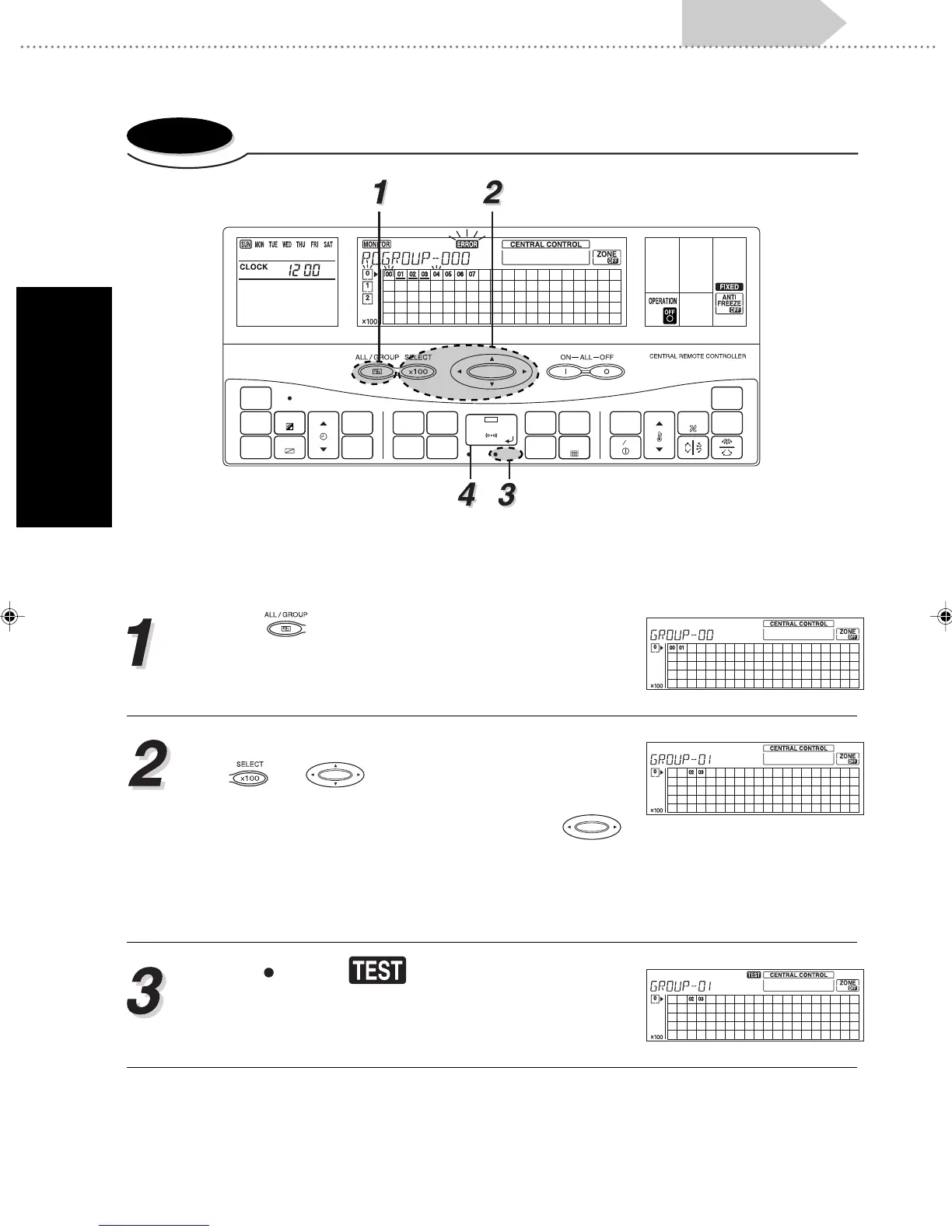
3-2-5. Test operation
Remote control group operation settings are performed in the control mode. The following proce-
dure for the setting is the same for any of the control modes: Individual control mode / Group control
mode / All control group.
Push to select control mode from among In-
dividual control mode / Group control mode / All con-
trol.
• When Individual control mode is selected, use
and to select the desired central con-
trol number, then go to step 3.
• When Group control mode is selected use
to select the desired group number, then go to step
3.
• When All control mode is selected, go directly to
step 3.
Press
TEST
and will light up. The operation
setting selected in 1 is applied to the selected con-
trol mode.
CHECK
ACL
MASTER
ENERGY ANTI
FAN
TIMER
SET
TIMER
DELETE
TIMER
DAY
CLOCK
ADJUST
DAY OFF
TEMP.
MEMORY
OPERATION
MEMORY
TEST
SET
CENTRAL
DELETE
BACK
GROUP
ZONE
ON OFF
TIME
CONTROL
CONTROL
FILTER
RESET
CONTROL
FREEZE
COPY
TIMER
MODE
SAVE
SETTING SETTING
Se_Ch3_p11-29.p65 01.5.22, 4:04 PM28





 To Next Page