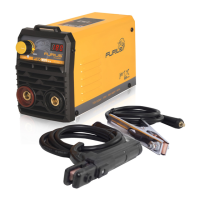
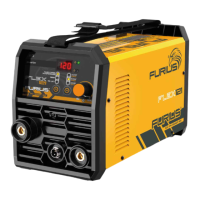
The FURIUS FIX 201 V03 is an inverter welding machine designed for manual metal arc welding (MMA/SMAW) and TIG scratch welding processes. It operates on a single-phase power supply of 110V/220V at 50/60Hz.
Function Description:
The FURIUS FIX 201 V03 is a versatile welding power source capable of delivering continuous welding current for various applications. It features a DC current output, making it suitable for 6013 and 7018 1/8” electrodes. The machine incorporates ARC FORCE, HOT START, and MMA functionalities to enhance welding performance and ease of use. For TIG welding, it supports the scratch TIG ignition method. A digital display provides clear readings of the adjusted current value.
Important Technical Specifications:
- Input Voltage: 110V/220V - 1ph (+/- 10%), 50/60 Hz
- Open Circuit Voltage: 65V
- Output Current Range (220V): 20-200A
- Output Current Range (110V): 20-130A
- Duty Cycle at 40°C: 40% (at maximum output current)
- Min. Recommended Fuse: 25A
- Output Current Type: DC
- Insulation Class: I.CL.H
- IP Protection: IP 21 S
- Electrode Diameter (Recommended): 3.2mm (Ørecom'd), Max. 4.0mm (ØMAX.)
- Nominal Supply Voltage (U1): 220V / 110V
- Maximum Nominal Supply Current (I1max): 29A (220V), 27A (110V)
- Maximum Effective Supply Current (I1eff): 18A (220V), 17A (110V)
Usage Features:
- MMA/SMAW Welding:
- Connect the work clamp (ground) to the workpiece and the electrode cable to the positive (+) socket.
- Ensure good electrical connection by removing rust, paint, or contamination from the workpiece.
- Insert the electrode into the electrode holder.
- To start the arc, scratch the electrode over the welding spot. The 65V no-load voltage ensures quick ignition, and DC current allows for even melting.
- ANTI STICK (Bonded Electrode) Feature: If the electrode sticks, the machine automatically reduces the welding current, allowing the user to free the electrode by moving it back and forth.
- TIG Process:
- Connect the torch to the negative (-) socket and the work clamp (ground) to the positive (+) socket.
- Requires Argon gas from a cylinder with a flow regulator. The torch should be connected directly to the regulator, as the equipment does not have a solenoid valve for gas flow control. A torch with a knob is recommended for gas flow regulation and interruption.
- Recommended gas flow: 10 to 20 l/m or 21 to 40 CFH.
- Scratch TIG Ignition: To start the arc, scratch the tungsten against the workpiece. Then, separate the tungsten from 2 to 4 mm to maintain the arc.
- Digital Display: Shows the adjusted current value.
- Current Adjustment Knob: Used to set the desired welding current.
- Duty Cycle: The machine can deliver its maximum output continuously for 4 minutes within a 10-minute period at 40°C. After this, a thermal control device activates, requiring a 6-minute rest period (machine should remain on to cool). The duty cycle increases as the output current or ambient temperature decreases.
- Power Switch: Turns the equipment on and off with an audible click.
- Transport Strap: For easy and safe transportation.
- Environmental Conditions:
- Operating ambient temperature: -10 °C to +40 °C.
- Transport and storage temperature: -20 °C to +55 °C.
- Relative humidity: Up to 50% at 40 °C and up to 90% at 20 °C.
- Designed for operating environments with normal levels of dust, acid, and corrosive gases, provided there is adequate ventilation.
- Equipment must be positioned less than 10° from the horizontal to prevent damage from overturning.
Maintenance Features:
- Regular Cleaning: Periodically clean the welder with a soft cloth after each use. Keep vents free of dust and dirt. Use a damp cloth with water and a little soap for stubborn dirt. Avoid petroleum-derived solvents or alcohol.
- Compressed Air Cleaning: Clean dust at regular intervals with clean, dry compressed air. For heavy smoke/contamination, clean monthly. Reduce air pressure to avoid damaging small parts.
- Insulation Check: Keep the machine dry and check insulation with a multimeter (including between AC connections, housing, and AC connections) to prevent problems from water or rain.
- Thermal Protection: The machine has a thermal control device that activates when the maximum duty cycle is reached or due to internal overheating. Do not turn off the welder immediately; allow the fans to cool the power components until the protection deactivates.
- Troubleshooting: Before servicing, check:
- Welding current setting (correct for electrode diameter/type).
- Power indicator LED (on when main switch is on).
- Yellow LED (off, indicating no thermal protection or voltage issues).
- Adherence to duty cycle.
- Mains voltage (must be between 95V ~ AC and 265V ~ AC for automatic restart).
- No short circuit at machine output.
- Correct welding circuit connections, especially the work clamp.
- Professional Repair: Only qualified personnel from UJUETA MÉXICO, S.A. DE C.V. should repair the welder using original spare parts. Unauthorized opening or internal manipulation voids the warranty and poses serious risks.
- Grounding: Connecting the ground wire to a phase automatically voids the warranty.
Safety Precautions (Summarized):
- Always wear adequate protection (face shield, insulated gloves, appropriate clothing, boots).
- Avoid electric shock by not touching electrically active parts with bare hands, not using the machine in rain/snow, and ensuring proper grounding.
- Be aware of fire/explosion risks from sparks and molten metal; remove flammable substances from the work area.
- Avoid breathing welding fumes; ensure adequate ventilation and use the machine in open areas.
- Protect eyes and skin from welding arc radiation.
- Workers with medical implants (e.g., pacemakers) should not use the product due to electromagnetic fields.
- Keep the workplace clean and tidy.
- Do not operate when tired or under the influence of substances.
- Ensure proper ventilation for the machine (minimum 10 cm from walls).
- Do not weld bicycle frames, vehicle steering parts, or trailer tow bars.
- Turn off power before maintenance.
- Do not move the gas cylinder with the regulator valve in place; secure it upright.
- Close gas cylinder and regulator valves after use.
- Avoid working in hazardous conditions (wet locations, metal structures, difficult positions, flammable materials, welding at height) without additional safety measures.
- Do not use the machine for purposes other than welding.
- Do not insert objects into moving parts like fans.
- Do not exceed 280V ~ AC mains voltage to prevent machine damage.
The FURIUS FIX 201 V03 is a robust and user-friendly inverter welder, designed for both professional and training use, emphasizing safety and performance.

 Need help?
 General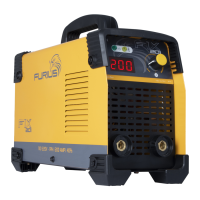

 To Next Page