Page 28 FCO770 Users Guide Issue 1
• Selecting Recall setting: Before will ensure that logged data will get recalled
immediately before the date defined by the date showing below.
• The Date shown is used in conjunction with the Before and After option as
documented above. Its value can be changed by clicking on the Calendar Icon Button.
• The Number of Products to Recall can be determined by setting a value using the #
button next to the corresponding number. This value determines how many Product
results are recalled when the Recall Products button is pressed. Additionally, when
the options dialogue is not showing and with the DATALOGGING screen showing,
this value also determines how many results are recalled when pressing the or
. button. Pressing the Last button will immediately recall logged results prior to
those being displayed. Pressing the Next button will immediately recall logged results
after those being displayed, thus these two button can be used to cycle through blocks
of logged data until a desired point is reached.
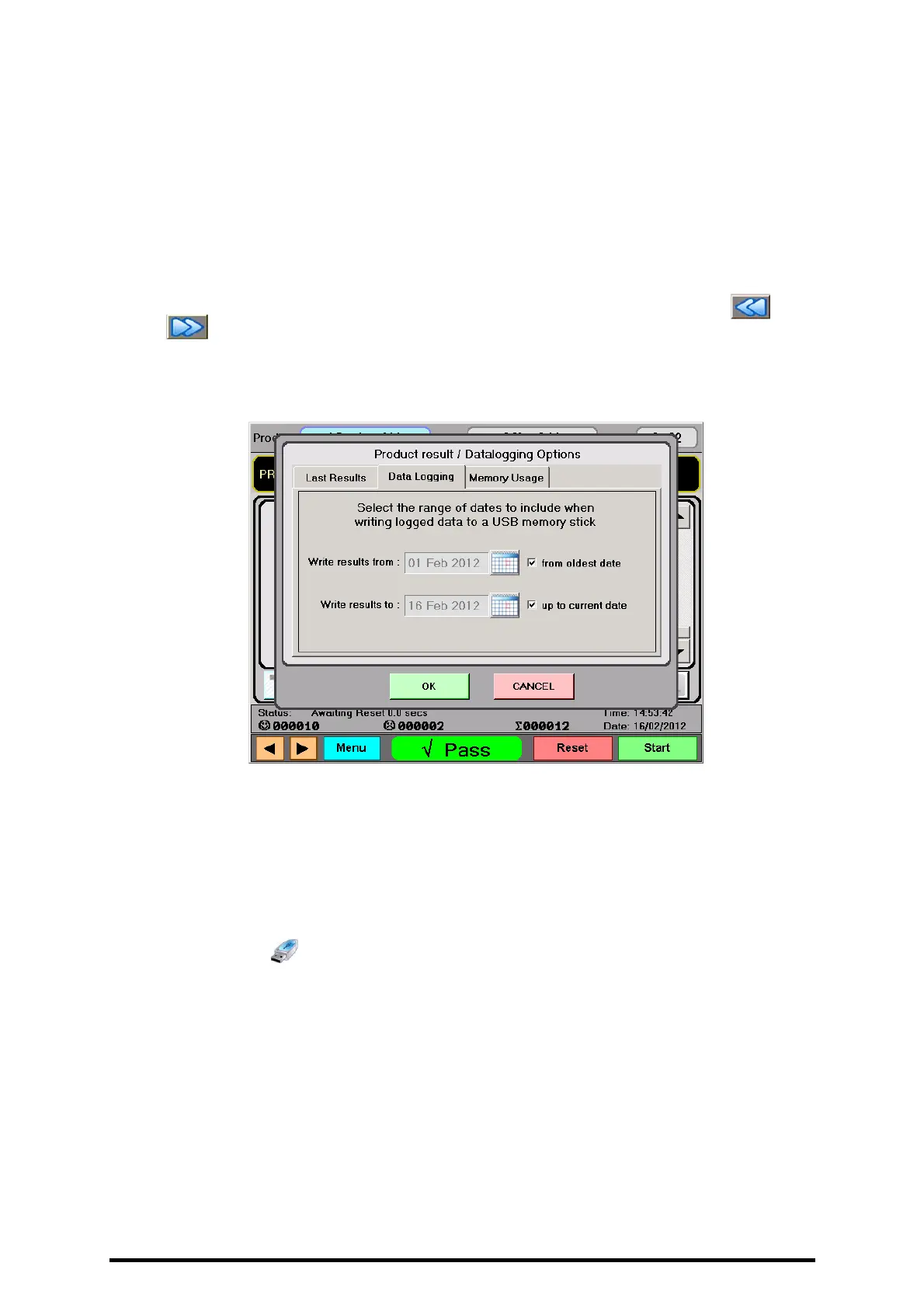
• The Data logging tab is used to set the range of dates included when writing logged
data from the FCO770’s repository to a USB memory stick. From and To dates can
be defined directly using the corresponding calendar icon buttons. Alternatively by
checking the boxes appropriately, data can be written from the oldest and/or the most
current logged date.
• When the options dialogue is not showing and with the DATALOGGING screen
showing, the button can be pressed at any time to transfer logged data within the
defined range to a USB memory stick.


 To Next Page