FCO770 Users Guide Issue 1 Page 27
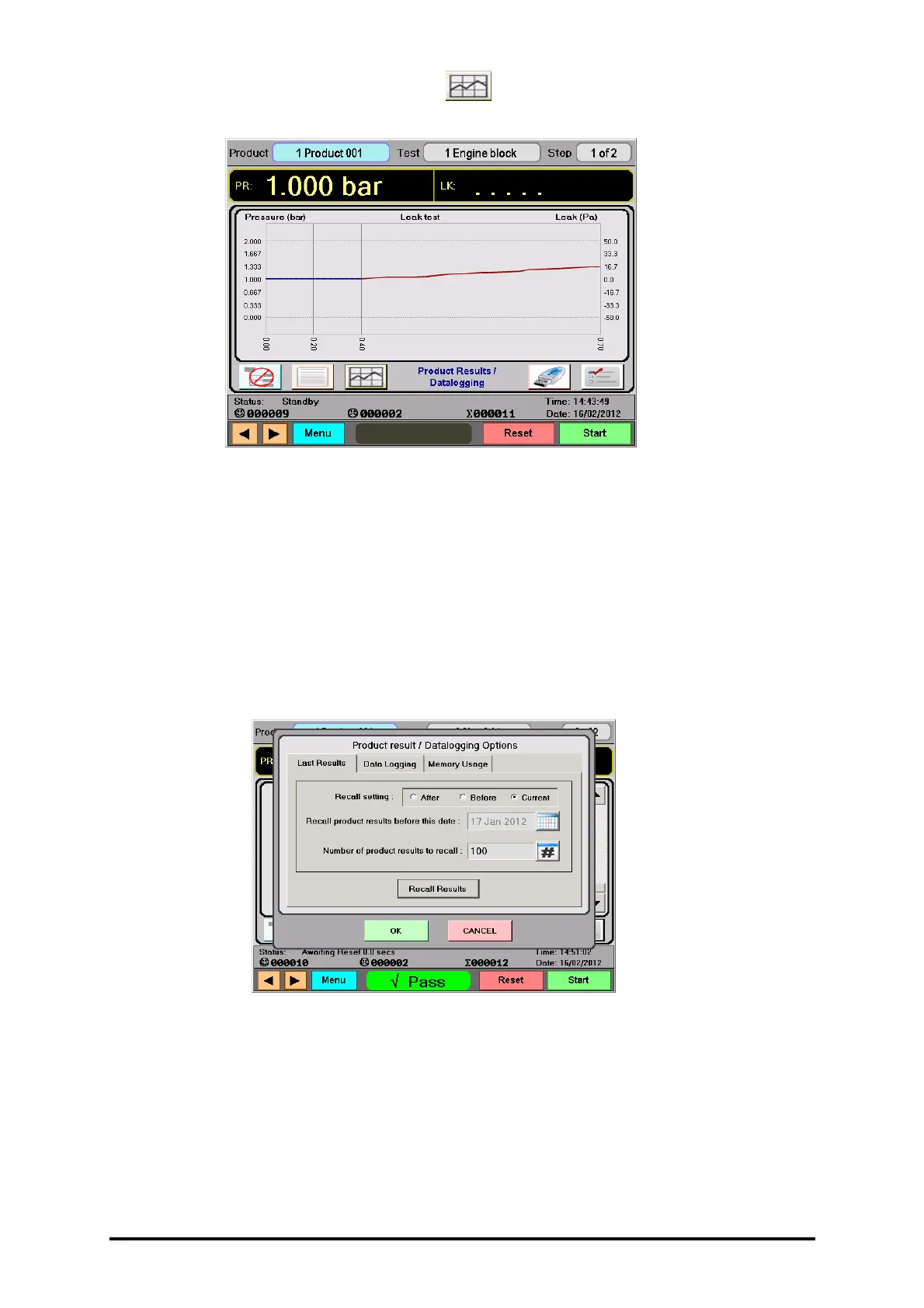
• Secondly, if configured to do so, the button can be pressed to show a
reconstruction of the graph plot produced for the test.
• To return to the list of products, simply press the prohibited Logged Product List
button.
• Pressing the prohibited Logged Product List button with the logged product list
showing will remove the scroll lock, re-position the list to the latest entry, and allow
auto scrolling to continue as normal.
PRODUCT RESULT / DATALOGGING OPTIONS
• Data logging options can be configured by clicking on the Data Logging options
button. This will bring up the following dialogue box.
• The Last Results tab is used to configure how logged data is recalled from the
FCO770’s massive internal repository, before being presented to the user.
• Selecting Recall setting: Current will ensure that logged data will get recalled up to
the current date.
• Selecting Recall setting: After will ensure that logged data will get recalled
immediately after the date defined by the date showing below.


 To Next Page