EasyManua.ls Logo

FUTABA R304SB-E - User Manual

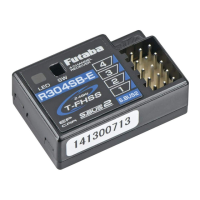
FUTABA R304SB-E
2 pages
Print Icon
To Next Page IconTo Next Page
Loading...
Link Pr o c e d u r e
Each transmitter has an individually
assigned, unique ID code. In order to start
operation, the receiver must be linked
with the ID code of the transmitter with
which it is being paired. Once the link is
made, the ID code is stored in the receiver
and no further linking is necessary unless
the receiver is to be used with another
transmitter.
1
Plac e the transmit t e r a n d the
receiver close to each other within
half (0.5) meter.
2
Place the transmitter into the linking
mode, and turn on the receiver.
3
During countdown, push the receiver
tact switch for approximately 2
seconds. The LED will begin to blink
red. After the receiver LED switches
from blinking red to green
red
steady light, If the transmitter and
receiver are linked normally, set the
power switch to the OFF position
and then turn on the PWR ON
position. If the receiver LED lights
green, linking was succeeded.
Actually check servo operation.
* Please refer to the table below for
LED status and receiver condition.
* Refer to the transmitters operation
manual for complete details on how to
place the transmitter into the linking
mode.
* If there are many T-FHSS systems
turned on in close area, your receiver
might have difficult in establishing a
link to your transmitter. This is a rare
occurrence. Your receiver may link to
the undesirable transmitter. This is
very dangerous if you do not notice
this situation. In order to avoid the
problem,we strongly recommend
yo u double c h e ck whether yo u r
receiver is really under control by your
transmitter.
WARNING
After the linking is done, please cycle receiver power and check if the receiver
to be linked is really under the control by the transmitter to be linked.
Do not perform the linking procedure with motor's main wire connected or
with the engine operating as it may result in serious injury.
Link switchLED
S.BUS2 / (Battery)
CH output
(1 to 4) / (Battery)
Operating Precautions:
Once the
R304SB-E
detects the
T-FHSS
normal mode
or
T-FHSS high
speed mode
, the detected mode is
locked as long as the power is ON.
When need to change the mode,
please cycle power.
Note:
The R304SB-E is compatible with the T-FHSS system
transmitters.
The receiver type setting of the transmitter is set T-FHSS.
*Futaba T-FHSS system does not work with current Futaba S-FHSS/FHSS/FASST-
est/FASST system.
Us a g e c o n di t i on on " High Speed m ode "
CAUTION
When using the high-speed mode, use a Futaba digital servo (including
brushless servo). Analog servos cannot be used.
The use of analog servos may cause servo trouble.
1M23N28504
T-FHSS-2.4GHz System
S.BUS2, 4-Channel
Built-in Antenna Receiver
for EP Car Models
Thank you for purchasing the
R304SB-E
receiver. The
R304SB-E
is designed for use
with the Futaba
T-FHSS
system transmitter.
The
R304SB-E
receiver has adopted the newly
developed bidirectional communication
system "
T-FHSS
".
•Telemetry system
With the
tel emetry s ystem
, the running
status can be displayed at the transmitter.
The telemetry data can be checked at the
transmitter by connecting the
telemetry sensor
sold separately to the
S.BUS2
connector of the
R304SB-E
receiver.
•Normal mode/High Speed mode
The "Normal mode" accepts any type of servos
or the peripheral. The "High Speed mode"
only accepts the digital servos, including BLS
series, and most peripheral equipments such
as the brushless ESCs. Please pay special
attention to the information contained within
this manual and transmitter's manual in order
to have a pleasant running experience.
•Built-in antenna
The
R304SB-E
receiver is designed to be
used only for EP Car models.
R304SB-E
WARNING
NEVER use dry batteries for
the power supply of the R304SB-E
as this may cause difficulties with
the receiver's operation.
NEVER use the R304SB-E in GP
(Engine) cars.
W r a p t h e r e c e i v e r w i t h
something soft,such as foam
rubber,to avoid vibration. Do not
splash water over the receiver.
Since the receiver generates a
certain amount of heat, install
the place with good ventilation.
No signal recep-
tion
LED: Red
Receiving signals LED: Green
Unrecover-
able failure
(EEPROM,etc.)
LED: Red
and Green
turn on alter-
nately
1

Other manuals for FUTABA R304SB-E

Question and Answer IconNeed help?

Do you have a question about the FUTABA R304SB-E and is the answer not in the manual?

Summary

R304 SB-E Receiver Overview

Telemetry System Capability

Enables display of running status and data via telemetry sensors connected to the S.BUS2 connector.

Normal and High Speed Modes

Supports standard servos or digital servos/BLS/ESCs for enhanced performance and compatibility.

Built-in Antenna Design

Receiver features a built-in antenna and is designed for EP (Electric Powered) car models exclusively.

Receiver Linking and Operation

Transmitter-Receiver Linking Procedure

Step-by-step guide to pair the receiver with the transmitter's unique ID code for initial operation.

Operational Safety Warnings

Includes precautions against linking with motors connected and verifies receiver control after linking.

High Speed Mode Servo Compatibility

Recommends using only digital servos (including brushless) in High Speed mode to prevent servo trouble.

Connection Example and Specifications

Example Connection Diagram

Illustrates how to connect the R304SB-E receiver to ESC, steering servo, and telemetry sensors via HUB.

R304 SB-E Technical Specifications

Details system type (T-FHSS), channels, frequency band, receiving range, power requirements, and physical dimensions.

Overview

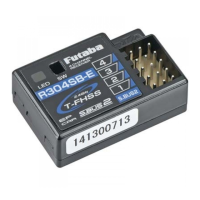
The Futaba R304SB-E is a 2.4GHz T-FHSS S.BUS2, 4-channel receiver specifically designed for use with EP (Electric Powered) car models. It operates on the Futaba T-FHSS system, a newly developed bidirectional communication system that allows for telemetry data transmission.

Function Description:

The primary function of the R304SB-E is to receive control signals from a compatible Futaba T-FHSS system transmitter, enabling the operation of various components in an EP car model. It features four channels for controlling functions such as steering and motor speed. The S.BUS2 port allows for the connection of multiple servos and other peripheral devices with a single cable, simplifying wiring.

A key feature of this receiver is its integrated telemetry system. By connecting optional telemetry sensors (e.g., temperature, RPM, voltage sensors) to the S.BUS2 port via a HUB, users can monitor the running status of their car model directly on the transmitter. This provides valuable real-time data for optimizing performance and preventing potential issues.

The R304SB-E supports both "Normal mode" and "High Speed mode." In "Normal mode," it is compatible with all types of servos and peripheral equipment. "High Speed mode," however, is designed for use with digital servos (including BLS series) and most brushless ESCs, offering faster response times. The receiver automatically detects and locks into the appropriate mode (Normal or High Speed) once power is applied.

Usage Features:

Linking Procedure:

To establish communication between the receiver and a transmitter, a linking procedure is required. Each transmitter has a unique ID code, which the receiver stores after linking. This process needs to be performed only once per transmitter.

  1. Place the transmitter and receiver within 0.5 meters of each other.
  2. Put the transmitter into linking mode.
  3. Turn on the receiver.
  4. During the countdown, press the receiver's tact switch for approximately 2 seconds. The LED will blink red.
  5. Once the LED changes from blinking red to green, then to a steady red light, the linking is successful.
  6. Turn off the power switch and then turn it back on. If the receiver LED lights green, linking was successful.
  7. Always verify servo operation after linking.

LED Status Indicators:

The receiver's LED provides visual feedback on its status:

  • Red: Indicates no signal reception.
  • Green: Indicates receiving signals.
  • Red and Green (alternating): Signals an unrecoverable failure (e.g., EEPROM error).

Mode Switching:

The R304SB-E automatically detects and locks into either "Normal mode" or "High Speed mode" based on the connected components and transmitter settings. To change the mode, the receiver's power must be cycled (turned off and then back on).

High Speed Mode Caution:

When operating in "High Speed mode," it is crucial to use only Futaba digital servos (including brushless servos). Using analog servos in this mode can lead to servo malfunction.

Safety Precautions:

  • Power Supply: Never use dry batteries to power the R304SB-E, as this can cause operational difficulties.
  • Engine Cars: The R304SB-E is exclusively for EP car models and should not be used in GP (Engine) cars.
  • Linking Environment: Avoid performing the linking procedure with the motor's main wire connected or with the engine operating, as this may result in serious injury. If multiple T-FHSS systems are active in the vicinity, there's a rare chance the receiver might link to an unintended transmitter. Always double-check that your receiver is controlled by your transmitter after linking.

Maintenance Features:

Vibration and Moisture Protection:

To ensure reliable operation and longevity, it is recommended to wrap the receiver in a soft material, such as foam rubber, to protect it from vibrations. Additionally, prevent water or other liquids from splashing onto the receiver.

Ventilation:

The receiver generates a certain amount of heat during operation. To prevent overheating and ensure optimal performance, install the receiver in a location with good ventilation.

The R304SB-E is a high-voltage system (HV), designed to handle higher input voltages, offering flexibility in power source selection for EP car models. Its built-in antenna design further simplifies installation and reduces clutter.

FUTABA R304SB-E Specifications

General IconGeneral
Frequency2.4 GHz
Channels4
Connector TypeJST
Telemetry CapableYes
Diversity AntennaYes
TypeReceiver
ModulationFHSS

Related product manuals