This document describes the FUTUR AIR PURIFIER (MINI), a device designed for air purification in various indoor environments.
Function Description
The air purifier operates on a high-voltage electrostatic adsorption principle. It generates a strong electrostatic field (4KV-8KV DC) within its electrostatic adsorption device. As indoor air passes through this field, particulate matter, including microorganisms, is instantly polarized and charged. These charged particles are then attracted to oppositely charged plates (anode and cathode), causing them to collide. This collision releases a significant amount of energy, which destroys the cell walls and electrolytes of viruses and bacteria, thereby achieving disinfection and sterilization. The device is suitable for use in homes, offices, schools, hospitals, food establishments, and catering facilities.
Important Technical Specifications
- Rated Voltage: 220V
- Rated Frequency: 50Hz
- Rated Power: 60W
- PM CADR (Clean Air Delivery Rate): 600m³/h
- Lifespan: 10 Years
- Coverage Area: 32-74m² (340-800 sq. ft)
- Filters: The purifier is equipped with 7 different pre-assembled filters, including:
- Aluminum Mesh Filter (washable)
- Electrostatic Filter (washable)
- Ozone Decomposition Filter (unwashable)
- Plasma Tube (recommended replacement every 2 years)
- Sensors: PM2.5 sensor and VOC sensor for air quality monitoring.
Usage Features
The air purifier offers several user-friendly features controlled via its control panel:
- ON/OFF: A single press of the button turns the unit on or off. All keys light up white when the machine is on.
- AUTO/SLEEP Mode:
- Auto Mode: A short press activates auto mode, with the "AUTO" button fully lit.
- Sleep Mode: A long press (3 seconds) activates sleep mode, with the "SLEEP" button fully lit. In this mode, all display lights on the panel and machine are off.
- AIRFLOW Control: Short presses cycle through four speed settings (1-4). The corresponding icons (3 and 8) display simultaneously, and the PM2.5 display restores after 5 seconds.
- TIMING/CHILD LOCK:
- Timing Mode: Short presses switch to timing mode, cycling through 1, 2, 4, 6, or 8 hours. Icons 4 and 9 display correspondingly, and the PM2.5 display restores after 5 seconds.
- Child Lock Mode: A long press (3 seconds) activates child lock. The "CHILD LOCK" button lights up, the machine emits a "beep," and other keys become unresponsive. Another long press (3 seconds) releases the child lock.
- UVC Sterilizing Mode: A short press activates UVC sterilizing mode, with the "UVC" button lit. Pressing again disables it.
- WIFI/RESET:
- Wi-Fi Network Configuration: Press the button for 3 seconds to enable Wi-Fi network configuration mode. Icons 6 and 11 blink simultaneously. The "WIFI" icon becomes steady once the network is successfully configured.
- Filter Reset: When the filter remaining time is less than 15%, icons 10 and "RESET" blink. Press the button for 5 seconds, and the machine will "beep," indicating a successful filter reset. Icon 10 will light up, and the display will show "100" (full) before restoring to the PM2.5 display after 2 seconds.
- Display Window: Shows current PM2.5 values and other relevant information.
- Air Quality Display:
- PM2.5 Indicator Light: Located above the front panel, it changes color based on PM2.5 status:
- Blue: Excellent
- Green: Good
- Yellow: Moderate
- Red: Poor
- VOC Indicator Light: Located under the front panel, it changes color based on gaseous pollutant status:
- Blue: Excellent
- Green: Good
- Yellow: Moderate
- Red: Poor
- Wi-Fi Connection (Smart Life APP): The device can be controlled via the "Smart Life" APP. Users can download the app by scanning a QR code or searching in app stores, register an account, and then add the device manually or automatically. The app supports "Easy mode" and "AP mode" for Wi-Fi connection. The Wi-Fi indicator on the device flashes quickly when ready for configuration.
Maintenance Features
Regular cleaning and maintenance are crucial for optimal performance and longevity of the air purifier.
- Filter Removal and Installation: Before using, the packing bag of the filter must be removed. The filter installation sequence is: Aluminum mesh filter, Electrostatic filter, Ozone decomposition filter, and Plasma Tube.
- Dust Sensor Cleaning:
- Open the sensor cover.
- Use a wet cotton swab to clean the lens, air inlet, and air outlet.
- Use a dry cotton swab to remove residual water.
- The dust sensor should be cleaned approximately every two months, or more frequently in dusty environments.
- Do not use the swab on any part other than the dust sensor.
- Ozone Decomposition Filter Cleaning: Use a vacuum cleaner or cloth to remove dust and fluff. Recommended cleaning time is every 8-12 years, but this varies with environment.
- Aluminum Mesh Filter Cleaning: This filter collects large particles and should be cleaned at least once every two months.
- Use a vacuum cleaner or tissue to remove dust or fluff.
- Wash with soap water.
- Thoroughly rinse to remove soap residue.
- Dry the filter.
- Electrostatic Filter Cleaning:
- Take out the filter.
- Spray with neutral detergent and let stand for 5-10 minutes.
- Shake well in warm water (under 40 degrees) and get out.
- Repeat steps until clean.
- Rinse dirt with warm water.
- Dry with a hair dryer or in the sun.
- Whole Machine Cleaning:
- Clean with a damp sponge or cloth.
- Do not immerse the air purifier in water.
- Do not disassemble fixed parts for cleaning.
- Condenser Mesh Cleaning:
- Gently unscrew the quartz condenser.
- Remove the OUTSIDE MESH (rotate slightly if difficult).
- Clean the quartz condenser with a moist cloth (do not use detergents, soaps, or similar products).
- Check for cracks or damage; replace if necessary.
- Replace the condenser if a whitish layer appears on the metal grill.
- Reposition the metal mesh over the internal grill, ensuring a minimum distance of 6-7mm from the bottom.
- Ensure the SPRING TAB touches the metal MESH OUTSIDE and pushes against the glass of the quartz condenser.
- VOC Sensor Cleaning:
- The VOC sensor is located on the middle right side of the machine, above the air inlet grille.
- Use a soft cloth to clean dust and debris around the sensor for accurate smell identification.
- Do not modify or open the VOC sensor, or spray near its grille opening, as this may cause sensor and warranty failure.
Safety Precautions
- Power: Use only two-pin sockets conforming to standard voltage. Do not use if power cord, plug, or socket are damaged. Hold the plug, not the cord, when unplugging. Clean dust from the power plug regularly. Damaged power cords must be replaced by the manufacturer or professional maintenance personnel.
- In Use: Do not use without filters. Do not insert fingers or objects into air inlet/outlet. Do not block air inlet/outlet. Keep away from heat sources or flammable gases. Unplug immediately if smoke, odor, or other malfunctions occur.
- Service Restrictions: Do not use in environments with oil residue, smoke, flame from cigarettes, chemical odors, flammable gases (hydrogen, natural gas, propane), or when using insecticide spray. Avoid unstable, hot, humid, or wet places like bathrooms.
- Moving: Stop operation and unplug before moving. Hold the handle on the side of the machine; do not hold the front panel to prevent falling and injury.
- Installation: The host will not start if the front panel is not installed correctly. Do not install near sensors directly to the tuyere. Avoid installing near objects that may contact the air inlet/outlet. Do not install where condensation may occur; use at room temperature (0-40 degrees). Avoid places with black smoke (e.g., kitchen) to prevent surface cracks or sensor failure.
- Cleaning: Do not clean ozone filter and composite HEPA filter with water. Use soft cloth for cleaning; avoid strong corrosive cleaners, alcohol, or organic solvents. Unplug the power before cleaning or not using the machine.
Troubleshooting
The manual provides a table for common troubleshooting methods, addressing issues such as odor from the air outlet, ineffective dust removal, excessive noise, and the filter not fitting. Solutions range from ventilating the room and replacing filters to contacting customer service. For motor abnormalities, unplugging and cooling the device for 1-2 hours before reconnecting is suggested, or contacting customer service if the issue persists.

 Need help?
 General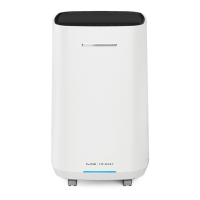

 To Next Page
