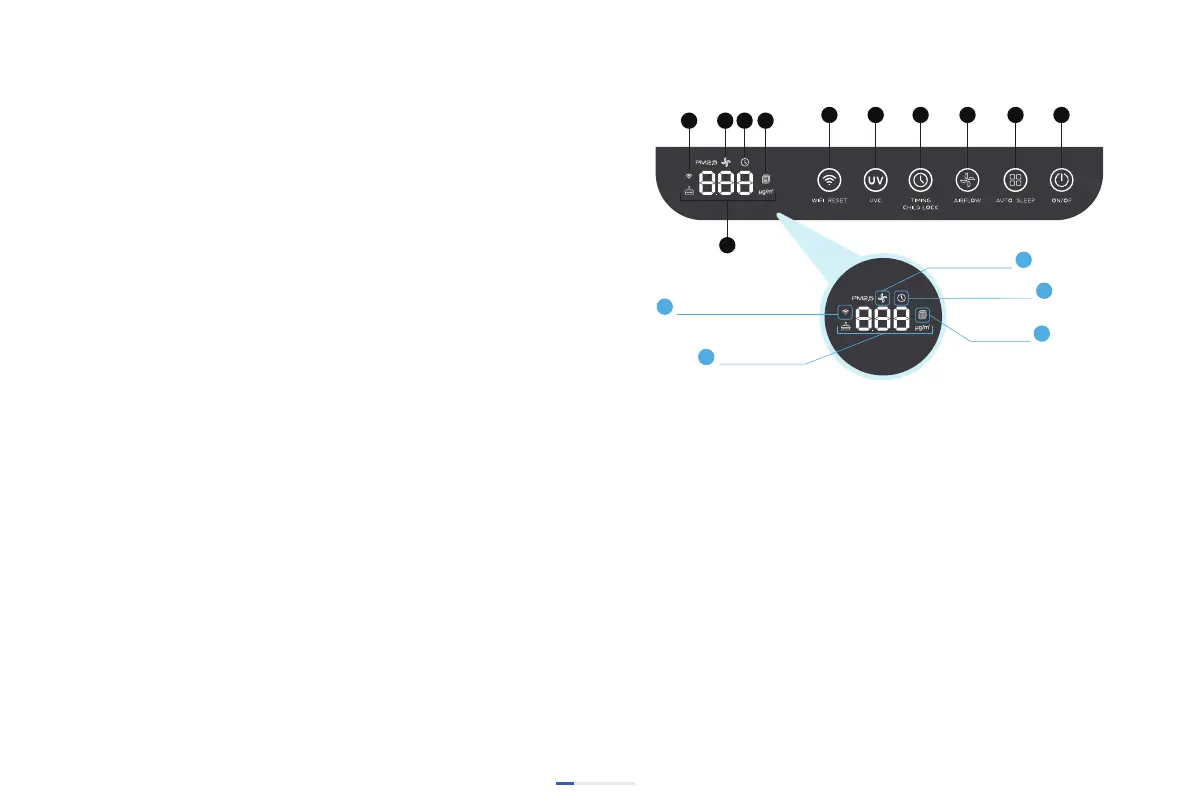
1. ON/OFF:
The icon lights up red when the power is on, and press the buon
to turn on/off respecvely. When the machine is turned on, all
keys light up white.
2. AUTO/SLEEP:
Short press for auto mode, the buon and "AUTO" are fully lit;
long press 3 seconds for sleep mode, the buon and "SLEEP" are
all on, at the same me, all display lights on the panel and machine
are in off state.
3. AIRFLOW: Short press the buon and switch to speed
1~2~3~4, icon 3 and icon 8 display correspondingly at the same
me; the PM2.5 display will be restored aer 5 seconds.
USE INSTRUCTIONS
High-voltage electrostac adsorpon is through the electrostac
adsorpon device under the acon of a high-voltage generator
can generate 4KV-8KV DC high voltage and form a strong
electrostac field inside the electrostac adsorpon device.
When the indoor air passes through the electrostac adsorpon
device, the parculate maer in the air (including
microorganisms) is instantaneously polarized and charged with
posive and negave charges due to the high-speed impact of
posive and negave electrons when passing through the
electric field. The charged parcles aract each other due to the
opposites when running in the electric field. The negavely
charged parcles will shi to the anode plate, and the posively
charged parcles will shi to the cathode plate, causing the
charged parcles to collide with each other in moon. The
posive and negave charges will also discharge at the moment
of collision and release a large amount of energy to destroy the
cell wall and electrolyte of virus and bacteria, so as to achieve the
purpose of disinfecon and sterilizaon.
Home, office, school, hospital, food, catering, etc
PRODUCT WORKING PRINCIPLE
1. Sterilizaon Principle:
2. Applicaon:
Airflow Display
Timing Display
Filter Reset
Wi-Fi Connecon Display
Display Window
03


 To Next Page