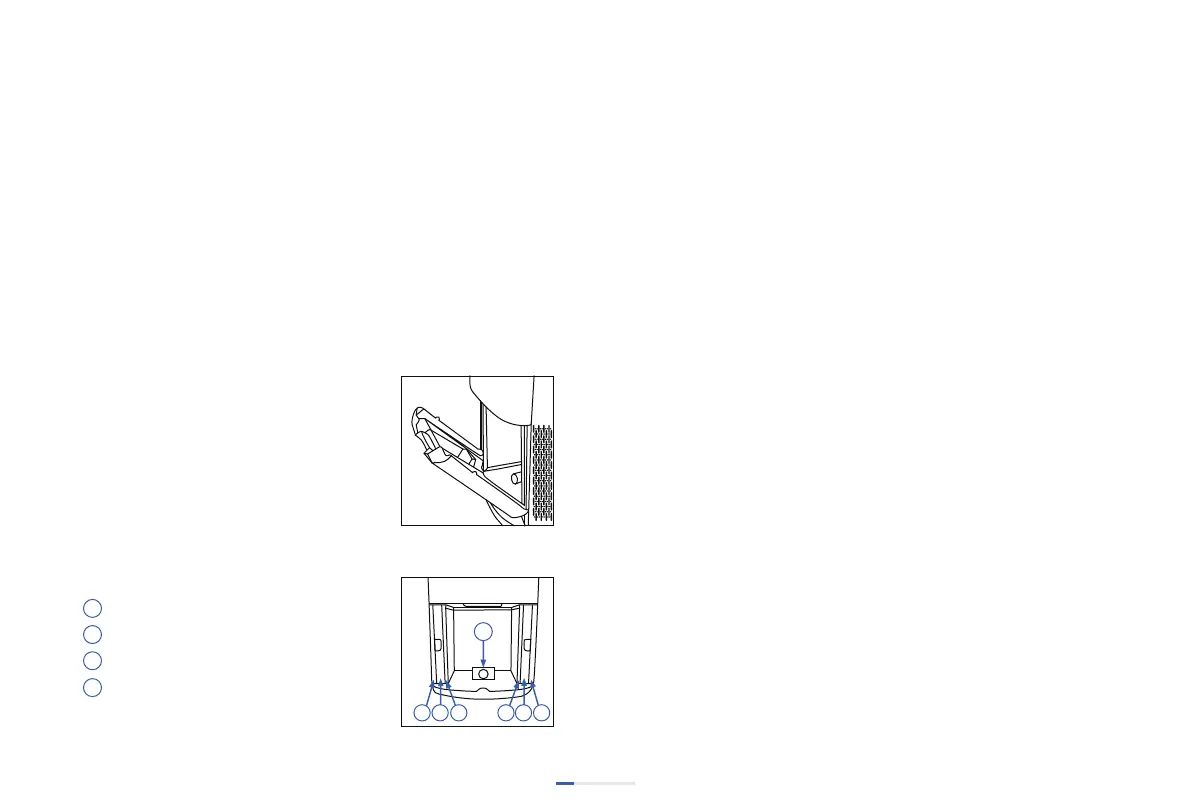
Cleaning Dust Sensor
1. Open the sensor cover
2. Use a wet coon swab to clean the lens, air inlet and air outlet.
3. Use a dry coon swab to remove residual water stains of the
dust sensor.
• The dust sensor needs to be cleaned regularly (approximately
every two months) for the machine to operate efficiently.
• The dust sensors needs to be cleaned more frequently if the
machine is placed in areas where dust accumulates.
• Do not use the swab on any part or area other than
the dust sensor.
Guidance for Cleaning Ozone Decomposion Filter
Use a vacuum cleaner or cloth to remove dust and fluff.
Recommend cleaning the filter me is about 8-12 years
(this replacement cycle greatly varies from different
environments)
Guidance for Cleaning Aluminum Mesh Filter
The aluminum mesh filter collects large parcles and should be
cleaned at least once every two months depending on the using
environment.
1. Use a vacuum cleaner or ssue to remove dust or fluff.
2. Wash with soap water.
3. Thoroughly rinse and remove soap residue from the filter.
4. Dry the filter.
Cleaning Electrostac Filter
1. Take out the electrostac filter
2. Spray with neutral detergent and let stand for 5-10 minutes.
3. Shake well in warm water (under 40 degrees) and get out.
4. Repeat step 2 and 3 unl it is clean.
5. Rinse the dirt on the dust collector with warm water.
6. Use a hair dryer or dry the filter in the sun.
07
Sequence of Filter Installaon
Aluminum mesh filter (washable)
Electrostac filter (washable)
Ozone decomposion filter (unwashable)
*Plasma Tube (Recommended to replace
every 2 years)
Filter Assembly
This purifier is equipped with 7 different
pre-assembled filters. When the filters
should be replaced or cleaned, please
install the back cover aer the filters
are assembled.


 To Next Page