Related ProductsRelated Products
P11A = Hand-held Programmer for L91,C91 Series Controller
SNA10A = Smart Network Adaptor for Third Party Software,
Converts 255 channels of RS-485 or RS-422 to
RS-232 Network
SNA10B = Smart Network Adaptor for FD-Net Software, Converts
255 channels of RS-485 or RS-422 to RS-232 Network
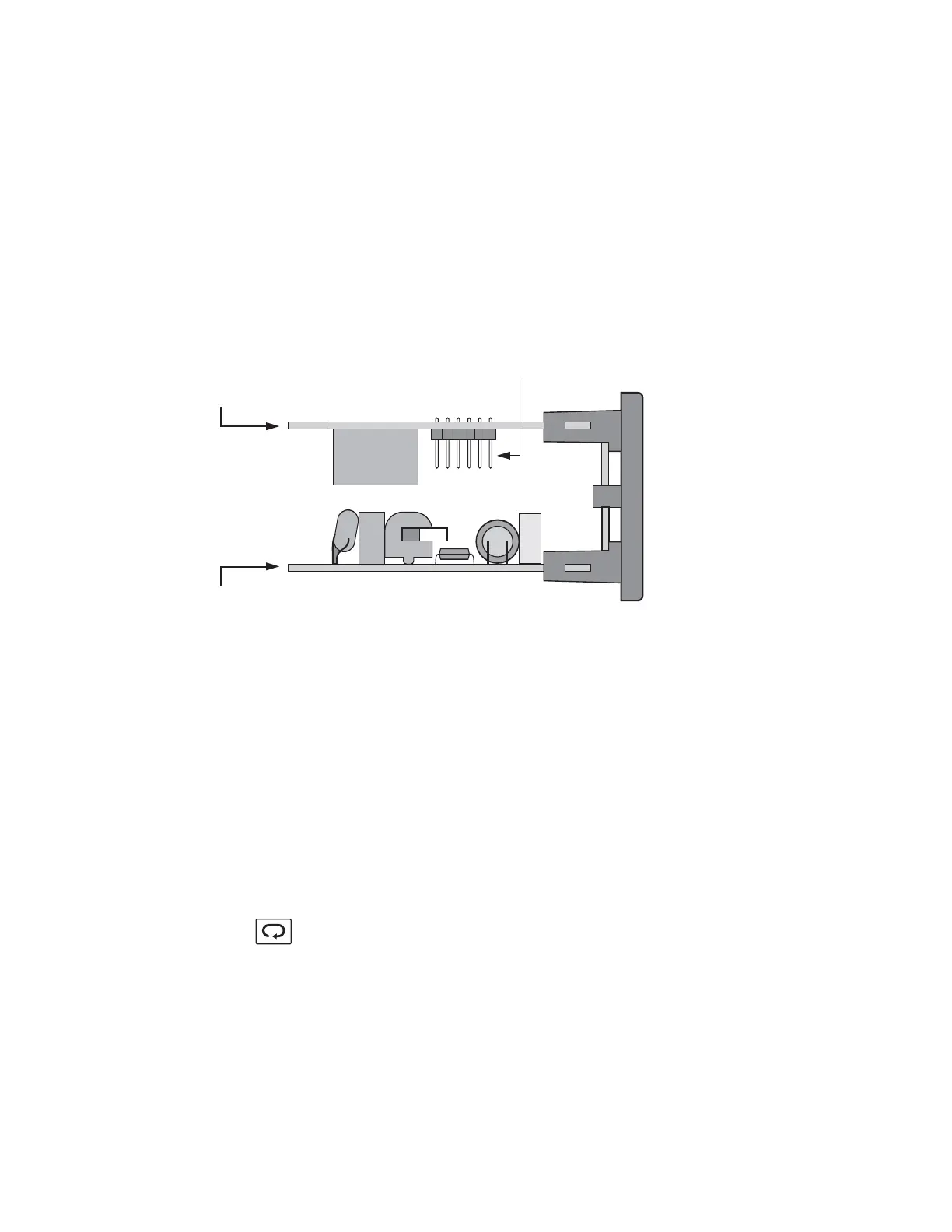
1-3 Programming Port1-3 Programming Port
1-4 Keys and Display1-4 Keys and Display
Note: The programming port is used for off-line setup and
calibration procedures only. Do not attempt to make any
connection to these jumpers when the unit is on-line. Port is
for bench setup only.
Note:
KEYPAD OPERATIONKEYPAD OPERATION
SCROLL KEY
This key is used to:
1. Select a setpoint to be displayed.
2. Select a parameter to be viewed or adjusted.
3. Advance display from a parameter code to the next parameter
code
7
Figure 1-1 Programming
Port Location
Figure 1-1 Programming
Port
Location
Programming Port
control board
Power board
Open the housing
Top view of L91
UM L91-Rev 8



 To Next Page