00075751.DOC, Version 1.1 47/54
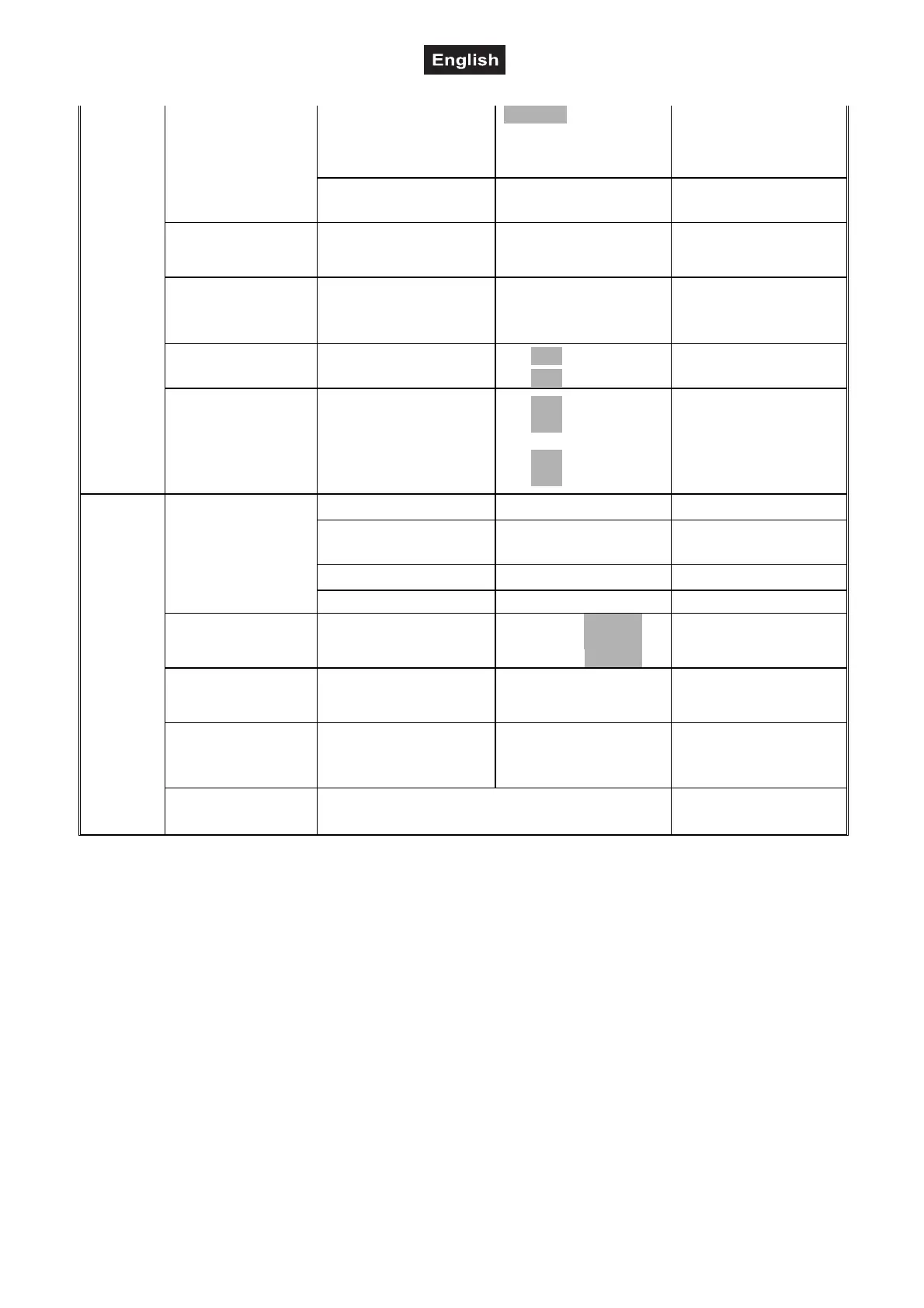
Set
Users
User Mode
Standard
Extended 1
Extended 2
User
User’s mode to
change channel
numbers
Edit User
Max Channel = XX
PAN = CH01 ...
Preset User modes
Calibration
--Password--
Color ...
Password=XXX
Color =XXX ...
Wheel adjustment
to standard position
password „050“
Fixture ID
Name
--Password--
PID Code
Name
password „050
Set PID Code of RDM
Wireless Set
DMX on cable
Reset Connect
ON/OFF
ON/OFF
Loopthrough data
Logout from sender
Reload Default
Basic Reload
Program Reload
--Password--
Private Reload
All Reload
ON/OFF
ON/OFF
XXX
ON/OFF
ON/OFF
Basic Reload
Program Reload
password „050“
Private Reload
All Reload
Program
Play
DMX receive
Back to DMX mode
Slave receive
Slave 1, Slave 2,
Slave 3
Slave setting
Sequence Master/Alone
Auto program
Music Master/Alone
Music control
Select Chase
Chase Part 1
Chase Part 2
Chase Part 3
Chase 1- 8 Chase 1
Chase 1- 8 Chase 2
Chase 1- 8 Chase 3
Select programs to be
run
Edit Chase
Chase 1
:
Chase 8
Chase Test
Step 01 = SCXXX
Step 64 = SCXXX
Testing program
Program in loop
Save and exit
Edit Scenes
Edit scene 001
:
Edit scene 250
Pan,Tilt, ...
-- Fade Time --
-- Scene Time --
DMX Input
Save and
automatically return
manual scenes edit
Scenes Record ScXX=>ScXX Automat. scenes rec
Connect
DMX address setting
With this function, you can adjust the desired DMX-address via the Control Board.
• Select “DMX Address“ by pressing Up or Down.
• Press the Enter button, adjust the DMX address by pressing Up or Down.
• Press the Enter button to confirm.
Wireless
From factory, this projector is prepared for wireless data transmission (WDMX).
With the function ”Wireless” you can log in the wireless receiver in to a wireless transmitter, the fixture could
now receive the wireless DMX signal.
• Select “Wireless“ by pressing Up or Down.
• Press the Enter-button to confirm.
If a device with wireless receiver is connected with a DMX-controller via cable, the device will be controlled
by the cabled controller and not by the wireless transmitter.


 To Next Page