51838165X87NXS_V_1_1.DOC
34/75
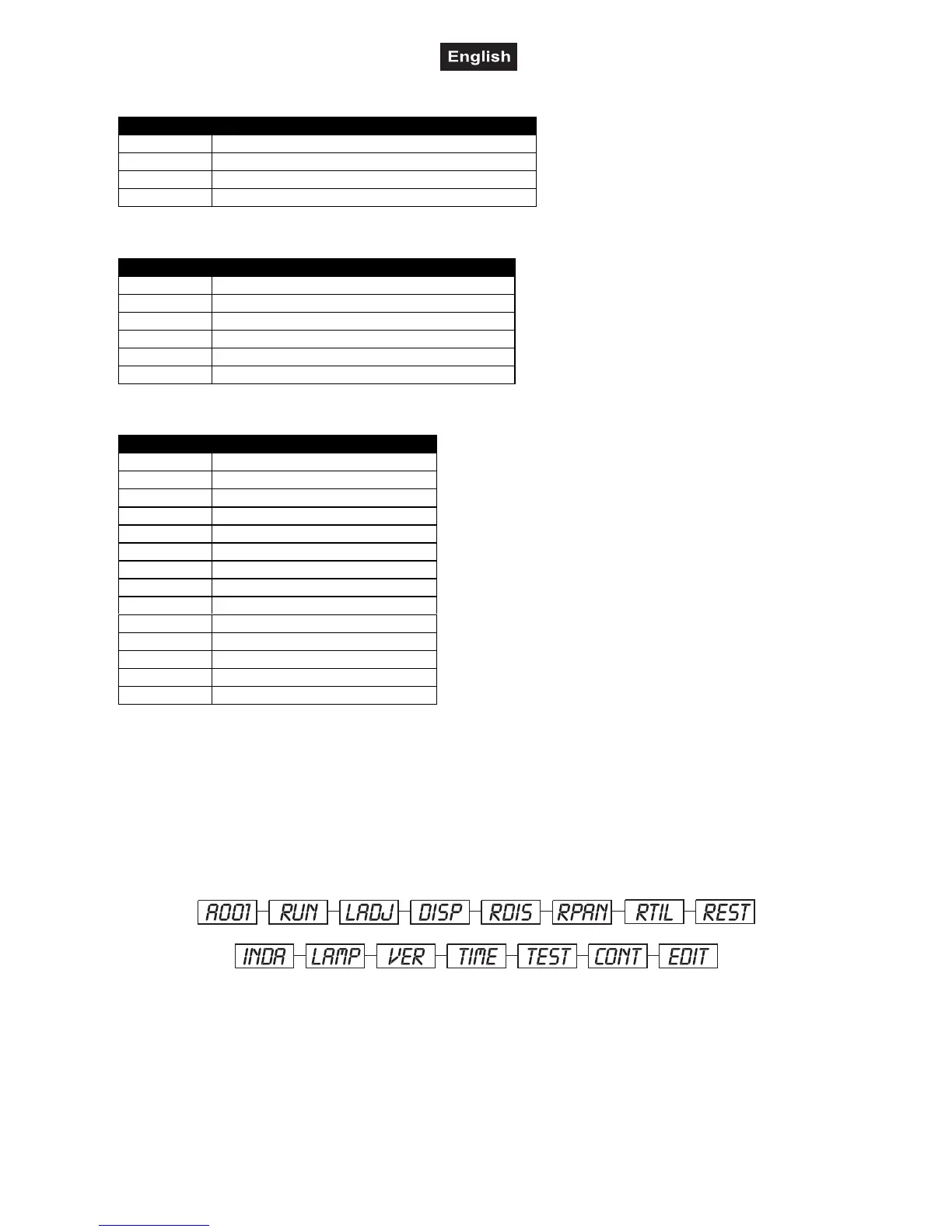
Control channel 6 - Gobo rotation
DMX-value Feature
0-7 No rotation
8-127 Forwards gobo rotation with decreasing speed
128-135 No rotation
136-255 Backwards gobo rotation with increasing speed
Control channel 7 - Shutter, strobe
DMX-value Feature
0-31 Shutter closed
32-63 Close – open
64-159 Strobe-effect with increasing speed
160-191 No function (shutter open)
192-223 Random strobe-effect with increasing speed
224-255 No function (shutter open)
Control channel 8 - Switching the lamp, Reset, internal programs
DMX-value Feature
0-31 Normal colour-change
32-63 Colour-change at every position
64-79 Lamp on
80-95 Reset
96-111 Internal program 1
112-127 Internal program 2
128-143 Internal program 3
144-159 Internal program 4
160-175 Internal program 5
176-191 Internal program 6
192-207 Internal program 7
208-223 Internal program 8
224-239 Lamp off
240-255 No function
Control Board
The Control Board offers several features: you can simply set the starting address, switch on and off the
lamp, run the pre-programmed program or make a reset.
The main menu is accessed by pressing the Enter-button for 3 seconds until the display starts flashing.
Browse through the menu by pressing the Up-button. Press the Enter-button in order to select the desired
menu. You can change the selection by pressing the Up-button. Confirm every selection by pressing the
Enter-button. You can leave every mode by pressing the Exit-button. The functions provided are described in
the following sections.
Main functions
A001
- DMX address setting
1. Press [ENTER] for 3 seconds to enter the main menu (display flashing).
2. Select “A---“ by pressing [UP] button.
3. Press [ENTER], adjust the DMX address by pressing [UP] or [DN].
4. Press [ENTER] to confirm.


 To Next Page