51838328_V_1_0.DOC
50/119
Control Board
The Control Board offers several features: you can simply set the starting address, switch on and off the
lamp, run the pre-programmed program or make a reset.
The main menu is accessed by pressing the Mode/Enter-button until the display starts flashing. Browse
through the menu by pressing Up or Down. Press the Mode/Enter-button in order to select the desired menu.
You can change the selection by pressing Up or Down. Confirm every selection by pressing the Mode/Enter-
button. You can leave every mode by pressing the Exit-button. The functions provided are described in the
following sections.
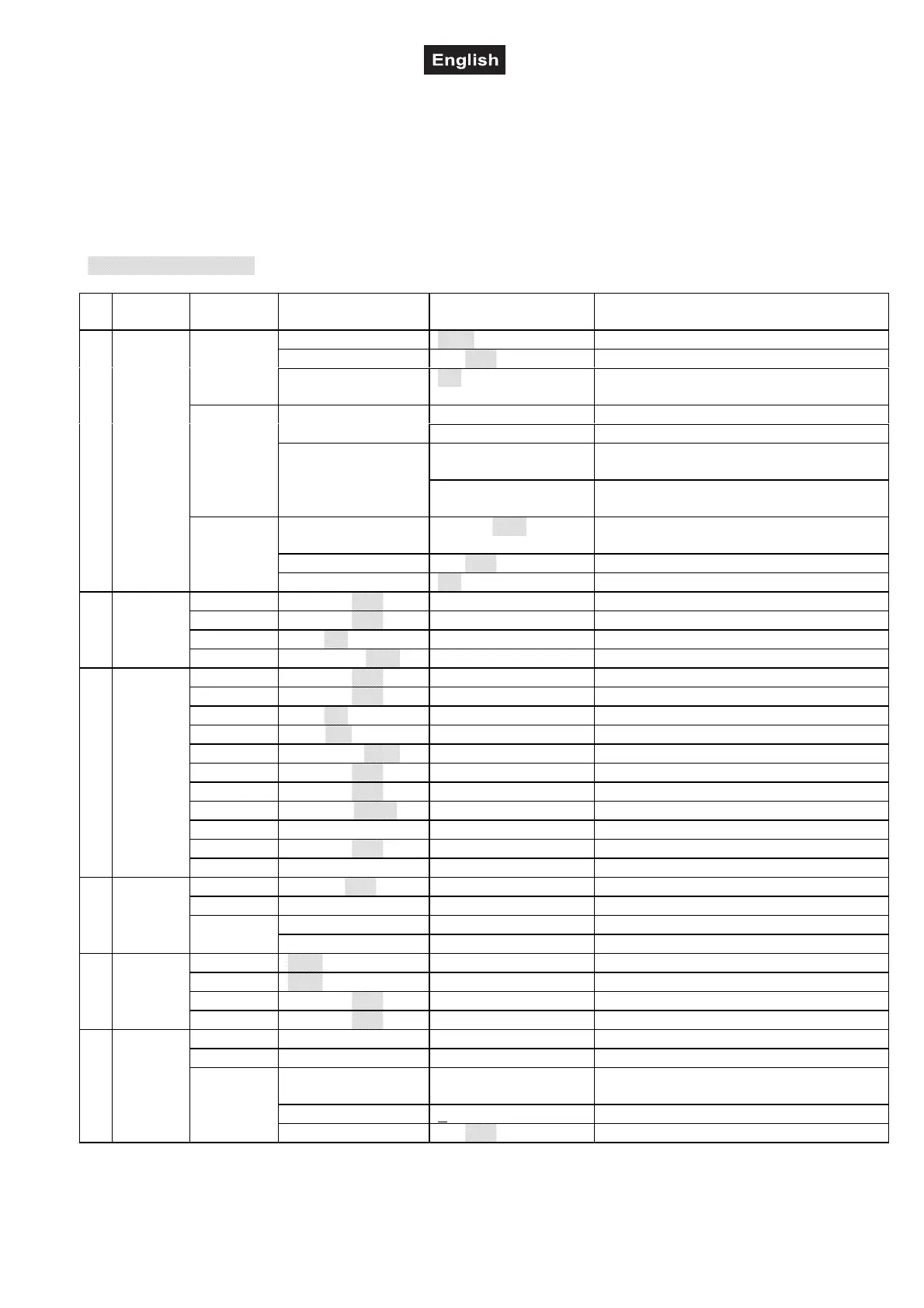
Default settings shaded.
Main
menu
Sub
menu
Extension Display Function
VALU A001~A511 (AXXX) DMX address setting
SLAV ON/OFF (SLAV) Slave setting
ADDR
EBOC
ON/OFF Change DMX address via external
controller
ALON (AU-A) Automatic Program Run in Stand AloneAUTO
MAST (AU-M) Automatic Program Run as Master
ALON (SO-A) Sound-control Program Run in Stand
Alone
RUN
SOUN
MAST (SO-M) Sound-controlled Program Run as
Master
VALU D-XX ~ D-00 (DXXX) Display the DMX 512 value of each
channel
RDIS ON/OFF Reverse display
0MODE
DISP
CLDI
ON/OFF Shut off LED display
OPEN
ON/
OFF Lamp on/off
LAAU
ON/
OFF Lamp on/off/Power switch
ONLI
ON/OFF Lamp on/off via controller
1LAMP
DELA
D–XX ~
D-05 Delay lamp on
RPAN
ON/
OFF Pan Reverse
RTIL
ON/
OFF Tilt Reverse
16BI
ON/OFF Switch 16 bit/8 bit
DEGR
630/540 Select Pan-degree
MIC
M-XX ~
M-70 Mic sensitivity
AUTO
ON/
OFF Auto run if no DMX
SOUN
ON/
OFF Music control if no DMX
FANS
HIGH/
AUTO Fan´s mode select
REST
Reset
LODA
ON/
OFF Restore factory settings
2 SET
VER
V-1.0~V-9.9 Software version
LADJ
ON/
OFF Lamp adjustment
TEST
T–01 ~ T–30 Test function of each channel
CODE CXXX Calibrate and adjust the effect wheels
3ADJU
WHEL
CH01~ CH30 XXXX (-128 ~ 127) Select channel
MATI
0000~9999 (hours) Fixture running time
LATI
0000~9999 (hours) Lamp running time
CLMT
ON/
OFF Service-function
4TIME
CLLT
ON/
OFF Clear lamp time
STEP
S–01 ~ S–48 Steps of Program Run
REC
RE-XX Auto scenes rec
C01 ~ C30 01XX (00~FFH)
30XX (00~FFH)
Edit the channels of each scene
TIME (sec.) T XXX (001~999) Time for each scene
5EDIT
SC01
~
SC48
CNIN ON/
OFF Edit program via controller


 To Next Page