8
3. Installation
3.1 Fitting/Exchanging the lamp
DANGER!
Install the lamp with the device switched off only.
Unplug from mains before!
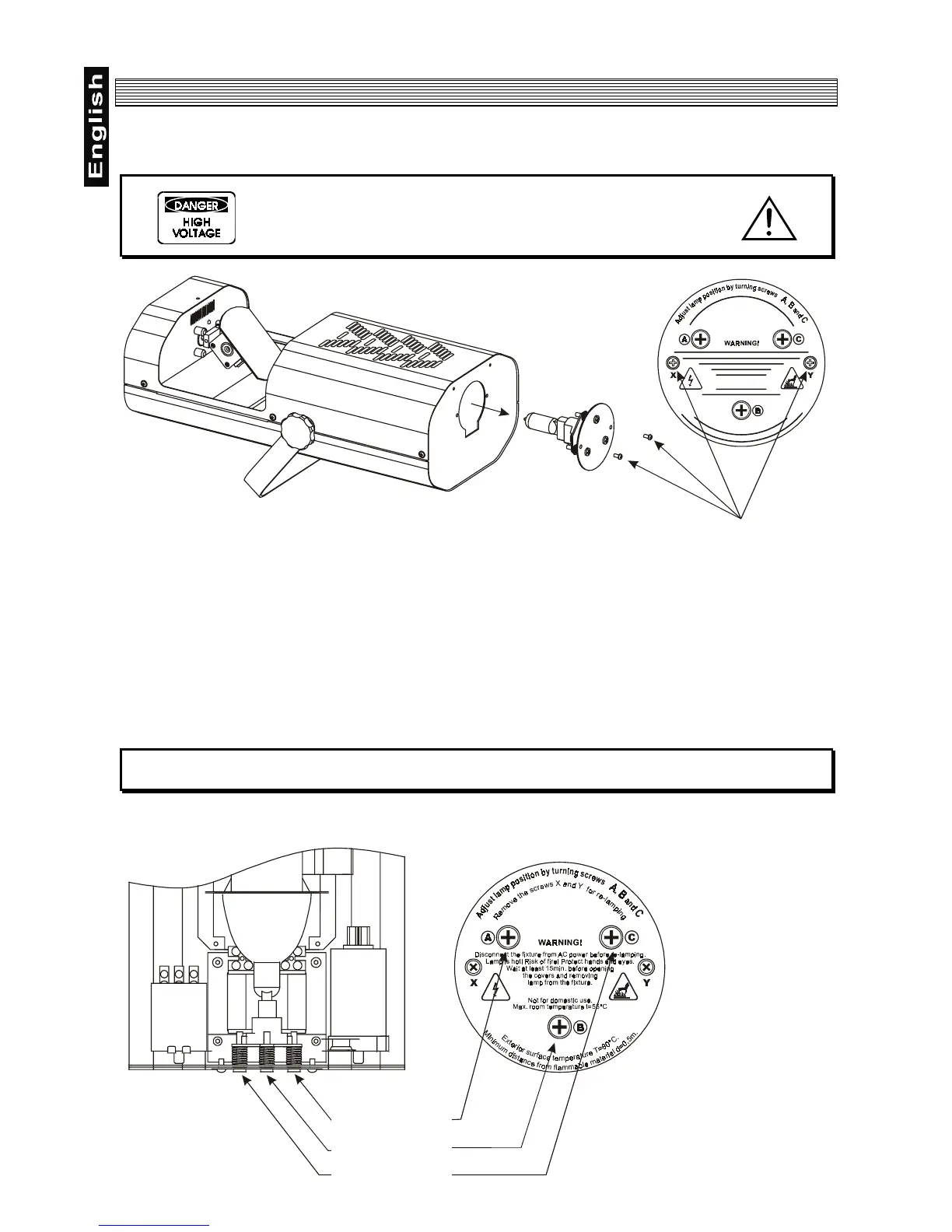
To insert the lamp HIT 230 V/150 W open the small cover at the rearpanel (see the drawing) by loosening
the 2 Phillips screws X and Y on the cover.
Gently pull out the lamp assemby.
If changing the lamp, remove the old lamp from the socket. Insert the lamp to the socket.
Do not install a lamp with a higher wattage! A lamp like this generates temperatures the device is not
designed for.
Damages caused by non-observance are not subject to warranty. Please follow the lamp manufacturer‘s
notes!
Do not touch the glass-bulb bare-handed during the installation! Make sure that the lamp is installed tightly
into the lampholder system.
Reinsert the lamp assemlby and tighten the 2 screws again.
Do not operate the fixture with opened housing-cover!
Lamp adjustment
Screws X and Y
Screw A
Screw B
Screw C


 To Next Page