13
Intruction:
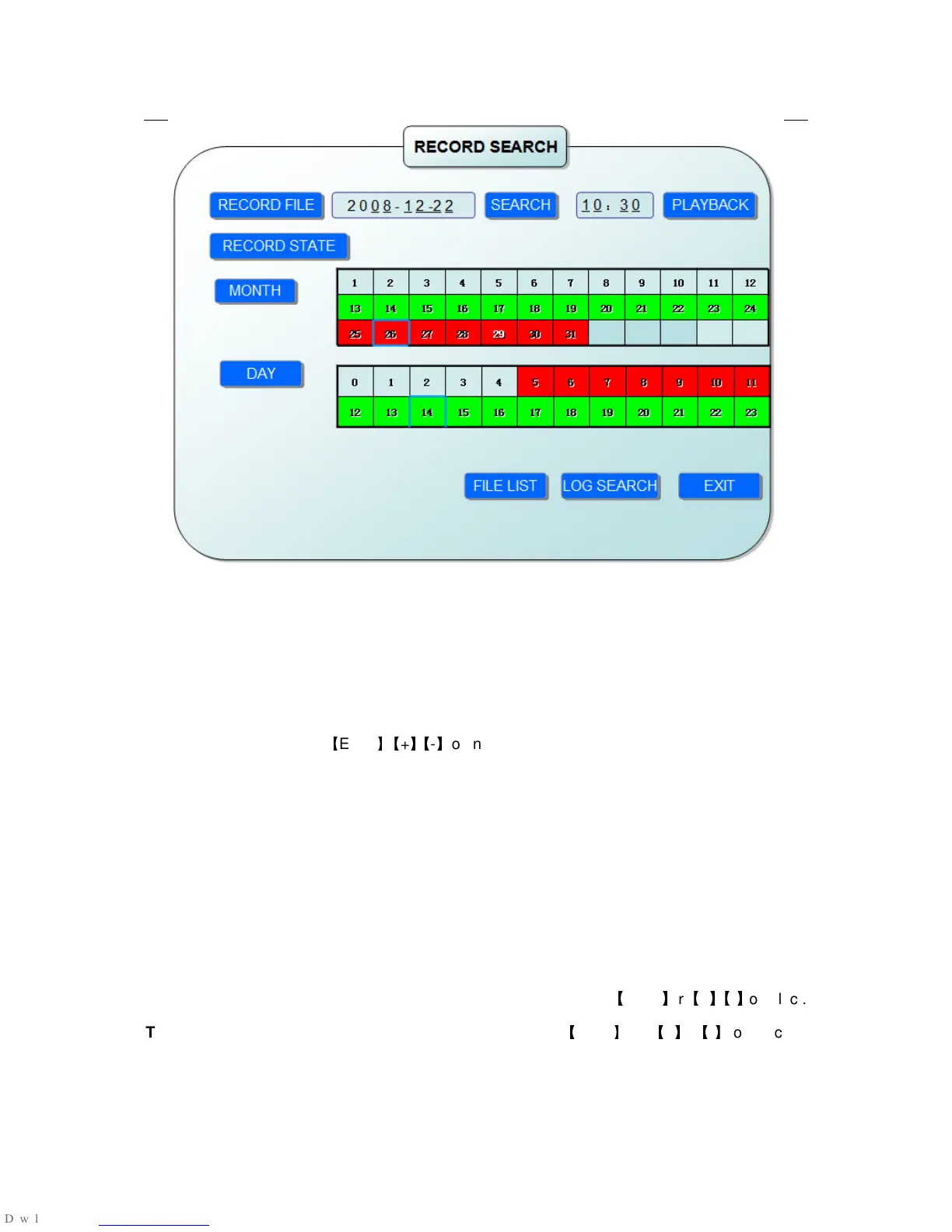
1. MONTH: It will show all the recording status in this month. Green means normal recording,
Red means alarm recording, Grounding means no recording. Click any date in this frame can
search the recording status of that day,the searching result will be showed in the below date
frame.
2. DATE: It will show all the recording status in this day, you can playback the record file in
this period via click the corresponding period.
PLYBACK:You can press
【
Enter
】
【
+
】
/
【
-
】
or input number directly to setup playback time.After
setting,move the cursor to “PLAYBACK”, and then press”APLLY”to enter into video playback of
that time.Also you can select any period of time in the video status frame after
searching,press”APLLY”to enter into the video playback of this period.
FILE LIST: Enter into the video file list interface of the selected date.
LOG SEARCH: Enter into the log seaching interface.
EXIT: Exit”video search” to back to the previous menu.
1. FILE LIST
Setup the searching date, after pressing “SERACH”,move the cursor to “FILE LIST” and
press”APPLY”to enter into the video file list of this date.
CHANNEL: There is 1,2,3,4 and all channel, totally 5 options. Press
【
Enter
】
or
【
+
】
/
【
-
】
to select.
TYPE: There are all,normal and alarm,totally 3 options.Press
【
Enter
】
or
【
+
】
/
【
-
】
to select.



 To Next Page