14
Instruction
:
::
:
1.
【
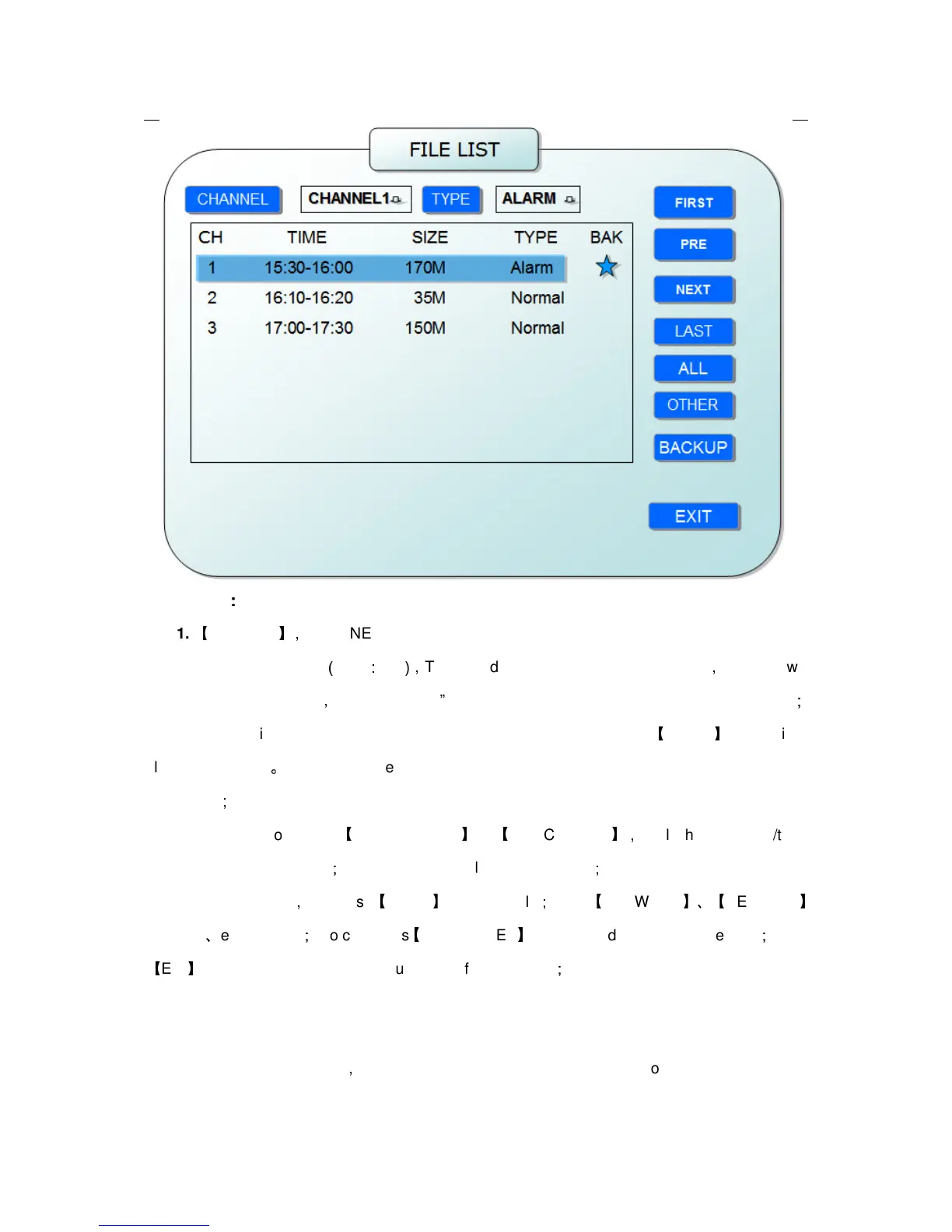
FILE LIST
】,
“CHANNEL”is the recording file which belong to which channel, “SIZE” is
display the size of this file
(
Unit
:
MB
),
“TYPE” is display the type of recording file
,
there are two
types: normal and alarm
,
press“BACKUP”button can export the selected files to USB storage
;
2. After moving the cursor up and down and select the files, and press
【
APPLY
】
to enter into
playback interface
。
If the all channels have recording files, it will playback all windows at the
same time
;
3. If setup as “on” in the
【
RECORD TIME
】
in
【
BASIC SETUP
】,
it will show the date/time
when playback record file
;
If setup as “off”it will not display time
;
4. When playback
,
can press
【
SLOW
】
to play slowly
;
press
【
FORWARD
】、【
REVERSE
】
to speed
、
reverse play
;
also can press
【
PAUSE/STEP
】
to pause and frame by frame play
;
Press
【
Exit
】
to exit from playback and return to the former menu
;
5. When finished playback files, it will return to the file list interface.
2. BACKUP
You can use USB for backup
,
should insert USB device into the USB2.0 port before backup files.
And it is support USB OTG.


 To Next Page