17
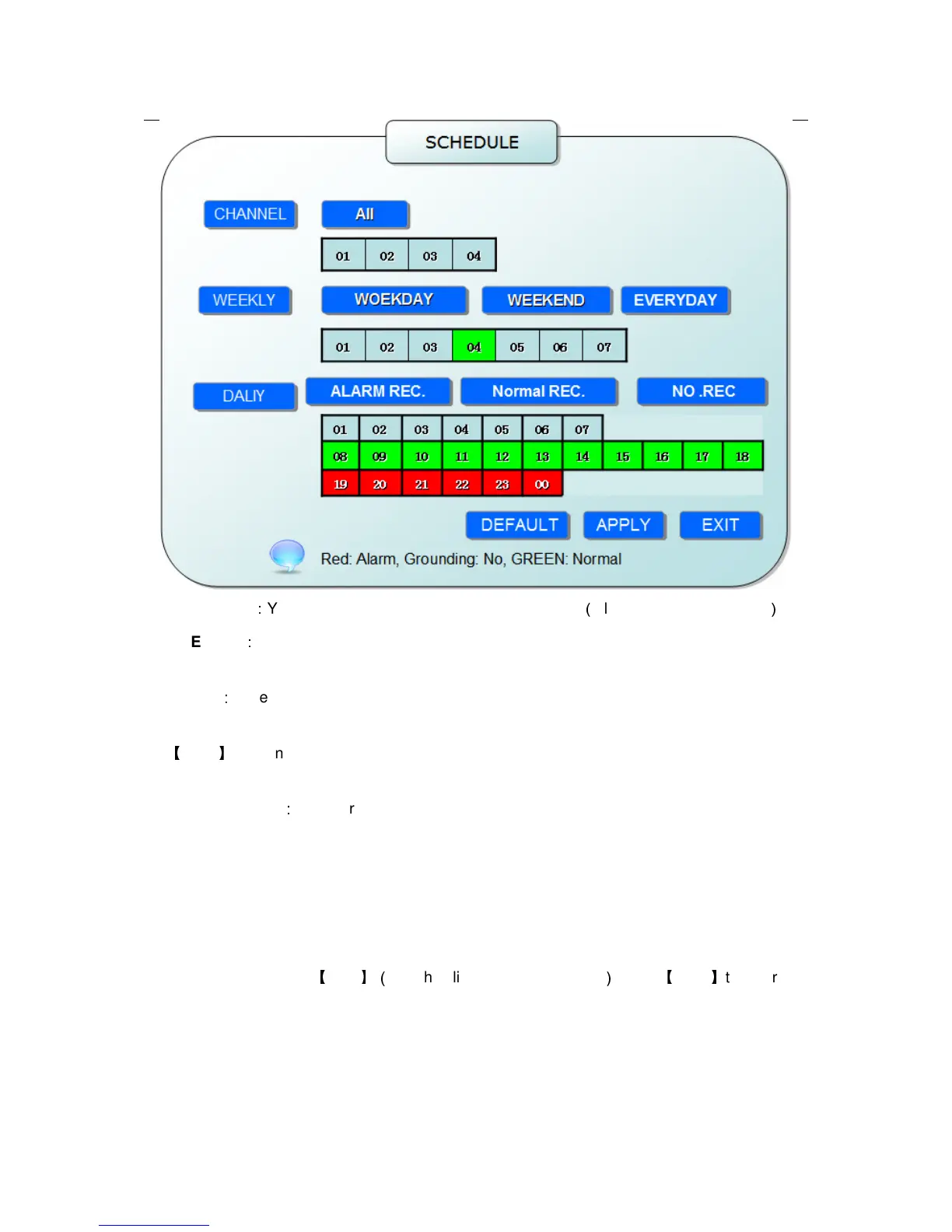
CHANNEL
:
You can select all channel or just one channel
(
blue means has selected
)
WEEKLY
:
You can select all everyday, weekend, workday or each day(blue means has
selected)
DAILY
:
There are ALARM, NORMAL, NO REC three modes, if you select this, that means all
the day will record as this mode, and if you don’t want some period to record, you can cancel it
via
【
Enter
】
button, grounding means don’t record, different color means different record mode:
Red means alarm record, green means normal record, grounding means no record.
RECORD SIZE
:
There are 15min, 30min, 45min, 60min four options, that means it will pack
as the mode you selected
Scroll to APPLY and press ENTER to save the new settings.
2.2.2.3 HDD MANAGE
Move the cursor to
【
HDD
】(
Icon highlighted when selected
)
,press
【
Enter
】
to enter into
the setting interface, and you can use direction keys and cursor to change the options.


 To Next Page