27
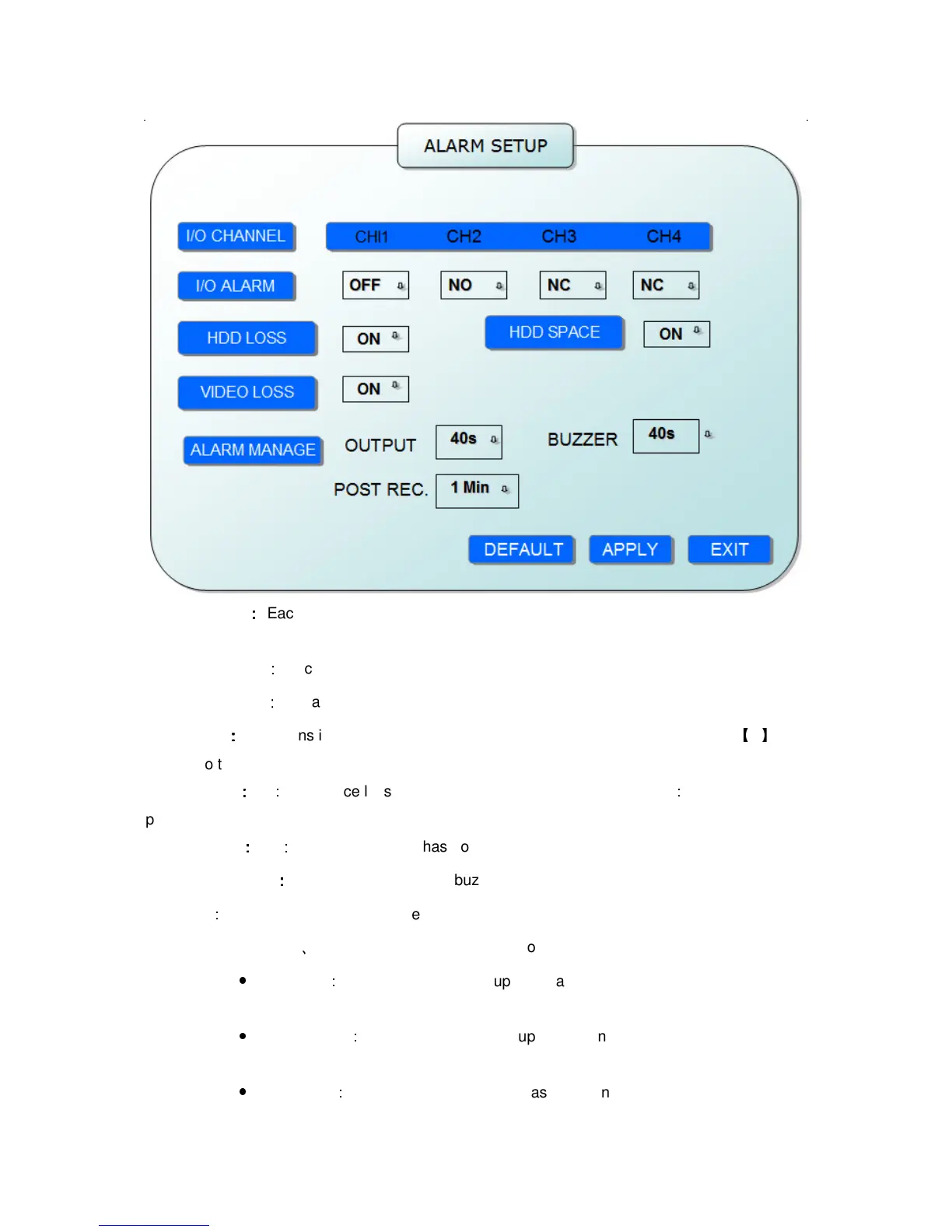
I/O CHANNEL
:
::
:
Each channel corresponds an I/O status, that is, when an alarm triggered, it will
activate the corresponding channel to start alarm recording.
N.O
:
indicate I / O input level from high to low effective
N.C
:
indicate I / O input level from low to high effective
HDD LOSS
:
::
:
ON means it will trigger a alarm if there is no HDD, and it will display an
【
H
】
On the bottom left of channel 1 in the live view
HDD SPACE
:
::
:
ON
:
If the space less than 500M, there is a remark in live view
:
No enough space,
please change HDD after shutdown.
VIDEO LOSS
:
::
:
ON
:
when one channel has no video input, it will display “video loss”in live view.
ALARM MANAGE
:
::
:
There are alarm output, buzzer and post REC three items.
OUTPUT
:
when an alarm triggered, the alarm output time will be:
0 second
、
10 seconds,20 seconds,40 seconds and 60 seconds
●
BUZZER
:
buzzer calling time setup when alarm triggered: 0 second,10
seconds,20 seconds,40 seconds and 60 seconds
●
POST REC.
:
post recording time setup: 30 seconds,1 minute,2 minutes and 5
minutes
●
PRE REC
:
Pre-recording time is fixed as10 seconds.


 To Next Page