33
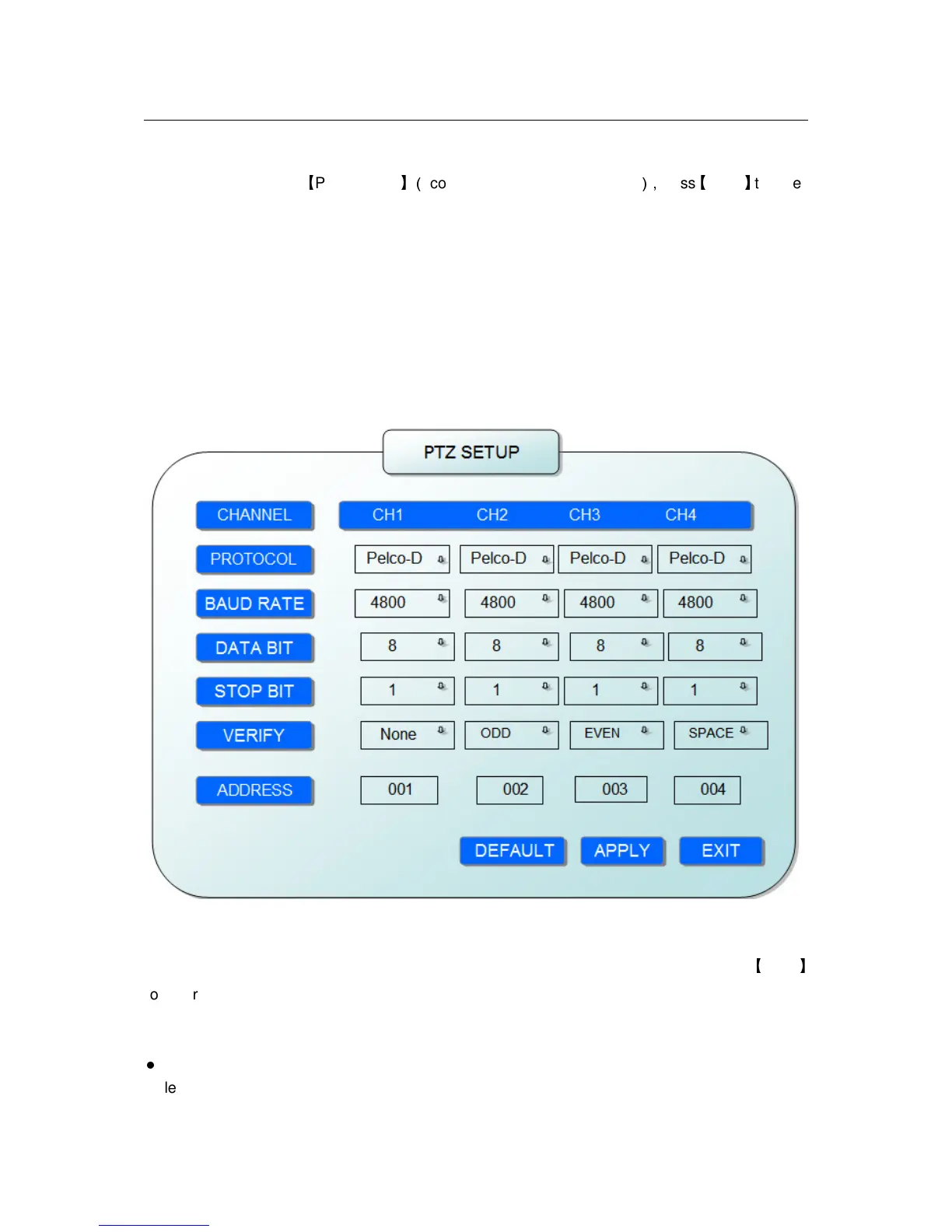
2.2.2.5.6 PTZ SETUP
Move the cursor to
【
PTZ SETUP
】(
Icon highlighted when selected
),
press
【
Enter
】
to enter
into setting interface, you can setup the parameters for each channel separately.
CHANNEL: The channel of PTZ connected.
PROTOCOL: select the protocol of different PTZ, there are two protocols to switch, and the
default is Pelco-D
BAUD RATE: select the different baud rate for your PTZ, there are 1200, 2400, 4800, and 9600
DATA BIT: there are 5,6,7,8 options to select, default setting is 8.
STOP BIT: there are 1and 2 to select, the default setting is 1.
VERIFY: there are None/Odd/Even/Mark/Space to select, the default setting is none.
ADDRESS: Fill the code of respective PTZ
2.2.2.5.7 NETWORK SETUP
Move the cursor to [NETWORK SETUP] (icon thighlitend when selected), and press
【
Enter
】
to enter into setting interface .
TYPE: There are PPPOE, DHCP & Static three options.
●
STATIC
Select [Static] in the type, and press [Enter] to enter into the interface as followings


 To Next Page