Administrative Tool
p. 64
Add/Edit Bond
Bonding is a technology that allows aggregations of multiple Ethernet interfaces into a single virtual
link, thus getting higher data rates and providing failover.
How to Port Bond 4 ports:
1. Login to admin tool after G-RACK 12 has been setup and configured with one of the primary
Ethernet ports (eth0 or eth1) I am using DHCP eth0 port to login as.
2. Navigate to Connect > Network > Interfaces tab
3. G-RACK 12 will configure eth0 and eth1(static). Delete eth1 interface.
4. After eth1 has been deleted, eth0 should be only one remaining. You will need this for now, do
not delete both or all eth ports or else you will not be able to login to the admin tool with an IP
address.
5. Click on “+” to add a new network interface.
6. Select “Bond” interface
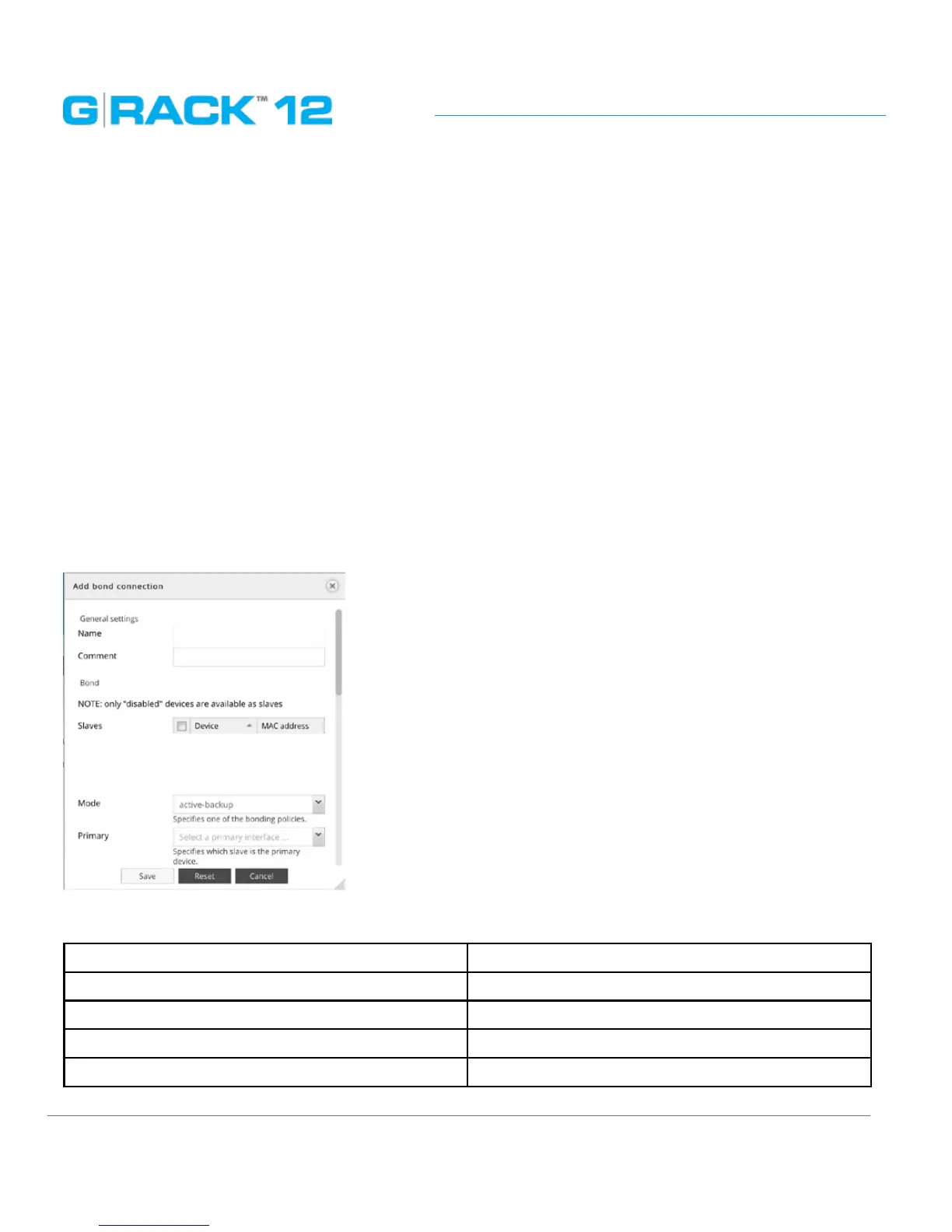
7. In the Add bond connection view that displays, under the available slaves list select all 3
available and currently disabled eth ports.
The following table describes the labels on the screen:
Name Enter the name of the connection
Comment Add an optional text here
Bond Slaves Choose slaves from the drop down list
Mode Specifies one of the bonding policies
Primary Specifies which slave is the primary device.


 To Next Page
 Loading...