4.1 Device instruction
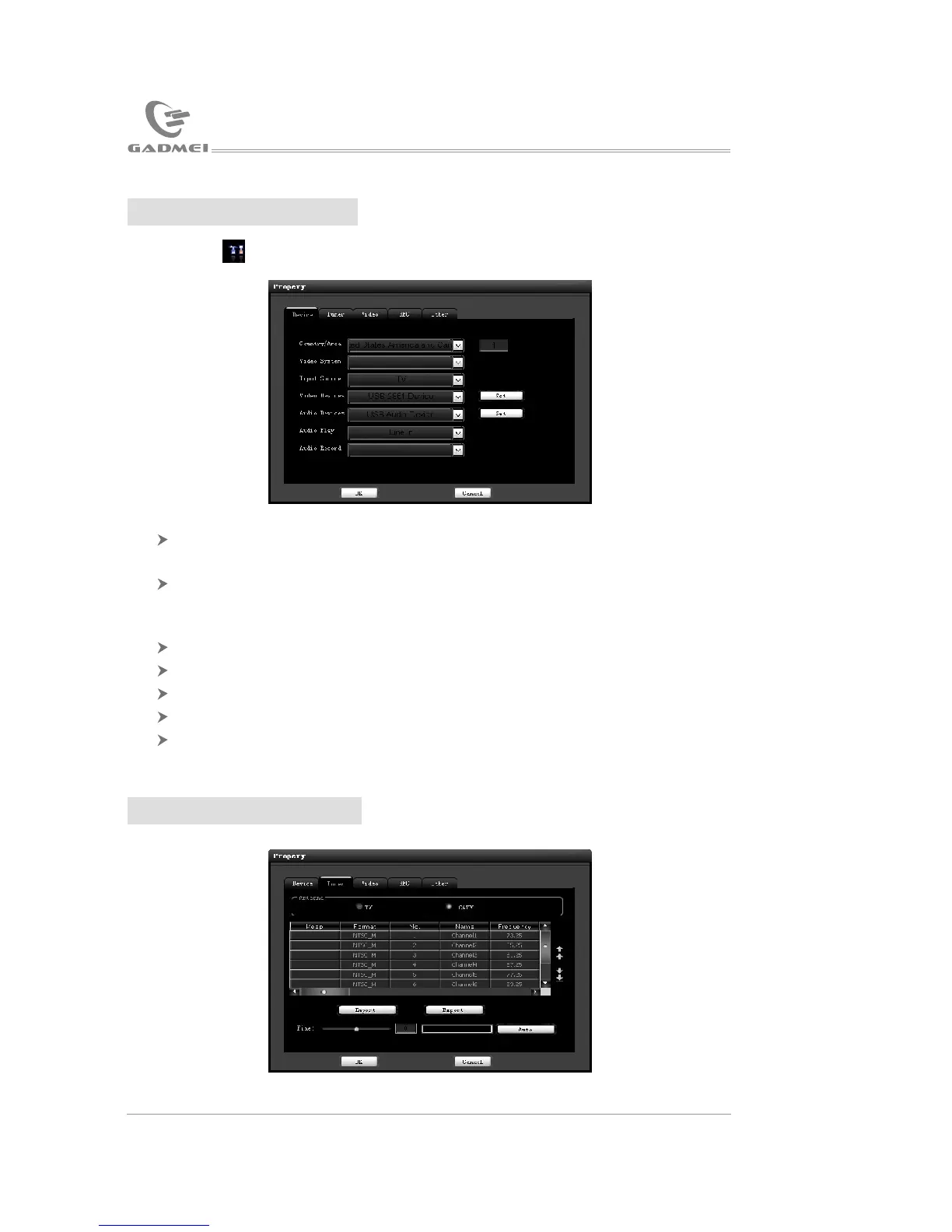
Click to open “function attribute” page, as below:
Country/region: Selecting country/region is to select frequency list of
your area, please correctly select you country/region.
Video system: When video or S-Video signal input, you can select
video system according to the input source.(Note: If the selected system does
not go with the input source, the image will be abnormal.)
Input source: Respectively TV, video or S-Video.
Video device: Please select “USB 2861 Device”.
Audio device: The default selection is the first audio device.
Audio playing: Audio input channel, generally select “Line In”.
Audio recording: Refer to audio playing setup.
4.2 Tuning instruction
1611
Then click “Finish” to complete driver installation:
Check whether “USB 2861 Device” is added to the device manager. Aft
-er confirming, the application software installation will begin.
3.2 Software installation
Next we will introduce TVR PLUS installation (prior to installation of
USB2.0 TV box software, please install “DirectX9.0” or higher version
first)
Place the disc of GADMEI USB2.0 TV box software into the CD-ROM
driver and the installation guide menu of the application software will pop
up. If auto run function is terminated by your system, you need to browse
the disc and double click “autorun.exe”, the following picture will pop up:
USB TV driver and software installation
Application software instruction


 To Next Page