1017
Select option2, and then click “Next”, as the following picture:
Click “Ok” and then click “Next”, as the following picture:
Click “Browse” to select the right saving path, as the following picture:
Antenna: Wireless/cable.
Channel list: Display the current channel information for editing
channel skip , channel name and frequency.
Import frequency list: Import the stored channel list as the current
channel list.
Export frequency list: Save the current frequency list for any time use.
Fine tuning: To adjust for better image effect via fine tuning.
Auto-search: Click to enter auto-search, stop when press again.
Sequencing: Sequence manually.
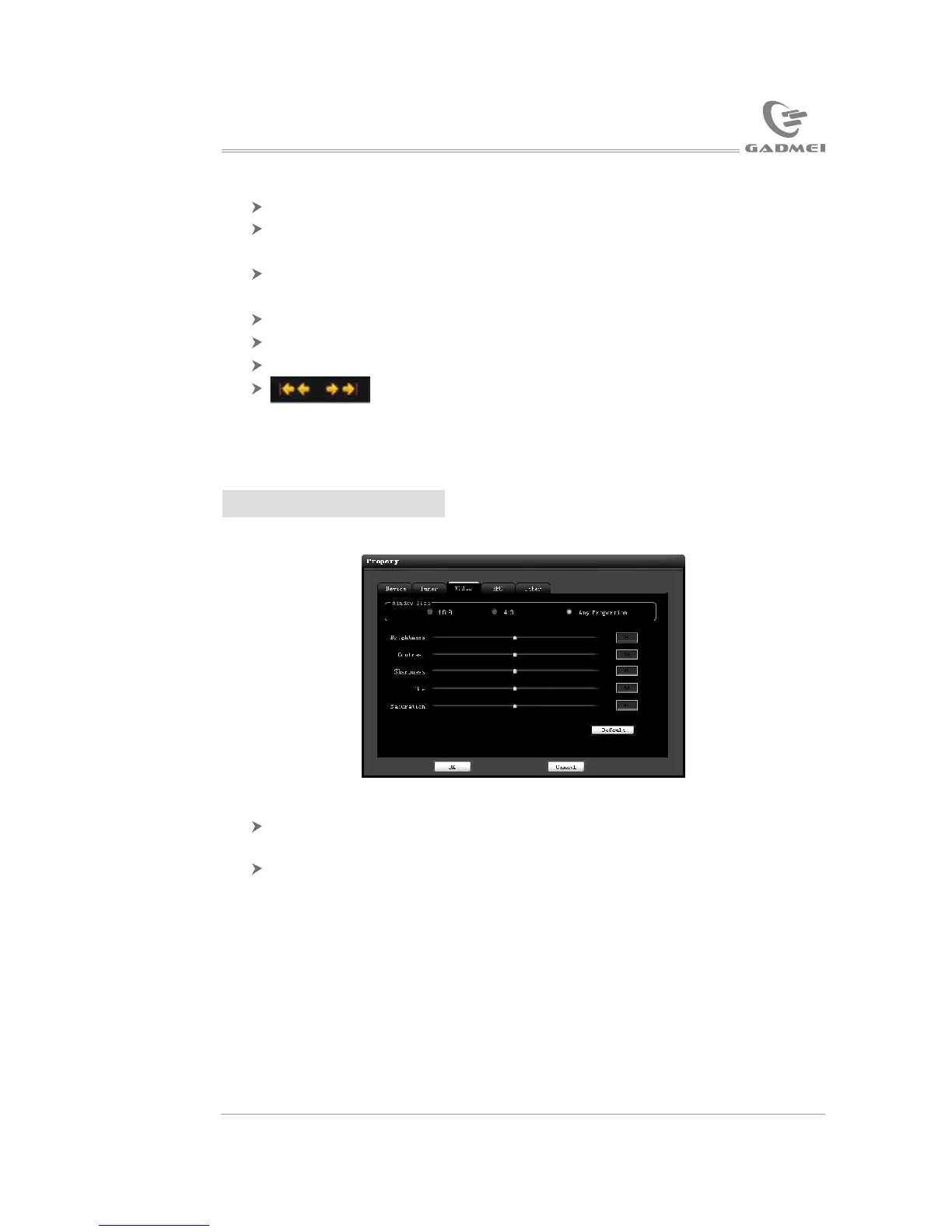
4.3 Video instruction
Window scale: Adjusting length and width scale when dragging the
video window. The default scale is any scale.
Image adjusting: The user can adjust brightness, contrast, sharpness,
chroma and saturation according to his or her favorite. Click “default
value” to restore to the default value.
(Note: Chroma is valid only when it is N system.)
USB TV driver and software installation
Application software instruction


 To Next Page