4. Application software instruction
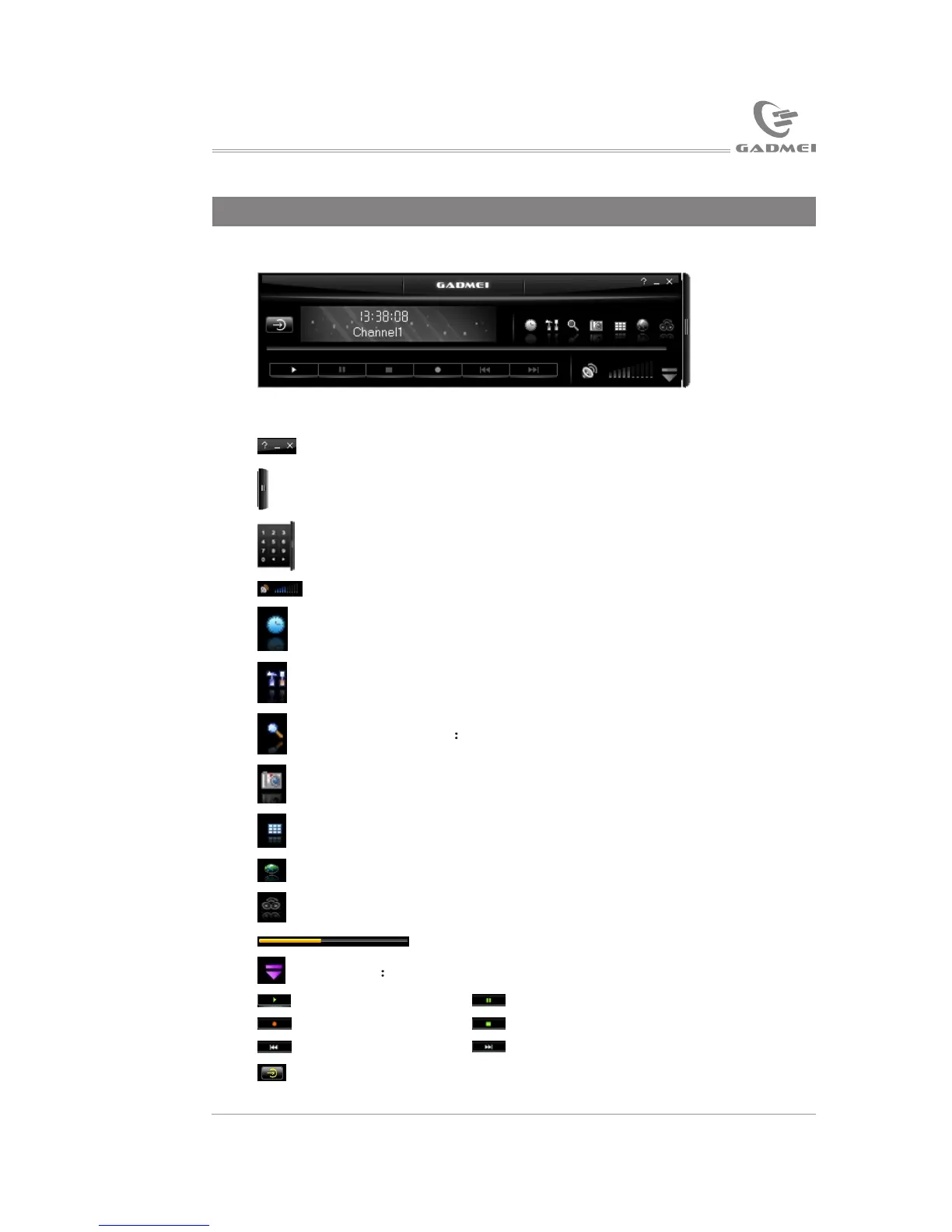
The main interface of the software, as below:
Instruction for common keystrokes:
Tuning box: Click to open or hide tuning box.
Digital input keystrokes: The left arrow is to decrease channels
and the right arrow is to increase channels.
For adjusting volume: Drag mouse to quickly adjust volume.
Scheduled recording setup: Click to open the scheduled recording
setting window.
Function attribute: Click to open the attribute page.
Channel scanning Click to access to channel scanning.
Picture capture: Click to capture static picture.
TV wall: For browsing channels.
Hyperlink to company website.
NICAM function keystroke (not available by this version).
A/V files playing progress bar.
Favorite Click to open or hide it.
Play
Pause
Record
Stop
Fast backward Fast forward
Input source switch: among TV, video1, video2 and S-Video.
Consecutively perform the following operation: Open “help” file,
minimize and close.
1215
Application software instruction
Click “Software” button to enter TVR PLUS installation interface, as
the following picture:
The installation procedure will note you to select the desired language,
and then click “Ok”, as the following picture:
After automatic installation, the following picture will appear:
USB TV driver and software installation


 To Next Page