Page: 6 of 21
Model TS959 Tone/Speech Generator Pub. 42004-278A
\\s_eng\gtcproddocs\standard ioms - current release\42004 instr. manuals\42004-278a.doc
12/97
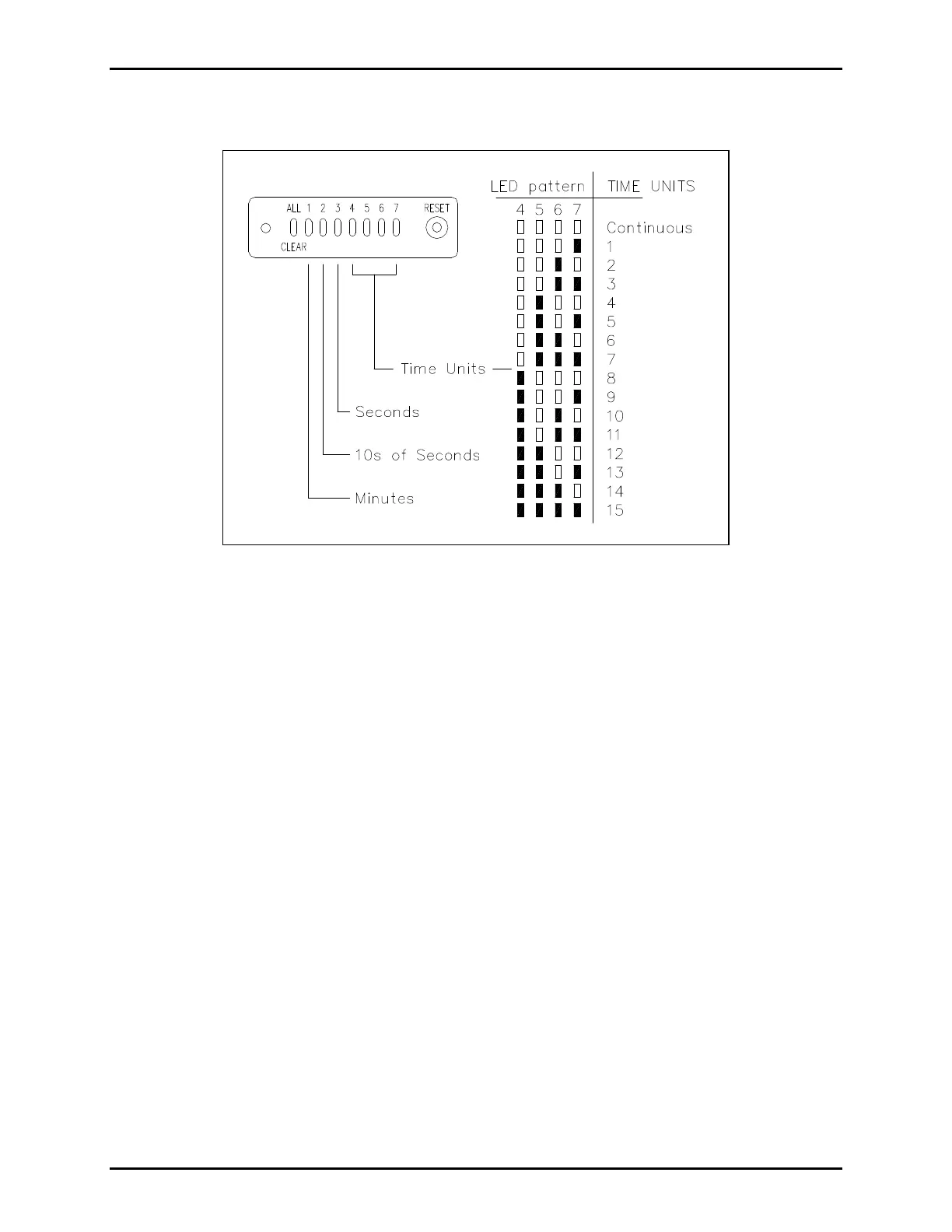
3. Press SW8 to determine the present duration status. To interpret the number, see Figure 2. For
example, if LEDs 5 and 6 are lit, the duration is 6 units.
1. If the duration must be changed, press switch 1, 2, or 3 to select the time unit to be changed.
• Switch 1: minutes (for durations of 1 to 15 min.)
• Switch 2: increments of 10 seconds (for durations of 10 seconds to 150 seconds)
• Switch 3: seconds (for durations of 1 to 15 seconds)
2. Now press switch 4, 5, or 6 to get the appropriate number of time units.
• Switch 4: advances the time units by 1
• Switch 5: advances the time units by 10
• Switch 6: resets the units to continuous duration
3. When the LEDs reflect the desired duration, press SW8 to store the data. The LEDs will flash
through 3 sweeps indicating that the unit has accepted the new parameters and is storing them in
memory.
4. If only one input is to be changed, proceed to step 8. If additional input time durations must be
changed, repeat steps 2 through 6 until all inputs have been programmed, and then proceed to step 8.
5. Reset S1 to OOOO.
Figure 2. Signal Duration Settings


 To Next Page