Page: 9 of 21
Model TS959 Tone/Speech Generator Pub. 42004-278A
\\s_eng\gtcproddocs\standard ioms - current release\42004 instr. manuals\42004-278a.doc
12/97
SPECIFIC TONE FREQUENCIES
The frequency of the Programmable Steady tone (tone 5) and the gong tones (tones 9, 26, 27, 28, and 29)
can be programmed to a selected frequency. If these tones are not being used, skip this procedure. The
frequencies of the Programmable Steady tone and the gong tones are factory-set to 800 Hz (default status).
Programmable Steady Tone Frequency
1. Set S1 to OCCO. The front panel LEDs will indicate the
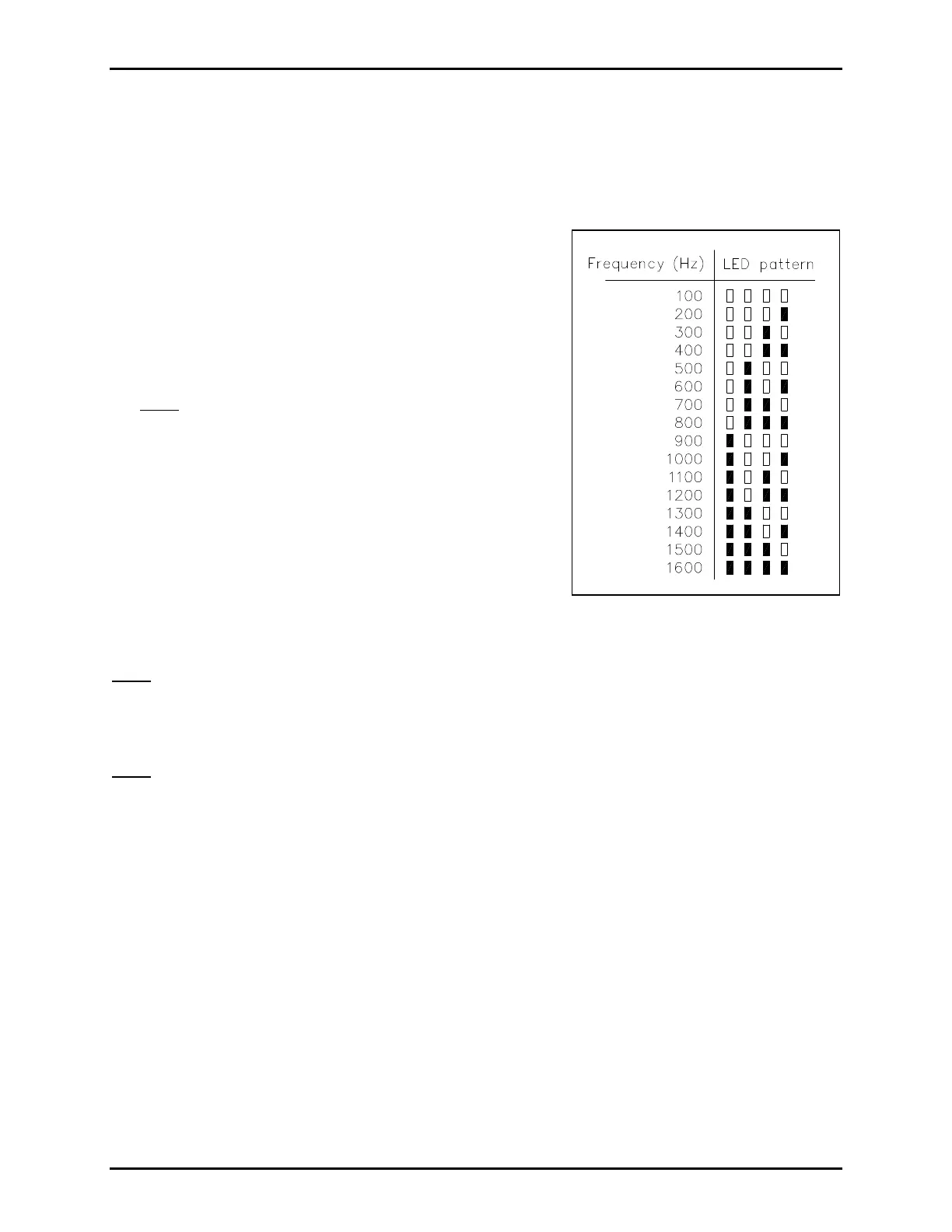
current status. Refer to Figure 5 to interpret LED pattern.
2. Push the switches until the correct LED pattern is
displayed.
• Switch 1: advances the number by 100 Hz
• Switch 2: advances the number by 1000 Hz
Note: The tone frequency will advance to maximum and
then cycle back around.
3. Press SW8 to save the entry. The LEDs will flash
through 3 sweeps indicating that the unit has accepted the
new parameters and is storing them in memory.
4. Reset S1 to OOOO.
Gong Tone Frequency
1. Set S1 to COCO.
2. Repeat Steps 2 through 4 of the Programmable Steady
Tone Frequency section.
Note: All gong tones are programmed to the same frequency. Different gong tones cannot be programmed
to different frequencies.
VOLUME LEVEL CONTROL
Note: The VLC option is used only in conjunction with GAI-Tronics speaker amplifiers equipped with a
VLC receiver. If the VLC option is not used, skip this step.
The VLC option is used to raise or lower the volume of pre-selected alarms or tones in particular areas.
For example, a facility located in a residential area may want to lower the level of its outdoor speakers at
night. VLC lowers the tone volume of selected speakers while broadcasting at full volume elsewhere.
When the VLC option is activated on the TS959, an inaudible (50 kHz) signal is placed on the page line
during an alarm condition. This signal is used to activate the VLC receivers in the amplifiers on the page
line. The VLC receivers then set the amplifier gain to a preset value bypassing the normal volume control.
1. Set S1 to CCOO.
2. All input switches (alarm tones) activating the VLC signal are indicated by the front panel LEDs. If
the LED indicator for an input is on, the VLC signal will be transmitted when that alarm is activated.
Pressing the corresponding input switch toggles the function on and off.
3. When all 7 inputs are set as desired, press SW8 to save the data. The LEDs will flash through 3
sweeps, indicating that the unit has accepted the new parameters and is storing them in memory.
4. Reset S1 to OOOO.
Figure 5. Frequency Settings


 To Next Page