Page: 8 of 21
Model TS959 Tone/Speech Generator Pub. 42004-278A
\\s_eng\gtcproddocs\standard ioms - current release\42004 instr. manuals\42004-278a.doc
12/97
MUTE ATTENUATION AND DURATION PROGRAMMING INSTRUCTIONS
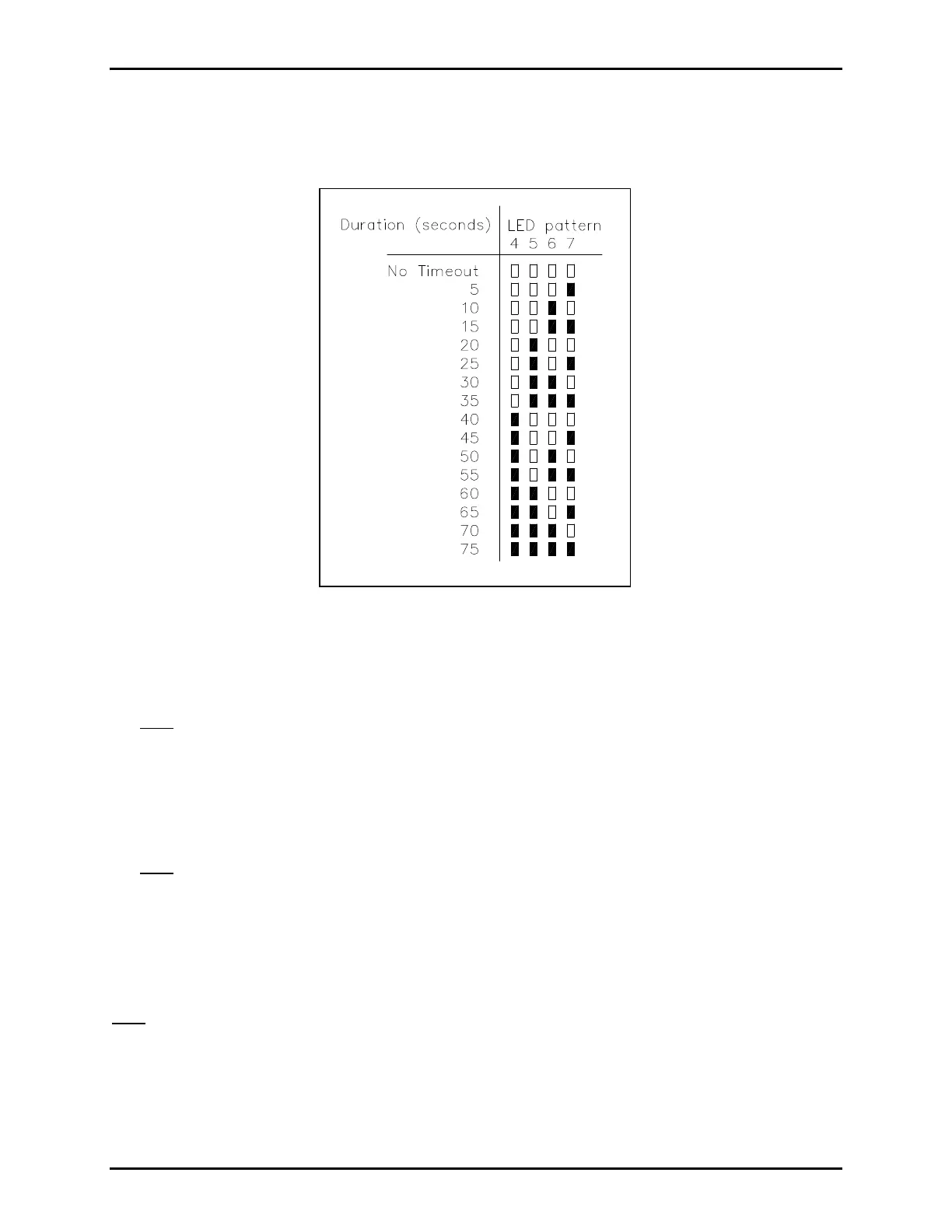
1. Set S1 to CCOC. Indicator LEDs 4 through 7 light in a pattern to designate the current mute duration
time. See Figure 4 to interpret the LED pattern.
1. If the duration time needs to be changed, press the appropriate program switches:
• Switch 1: advances the time in 5 second intervals
• Switch 2: advances the time in 50 second intervals
Note: The mute duration advances to the maximum value, and then cycle back to zero and begins to
advance again.
3. After setting the mute duration, press SW8 once to program the mute attenuation. LEDs 5 through 7
will now show the current attenuation level. See Figure 3 to interpret the LED pattern.
4. To change the attenuation, press programming Switch 3 to advance the attenuation setting.
Note: The attenuation will advance to maximum, and then cycle back to zero and begins to advance
again.
5. Press SW8 to save the information. The LEDs will flash through 3 sweeps indicating that the unit has
accepted the new parameters and is storing them in memory.
6. Reset S1 to OOOO.
Note: If a mute switch fails, either through a short between contacts or a short on the mute switch
interconnect cable, the maximum length of time muting will occur is limited to the time programmed (5 to
75 seconds). However, if “No Time-out” is selected for the mute duration, the muting will remain active
until the short is removed.
Figure 4. Mute Duration


 To Next Page