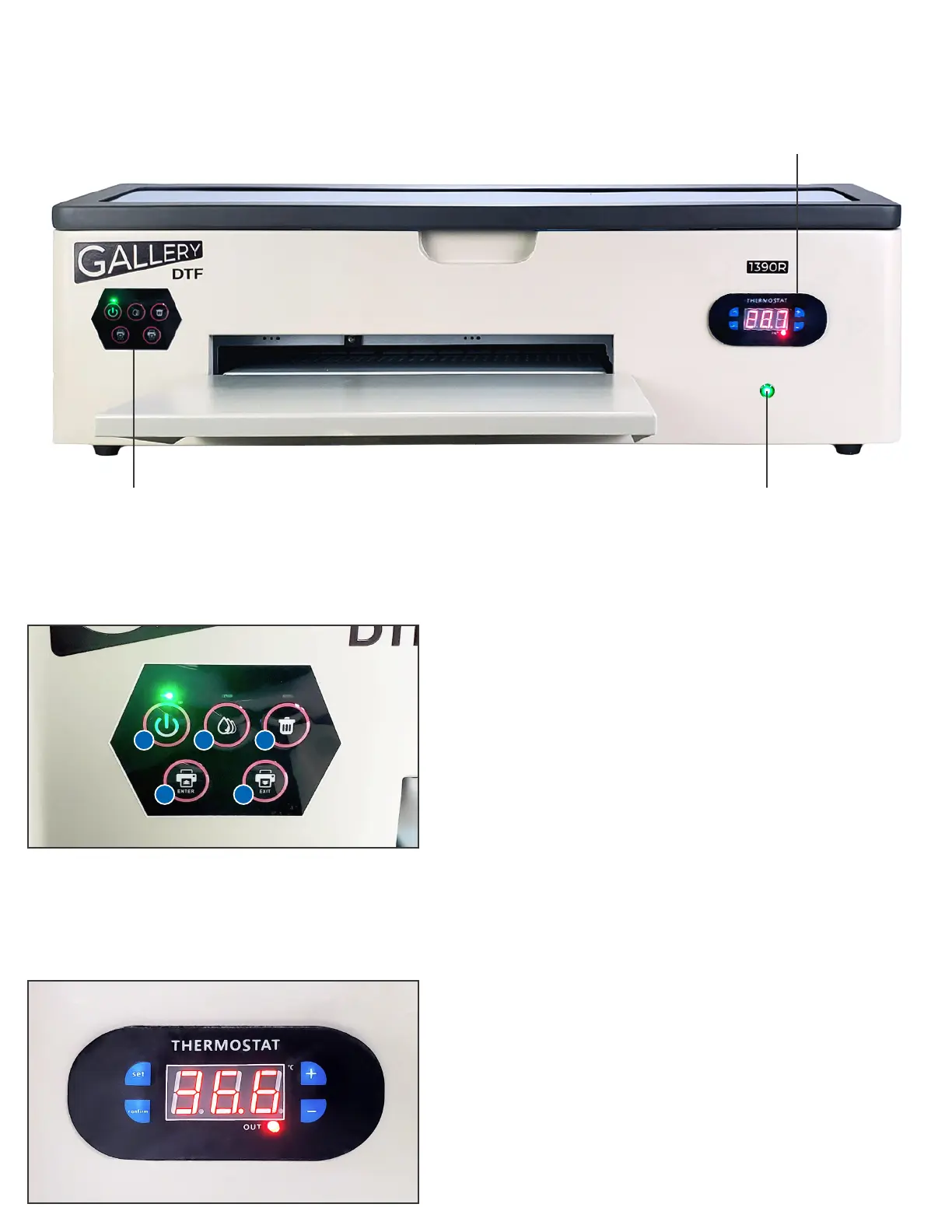
Overview Of Main Components:
Front Left
Control Panel
LED To Monitor
White Ink Circulation
Front Right
Control Panel
Front Left Control Panel
The front left control panel has ve buttons:
1. POWER - turns on power to the printer section.
Solid Green = Ready, Blinking Green = Busy
2. MAINTENANCE - Releases the print head from the
capping station for access to manual cleaning
3. END JOB - Press at the end of a job, or press during a job
to cancel a job in progress
4. ENTER (REVERSE) - pulls lm back into the printer
5. EXIT (FORWARD) - pushes lm forward out of the printer
Note that the front panel Green LED must be ON whenever the PC wants
to communicate with the printer
Front Right Control Panel
SET - used when you want to set the target temperature
(40 degrees Celsius is default)
PLUS (+) - increases the target temperature
MINUS (-) - reduces the target temperature
CONFIRM - saves the new target temperature to memory
The platen heater dries the color ink layers so that white
ink can be printed on top almost immediately
1
4
5
2
3


 To Next Page