Basic Functions
12
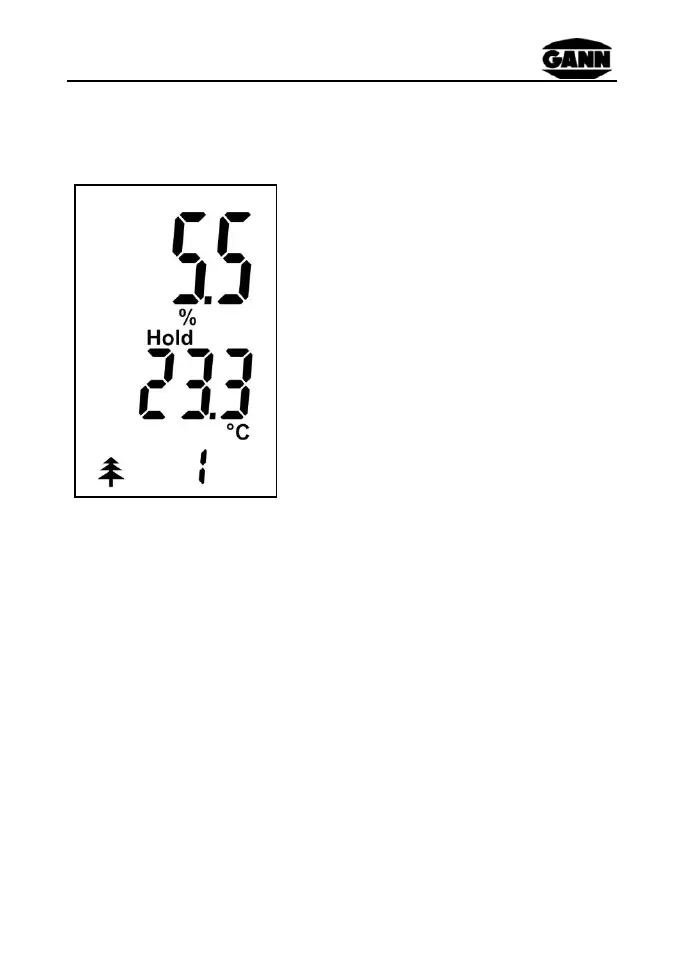
2.2 Display in Measuring Mode
Displayed measured value in %
"Hold" icon signals measurement
readiness
Instrument temperature in° C
Type icon and ID
A measuring process is started by pressing the "M" key.
2.3 Settings Menus
By repeatedly pressing the "Up" and "Down" keys the following
menus can be selected in sequence (sequence using the "Down"
key; the menus are accessed in the opposite direction using the
"Up" key):
Figure 2-2 Measuring mode


 To Next Page