8
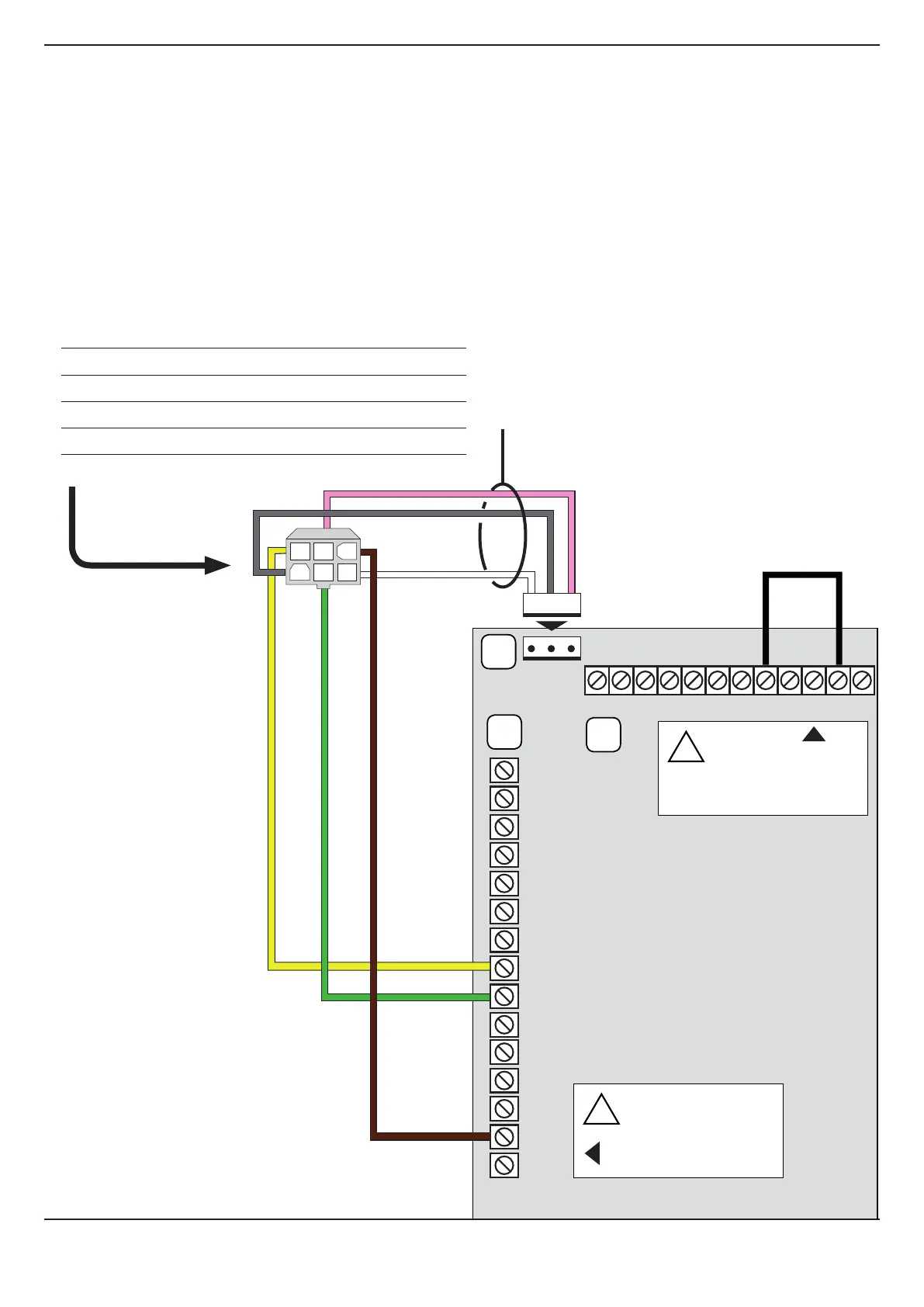
4 CONNECT QC400 TO MECHANICAL LIMIT SWITCH MOTOR
ATTENTION: if you connect a control unit already pre-set for mechanical limits to a motor with encoder limits, the motor
won’t work correctly. In particular, the motor will not find the limit positions and this could put at risk the safety of peo-
ple and/or things.
In order to connect the QC400 with a motor with mechanical limits set the DIP10 on S3 in OFF (See 4.1 PROGRAMMING).
1
GREY > OPEN LIMIT SWITCH
2
GREEN > OPEN BUTTON (Micro on motor limit switch)
3
WHITE > SAFETY
4
YELLOW > CLOSE BUTTON (Micro on motor limit switch)
5
PINK > CLOSE LIMIT SWITCH
6
BROWN > SAFETY
1
2
3
4
5
6
7
8
9
10
11
12
13
14
15
X5
X7
X6
12 11 10 9 8 7 6 5 4 3 2 1
GRD
ATTENTION!
In case of mechanical
limits terminals 2 and 5
of the X6 must
be jumped
!
ATTENTION!
Never bridge
the 14-15 terminals
because safeties
will be disable
!
1
2
3
4 5 6
FLCE31W012


 To Next Page