2. PROGRAMMING QCXSUN
1 2 3
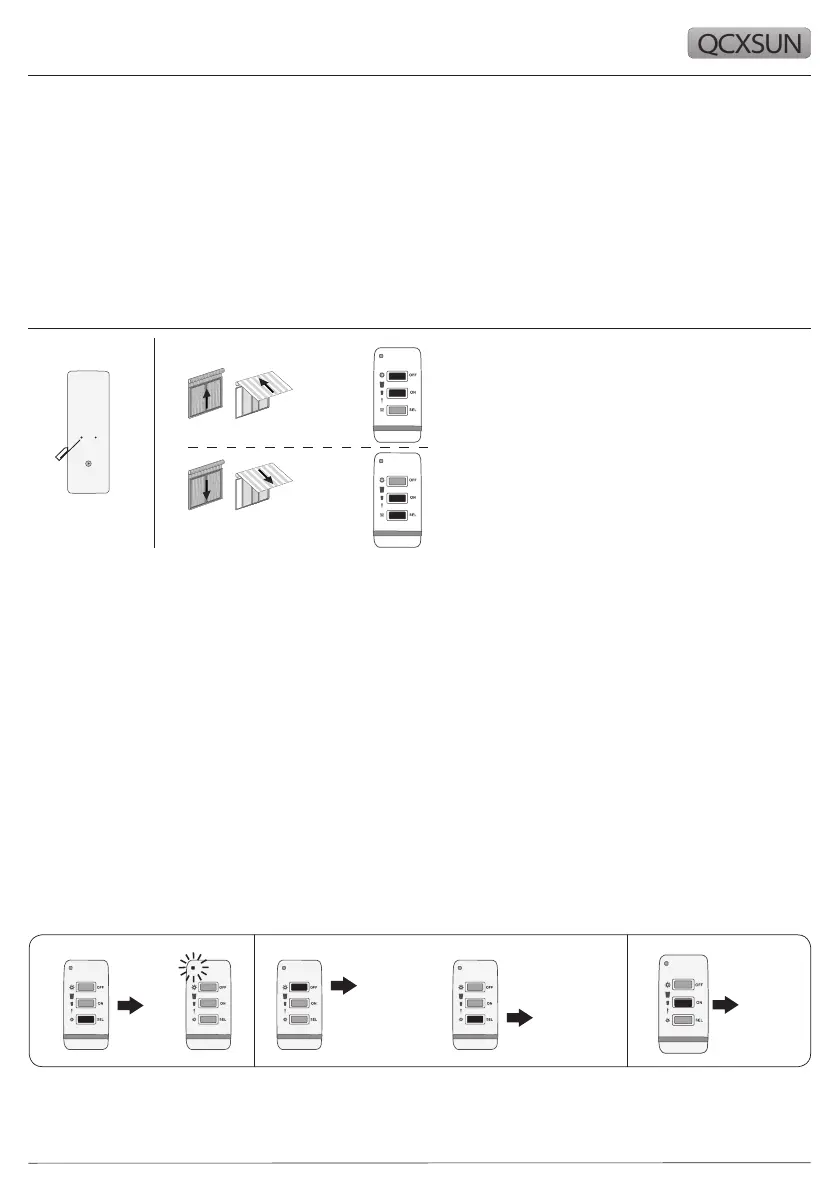
1 Press and hold PROG-TX button of the MASTER
transmitter till the motor starts moving
2 Check the motor rotation then release Prog-TX
button
3 Press 1+2 (if motor move UP) or 2+3 (if motor move
DOWN) button of the QCXSUN
Transmitter is now programmed
3. SUN SENSIBILITY THRESHOLD ADJUSTMENT
1. Press and hold BUTTON 3 (the LED will turn on at rst) until the LED starts to ash slowly,
release BUTTON 3
2. Adjust the threshold by using BUTTONS 1 and 3 which will allow you to either increase
(Button 1) or decrease (Button 3) the threshold.
Whenever a button is pressed the LED ashes according to the level of sun threshold (1,
2 or 3).
Threshold 1 - 5 Klux (default) = Low light (most sensitive) > led ashes 1 time
Threshold 2 - 30 Klux = Med Light > led ashes 2 time
Threshold 3 - 60 Klux = High light (less sensitive) > led ashes 3 time
3. Once the desired threshold has been obtained press BUTTON 2 to conrm.
NOTE: It is important to program the sun sensor’s threshold within 30 seconds or the time
out function will automatically exit the programming procedure without saving the new
threshold.
Led
flashes
slowly
Press 1
to increase
the threshold
Press 3
to decrease
the threshold
Press 2
to confirm
threshold
1 2 3
IMPORTANT: QCXSUN sensor can only be programmed once the radio motor has already been
programmed to a transmitter.



 To Next Page