11
GB
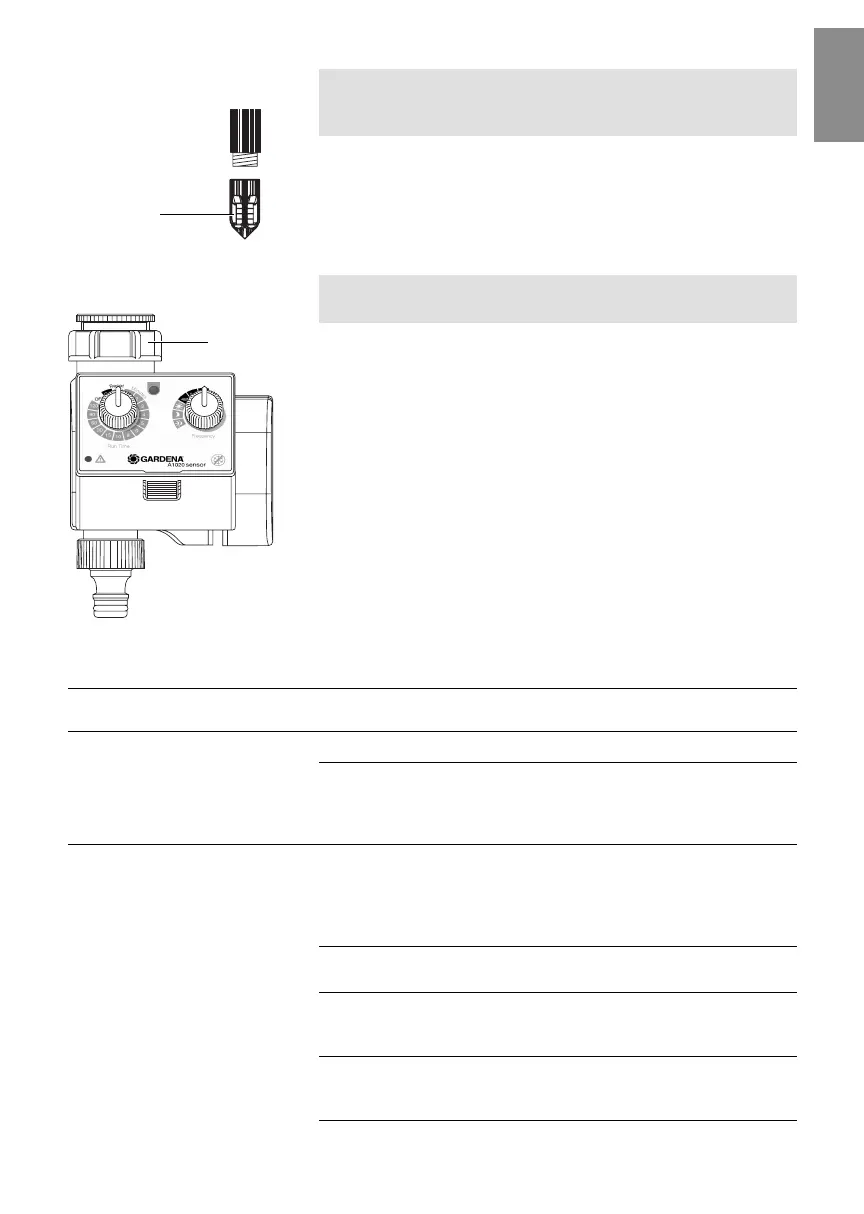
Whenever the Soil Moisture Sensor is relocated, the sensor tip
should be cleaned / replaced. The felt on the tip should not come
into contact with grease.
v Clean sensor tip
0
with clear water.
If the felt becomes damaged, the sensor tip can be re-ordered
from GARDENA Service.
v Unscrew sensor tip
0
and screw on new tip.
The dirt filter should be controlled regularly and cleaned if
necessary.
1. Unscrew sleeve nut
5
of the Water Timer manually from the
thread of the tap (do not use pliers).
2. Remove dirt filter of the sleeve nut and clean it.
3. Screw sleeve nut
5
of the Water Timer onto thread of the tap
again manually (do not use pliers).
8. Troubleshooting
Fault Possible cause Remedy
Manual watering not Water tap is closed. v Open tap.
possible
Battery of the Water Timer v Replace battery of the Water
spent / inserted incorrectly / Timer / insert correctly / use
wrong battery used. alkaline battery.
Watering is not switched Soil Moisture Sensor is in v Reposition Soil Moisture
on although soil is dry a dip in the ground. Sensor at correct location
(see 4. Initial Operation
“Select correct location
for Soil Moisture Sensor”
).
Switching controller too far to v Turn switching controller to
the left on “Dry”. the right accordingly.
Battery of the Water Timer v Replace battery of the Water
spent / inserted incorrectly / Timer / insert correctly / use
wrong battery used. alkaline battery.
Two-hour pause in irrigation v Increase watering time
after irrigation controlled by so that watering is only
Soil Moisture Sensor. required every 2 hrs.
Clean / replace sensor tip:
Clean dirt filter:
5
0
1835-29.960.02_12.03.2007.qxd 15.03.2007 15:52 Seite 11


 To Next Page