13
GB
6. Trouble-shooting
Warning! Electric shock!
V Disconnect the pump from the mains before working
on it.
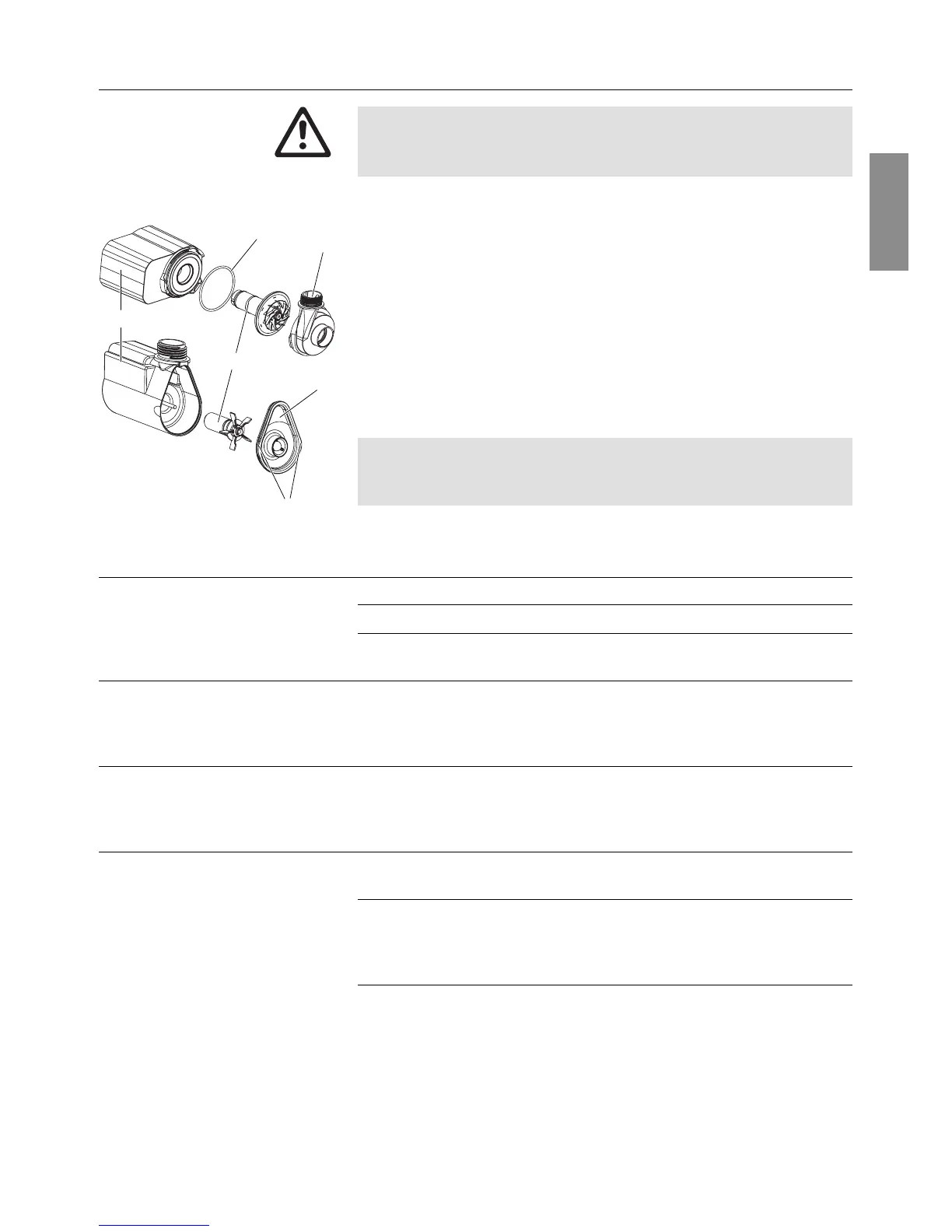
1. Remove pump from the filter housing (see 5. Maintenance).
2. FP 750 E: Detach the cap
G
from the motor housing
F
at the
catches
H
.
Other pumps: Turn the pump housing
E
anticlockwise and
pull it vertically off the motor housing
F
.
3. Pull impeller unit
I
out of the motor housing
F
and clean.
4. Push cleaned impeller unit
I
back into the motor housing
F
.
5. FP 750 E: Push pump cap
G
onto motor housing
F
.
Other pumps: Press pump housing
E
vertically onto motor
housing
F
and turn clockwise.
FP 4000 E / FP 5000 E / FP 7500 E:
During assembly, ensure that the seal / foam filter
J
is correctly
seated in the motor housing
F
.
Fault Possible cause Remedy
No water feature operating Mains plug not plugged in. v Plug in mains plug.
Impeller unit is blocked. v Clean pump.
Regulating valve at pump or v Open the appropriate
pond edge controller is closed. regulating valve.
FP 1800 E / FP 2500 E / Thermal overload switch has 1. Unplug the mains plug
FP 7500 E been triggered and allow the pump to cool
(pump has run dry). 2. Plug the mains plug back
in after approx. 2 minutes.
FP 750 E FP 1000 / Electronic dry-running safety v Unplug the mains plug,
FP 1400 E / FP 4000 E / has been triggered. stand the pump in the
FP 5000 E / FP 7500 E water and plug the
mains plug back in.
Water feature reduced in Water feature insert is dirty. v Clean water feature
size and uneven insert and nozzle pipe.
Air lock in the hose. v Fill connection hose for
pond edge filter/pump with
water.
(see 4. Initial Operation).
Filter housing / pond v Clean filter housing / -
edge filter dirty. pond edge filter.
If any other faults arise, please contact GARDENA Service.
Clean the pump:
E
G
I
J
H
F



 To Next Page