
 Need help?
Do you have a question about the Gardner Denver RGD Series and is the answer not in the manual?
Covers pressurized devices, electrical, and breathing air safety.
Requirements for ambient temperature, dryer placement, and clearance.
Guidance on system layout, piping, and condensate removal.
Requirements for safe and compliant electrical wiring.
Understanding the dew point indicator for smaller models.
Steps for starting, running, and safely shutting down the dryer.
Guide to diagnose and resolve common dryer issues.
Technical details including capacity, dimensions, and power.
Visual representation of air and refrigerant paths.
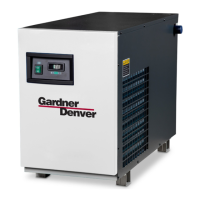
This document describes the Gardner Denver RGD Series refrigerated type compressed air dryers, providing instruction on their installation, operation, maintenance, and replacement parts.
The RGD Series dryers are designed to remove condensate from compressed air systems, ensuring that the air delivered is dry and suitable for various applications. They operate based on a refrigeration cycle, cooling the compressed air to a specific dew point temperature, which causes water vapor to condense into liquid water. This liquid condensate is then automatically discharged from the system. The dryers are available in models ranging from RGD75A1 to RGD500A4, accommodating different flow capacities.
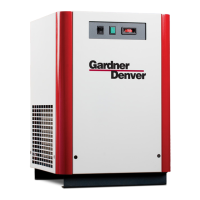
The dryers are equipped with user-friendly features for operation and monitoring. All models include an ON/OFF switch on the front panel, with a light indicating when the dryer is active.
For models RGD75A1 through RGD150A1, a Dew Point Indicator is provided. This indicator shows the dryer's conditions, typically starting in the red zone upon initial startup and moving to the green zone once the dryer reaches its normal operating temperature. If the indicator remains in the red zone during normal operation, the dryer should be turned off to prevent compressor damage.
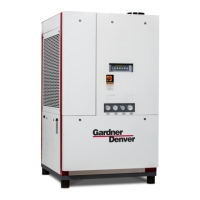
For larger models, RGD200A4 through RGD500A4, a Dryer System Monitor (DSM) is featured. This monitor includes an LED type dew point temperature indicator and controls for the electronic drain valve. A green LED illuminates during normal operation, while a red LED indicates a need to check the dryer's operating condition. If all LEDs are illuminated, it signals a malfunction of the dew point temperature sensor. The DSM also allows for setting the drain valve's opening period (1 to 9 seconds) and closed time (0.5 to 15 minutes). A Drain Push-to-Test button is available to manually open the drain valve for the set duration, with a Drain LED illuminating to confirm activation.
The automatic drain valve is a standard feature across all models, designed to automatically discharge condensate. For models 75 through 150, the drain timer is mounted directly on the valve, allowing adjustment of open time (0.5 to 9 seconds) and closed time (0.5 to 15 minutes) via adjustment knobs. For models 200 through 500, these adjustments are made through the Dryer System Monitor. The drain valve settings are factory pre-programmed for optimal energy efficiency at minimum 100 psi saturated inlet air pressure. Adjustments are generally not necessary but can be made to minimize air loss when the dryer operates consistently below maximum capacity, especially on hot, humid days with peak air loads.
The dryer is designed for continuous operation and will not freeze up even if the demand for compressed air is interrupted.
The RGD Series dryers require minimal maintenance for satisfactory operation, but routine steps are essential to ensure good performance.
Daily Maintenance: The automatic drain valve operation should be checked daily. This involves pressing the "Push-to Test" button to confirm condensate discharge. Malfunctions of the drain valve should be addressed promptly, referring to the Field Service Guide for remedies.
Monthly Maintenance: The condenser coils should be inspected monthly. If dirt or other particles are present, they should be removed using compressed air from an OSHA-approved air nozzle, ensuring the discharge pressure is limited to 30 psig (2.1 kgf/cm²).
Electronic Drain Valve Disassembly and Servicing: The electronic drain valve can be disassembled for cleaning and maintenance. This involves depressurizing the unit, disconnecting power, and then removing the valve from the strainer. Internal parts of the valve body should be inspected, cleaned, or replaced as needed. Solenoid core components should be wiped clean or blown out with compressed air. The plunger assembly should be checked for free movement. The timer assembly should not be disassembled or repaired; if defective, it should be replaced. After reassembly, the drain valve should be checked for air or condensate leaks, and the drain cycle adjusted if necessary.
General Maintenance: All refrigeration system maintenance should be performed by a competent licensed refrigeration mechanic due to the potential dangers of closed refrigeration systems and fluorocarbon refrigerants. Before any corrective maintenance during the warranty period, the local distributor should be contacted for instructions to ensure warranty coverage.
Troubleshooting: The Field Service Guide provides a comprehensive list of common problems, symptoms, possible causes, and remedies, such as "Water Downstream of Dryer" or "Excessive Pressure Drop Across Dryer." This guide helps users identify and resolve issues like refrigerant compressor not running, clogged condensers, inoperative fan motors, or drain valve malfunctions.
Safety Precautions: Several safety warnings are highlighted throughout the manual. These include:
Replacement Parts and Maintenance Kits: The manual includes detailed lists of replacement parts for various models, categorized by components such as refrigerant compressors, condensers, fan motors, filter dryers, solenoid valve assemblies, heat exchangers, and electrical components. Maintenance kits are also listed, including standard kits with drain valves and kits with filtration packages that include prefilter elements, afterfilter elements, and filter drains.
 General
| Model | RGD Series |
|---|---|
| Airflow | Varies by model |
| Moisture Removal | Varies by model |
| Power Supply | Varies by model |
| Dimensions | Varies by model |
| Weight | Varies by model |


 To Next Page