backlight will be off for the duration of the DCF-77 signal reception, and the alarm clock functionality will be
also limited. Only the pushbutton and the WAVE button on the rear side of the clock will
function.
As soon as the signal is received successfully, the display shows the current time, date and signal reception
icon The weather station will automatically receive the DCF-77 signal to adjust the time every day at
1:00. If reception is unsuccessful (the icon will not appear on the display), reception will be attempted
again in another hour, five times in total. The received time is compared with the time on the main unit and
adjusted if necessary. For better signal reception, place the main unit near a window. As soon as the
DCF-77 signal is received successfully, the icon
will be displayed.
Note:
The received DCF-77 time adjustment signal strength may be affected by the geographical location or the
premises where the weather station is located.
For better reception, the main unit should be placed on a flat non-metallic surface, near a window on the
upper floor of your house away from electrical appliances such as a TV, computer, etc.
Manual reception of the DCF-77 signal
To start the DCF-77 signal manually, press and hold the WAVE button on the rear side of the clock
for 2 seconds. To terminate the DCF-77 signal reception, press the WAVE button.
Manual setting of time and date
If the DCF-77 signal reception is not successful and the time and date are not adjusted, the adjustment can
be made manually.
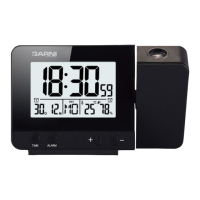
To enter the setting mode, press and hold the TIME button for 2 seconds. For setting, use the +, or –
buttons. Confirm the setting by a single push of the TIME button, this will move to the next setting.
Setting order:
Set time format 12 or 24 hours (12H / 24H) set timezone from -12 to +12 hours (for the Czech and
Slovak republic leave 00) set current hour set current minute set date display order day-month
(D-M), or month-day(M-D) set current year set current month set current day set the
language of the day name abbreviation
The setting mode is terminated by the last confirmation.
Note: If no button is pressed for 20 seconds, the setting mode will be terminated.
Day name abbreviations
Monday
Tuesday
Wednesday
Thursday
Friday Saturday
Sunday
EN - English MO TU WE TH FR SA SU
DA - Danish MA TI ON TO FR LO SO







 To Next Page