EasyManua.ls Logo

Garmin Echo 150 - Getting Started; Device Keys and Power Management; Initial Device Configuration

Garmin Echo 150
20 pages
Print Icon
To Next Page IconTo Next Page
To Previous Page IconTo Previous Page
Loading...
g_~!~i!!t._~~~!!~9---------------------------------------------------------------------------------------------
-
--------------------------------------------------------------------------------------------------------------------------------------------------------
--
Getting
Started
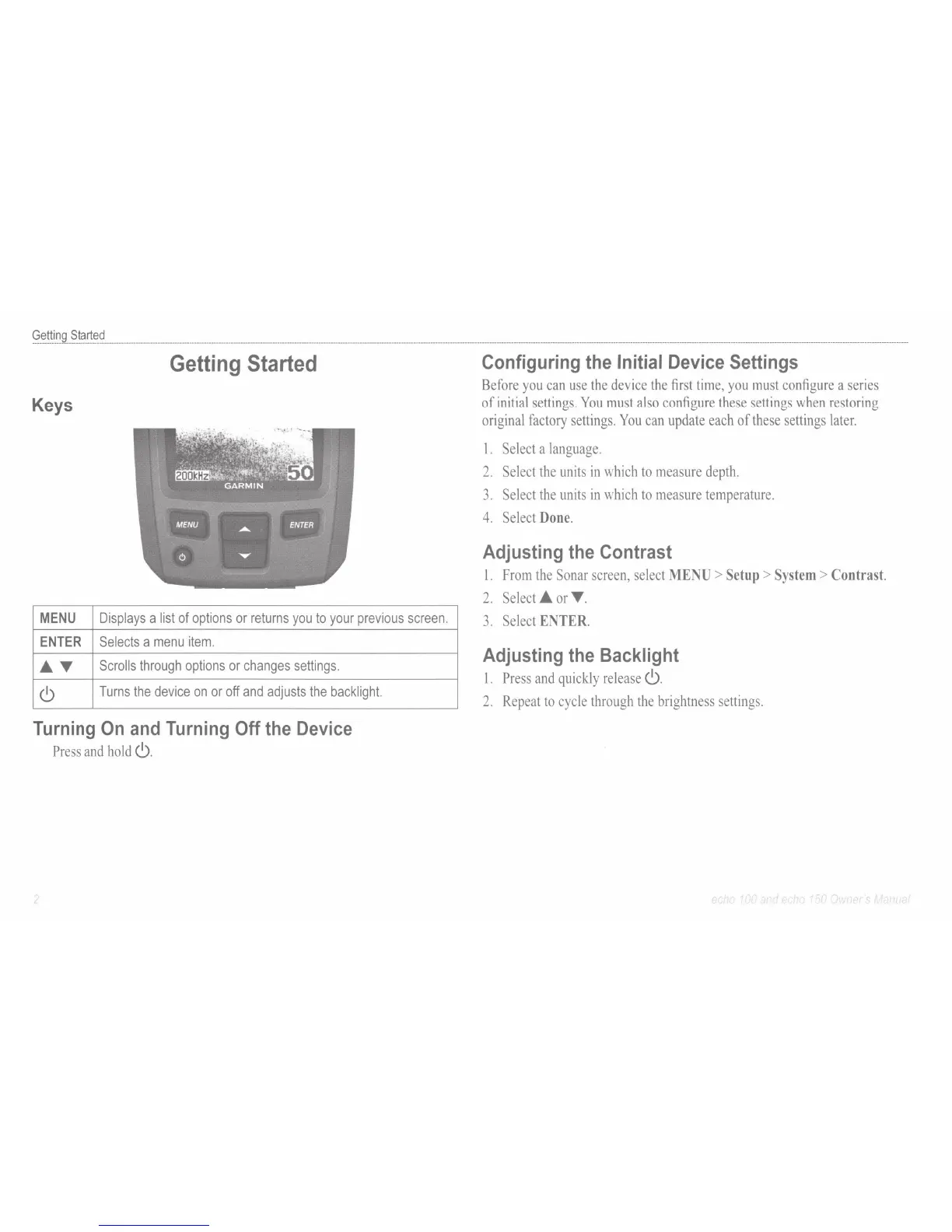
Keys
MENU
Displays
a
list
of
options
or
returns
you
to
your
previous
screen.
ENTER
Selects
a
menu
item.
T
Scrolls
through
options
or
changes
settings
.
<9
Turns
the
device
on
or
off
and
adjusts
the
backlight.
Turning
On
and
Turning
Off
the
Device
Press
and
hold
<9.
Configuring
the
Initial
Device
Settings
Before
you
can
use
the
device
the
first
time,
you
must
configure
a
series
of
initial
settings.
You
must
also
configure
these
settings
when
restoring
original
factory
settings.
You
can
update
each
of
these
settings
later.
1.
Select
a
language.
2.
Select
the
units
in
which
to
measure
depth.
3.
Select
the
units
in
which
to
measure
temperature.
4.
Select
Done.
Adjusting
the
Contrast
1.
From
the
Sonar
screen,
select
MENU
>
Setup
>
System
> Contrast.
2.
Select
or
T .
3.
Select
ENTER.
Adjusting
the
Backlight
1.
Press
and
quickly
release
<9.
2.
Repeat
to
cycle
through
the
brightness
settings.
I f
"t
1 f I l
)f
I'
·
'-
'i l

Related product manuals